ipad
19 Topics
Secure release QR code from iPad
We have successfully configure universal print and have secure release setup. This is working fine from an android phone and iPhone using the M365 app which needs to be installed. Scan the QR code, finds the printer and job is released. However when scanning the QR code from an iPad using the same version of the M365 app this doesn't work. The QR scan opens the M365 app but doesn't find the printers as it does on the mobile versions. It just lands on the co-pilot page. If you scan the QR code from the iPad and get safari to open the link, rather than M365 Co pilot app, but I get the message "Currently secure release of print jobs is not supported on this device" Can I confirm that this is not supported from an iPad as it works from an iPhone on the same software version. Will support be added to the M365 Copilot for iPad release. IOS says it is supported but not clear if this is only Phones that are supported? Many thanks387Views0likes2CommentsVPP Apps on DEP iPadOS Devices Do Not Automatically Update Error code: 0x87D13B9F
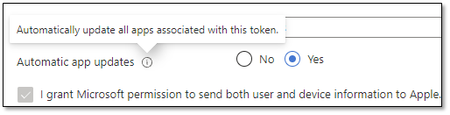
We're in the process of migrating to Intune and we're starting with DEP devices. However we've noticed that as applications are updated in the App Store, the device itself is not updating the applications automatically but requires human intervention. Today we checked one of the devices and saw that the update failed with error 0x87D13B9F: Application attempted to install 9/30/2021 6:43:12 AM App installation failed 9/30/2021 4:13:53 AM Hide details Error code: 0x87D13B9F An app update is available. Available apps can be updated using Company Portal and required apps will auto-update on device sync. Suggested remediation This code is returned when a VPP app is installed but there is a newer version available. Our Apple VPP token is configured for automatic updates: The Microsoft documentation confirms that: Automatic app updates - Choose from Yes or No to enable automatic updates. When enabled, Intune detects the VPP app updates inside the app store and automatically pushes them to the device when the device checks in. Note: Automatic app updates for Apple VPP apps will automatically update for both Required and Available install intents. For apps deployed with Available install intent, the automatic update generates a status message for the IT admin informing that a new version of the app is available. This status message is viewable by selecting the app, selecting Device Install Status, and checking the Status Details. All this to say that this configuration should be working as the application in question is required But it's not happening automatically Did we miss something somewhere? Any advice is greatly appreciated. References: https://docs.microsoft.com/en-us/troubleshoot/mem/intune/troubleshoot-app-install https://docs.microsoft.com/en-us/troubleshoot/mem/intune/app-install-error-codes https://docs.microsoft.com/en-us/mem/intune/apps/vpp-apps-ios#upload-an-apple-vpp-or-apple-business-manager-location-token 0x87D13B9F App Install Error - Microsoft Tech Community21KViews0likes12Comments
iPads in Single App Mode stuck after Update
Hi, We've got a bunch of iPads that we control via InTune, a bunch are set to Single App Mode. They have auto-update on for iOS updates, however when they restart themselves after completing the update often(not always) they will go back to the lock screen rather than the single app screen. Thankfully we've got the SN displayed on the lock screen and when we reboot from InTune it fixes it, however this isn't a proper solution. Because it's single app mode it won't let the users swipe away the lock screen. Has anyone got a fix for this? Any assistance is greatly appreciated.1.1KViews0likes7Comments
After installing new Edge iPad version 140+ the site cannot be displayed in iframe
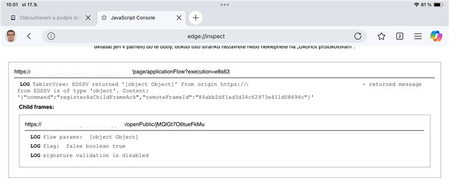
Putting it here after discussion: https://learn.microsoft.com/en-us/answers/questions/5560097/after-installing-new-edge-ipad-version-140-the-sit Hello, after installing Edge Version 140.0.3485.52 (Android and iOS): September 8, 2025 and newer on iPad our site cannot display iframe with weird command in Edge (Safari works, PC version works): {"command":"registerAsChildFrameAck","remoteFrameId":"f2676238dc84d6ae727acdd8ae6c39e5"} Screen of ERROR: I was able to test it again on version 139+ and it was stable. We tried: turn off every restriction from Intune - same error. add sites to Edge allowList - same error We cannot find any decription or help on registerAsChildFrameAck. I have very limited hands, cuz the problem is on device of bank. Thanks, Ian43Views0likes0Comments
Access Issues due to supervised Device
Hello we have Supvised (ADE) and user affinity iOS devices in our company. The users can log on to their device via their Modern Auth and the whole thing is managed with Intune. As a company, we have access to Azure Virutell clients (Win 11) hosted by our customers. If I now want to access this virtual Azure client via my supervised iPad and the iOS App Windows App, I receive the message: ‘Warning: incorrect configuration. The administrator wants the apps on this device to be managed via the ‘xxx’ account. [...] To access company data via the ‘yyy’ account, you must unregister your device from the company portal’ Is it possible to define exceptions in Intune so that I can log on to the virtual client with credentials other than those stored in the company portal? best regards497Views0likes10Comments
Access word on iPad
Good morning. I have a subscription to Microsoft 365 Basic, which includes access to Word. However, when I open the Word app on my iPad, it does not allow me to edit Word files from my OneDrive, telling me I do not have a subscription. This doesn’t happen on my iPhone, where all works fine. Any suggestions for solving this issue? Thanks.379Views0likes0Comments
Android iPads - weblink deployment
Hi, We are trying to deploy weblink via managed browser MS Edge in Intune for all Ipads potentially all android devices, when the policy is deployed and when weblink launches in MS Edge getting an error message of “Action not allowed - Organization does not allow you to open this data here”. We believe it may be an app protection policy, does someone faced this issue and do you have any proven solutions for this?1KViews0likes2Comments