User Profile

JohnMoore33
Brass Contributor
Joined Oct 02, 2017


User Widgets
Recent Discussions
Re: Changes to Classic site custom scripting?
NicolasKheirallah thanks for sharing. We also didn't spot this message MC714186. MC714186 says "The Custom Script setting in SharePoint and OneDrive will be removed by early-May 2024" but only noticed this since 1st July. Are you sure this is related? CTFlorian were you able to fix it by running the powershell? If I read correctly we have till mid Nov24 to find a permanent solution.4.4KViews0likes1CommentPlanner embed or hide navigation
Currently it is not possible to add a planner board in Teams to a Private or Shared channel (https://feedbackportal.microsoft.com/feedback/idea/1d6cc086-cc27-ed11-a81b-6045bd7d68ae The app is only available in standard channels (private/shared channels don't rely on MS365 groups) As a workaround I tried to create rosterplans, but now want to add this plan to the Shared/Private Channel. Unfortunately pasting the Planner URL (https://tasks.office.com/as a web page tab, shows also the navigation. Is there a way to hide the navigation? I've tried adding &action=embedview (as suggested by chatgtp) but that doesn't work. Also adding it as an iframe to a sharepoint page fails.2.3KViews1like1CommentRe: How do I create a roster plan?
mattias-skog Here my notes from investigating and testing this earlier. Hope it helps. Microsoft has changed this by using Roster Containers: https://m365admin.handsontek.net/planners-new-roster-containers/ This is managed via Graph APIs Roster: is the "security container" that holds the members and plans First create a Roster then create a Plan adding it to the Roster Creator of the Roster is automatically member. Additional Members to the Roster can be added via the Planner Web-UI Planner Roster APIs: https://learn.microsoft.com/en-us/graph/api/planner-post-rosters?view=graph-rest-beta&tabs=http Create Roster POST https://graph.microsoft.com/beta/planner/rosters Content-Type: application/json { "@odata.type": "#microsoft.graph.plannerRoster" } Create Plan in Roster You need to follow the documentation to create a Roster, then you can create a Plan by calling a POST to beta/planner/plans with a request body like this: { "container": { "@odata.type": "microsoft.graph.plannerPlanContainer", "containerId": "{RosterID}", "type": "roster" }, "title": "My Roster" } From <https://techcommunity.microsoft.com/t5/microsoft-365/preparing-for-planner-s-new-roster-containers/m-p/2222287> Testing Use the https://developer.microsoft.com/en-us/graph/graph-explorer to test Utalising Power Platform Power Automate can be used to build a solution to create rosters (while waiting for MS to create UI options in planner) https://support.newoldstamp.com/en/articles/5967487-how-to-register-the-microsoft-graph-app-on-microsoft-azure-active-directory (needed for the Flow to access graph Create a List in SharePoint for requesting new Rosters (Plan Name, and owner of Plan) Create a Power Automate Flow when new list item is created, to create a roster (using APIs above) and create a plan in the Roster and adding the owner as member (https://michelcarlo.com/2021/09/04/creating-planner-plans-using-power-automate/ using the above APIs) Check if roster is enabled via Powershell It is by default https://learn.microsoft.com/en-us/office365/planner/prerequisites-for-powershell Get-PlannerConfiguration9.5KViews0likes6CommentsMaster Site to manage multiple communication sites.
I'm looking for a way to easily create and manage multiple communication sites (for 18 different country teams) under our home (hub) site. Each of these communication sites need to have an identical home page, several identical lists with multiple views (although list content is different) and identical navigation. unique news items I know that creating a template site is possible, but I also want to ensure future manageability. E.g. when adding a list or changing a list view or adding a web part on the home page, I want this to propagate to all the sites build from the template. This way each different country can manage their list items, allowing to use the list web part on each site home page and using default permissions. I'm creating a flow to rollup the list items to a list on the home site. I'm curious to hear advise as how to best approach this.Solved1.1KViews0likes2CommentsRe: Move/Copy SharePoint Pages from one Site to Another in Classic View
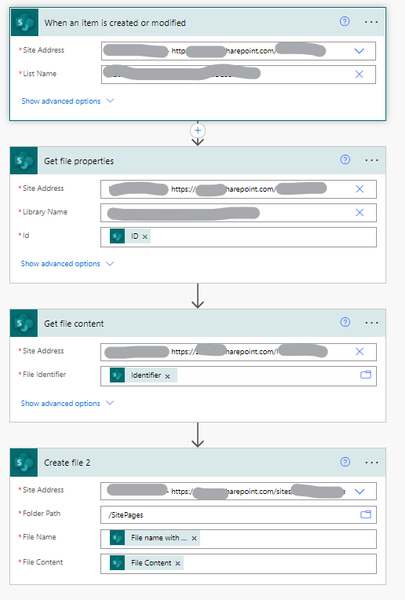
FlyingDutchman1080 You can try using Create New File rather than copy. (I used another trigger instead of json button in list, my flow triggers when page is modified). Note that you have to set specific permissions when you want to copy SitePages using Power Automate. Even if the user is owner of the site you'll get an access denied, unless you change the "-DenyAddAndCustomizePages $false" using powershell as explained in https://www.qdoscc.com/blog/sharepoint-o365-permissions-deny-add-and-customise-pages-issue140KViews0likes0Comments

Recent Blog Articles
No content to show