User Profile

Hollis255
Copper Contributor
Joined Oct 16, 2020


User Widgets
Recent Discussions
Re: Connect to Outlook not available in Modern SharePoint
Thank you, Terry - that is a brilliant suggestion and a rookie move on my part, for not having cleared cache or gone incognito already. Just did it and now it works. Also confirmed with users in the field. Thank you!! ~ L378Views0likes1CommentRe: Connect to Outlook not available in Modern SharePoint
Terry_McCullagh - thank you! Unfortunately, these were the first steps I tried. I even tried creating a 'contacts app' in a few Team Sites 'classic experience' and cannot get it to work. I can get the app installed, but the top menu doesn't change to the 'old' experience when I set the list experience to 'classic'. ~ L548Views0likes3CommentsConnect to Outlook not available in Modern SharePoint
Our company has been using this function for years and it has been a crucial part of our SharePoint and Outlook experience. Since we've moved from Classic to Modern SharePoint, the option is no longer there for our contact lists. Is there any way to get it back? I've even tried adding the 'contacts' app to one of the site collections that is still classic and the option is still not there. (also set the classic site list to show in the 'classic experience). Thank you, in advance. ~ LSolved965Views0likes5CommentsRe: Sharepoint Online Search is finding old folder name
Adin_Calkic - that was my next step. I thought this happened on a regular basis, and this folder update was probably done weeks or months ago. I was nervous about reindexing the library because there are thousands of regularly used and important company documents in it and I didn't want to take the chance the reindexing might mess something else up. I'll look further into that process. Thank you for the suggestion! ~ lahddah2.9KViews0likes0CommentsRe: Sharepoint Online Search is finding old folder name
Thank you for your response! I did try this and if I change the 'name' to what it should be, I get the error that the 'destination already exists'. I can't see versioning for folder names, or else I would think I could delete the 'old' name from there.3.2KViews0likes4CommentsSharepoint Online Search is finding old folder name
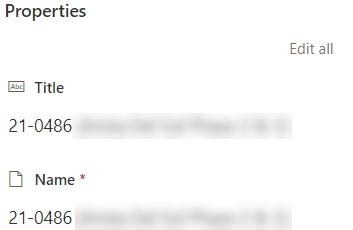
Hello - We have users copying folder structures in a document library, then renaming the main folder. However, when we use the search function on the library, it pulls up the newly named folder when we are searching for the previous folder. For instance, I copied a folder called '11881.00' and renamed it to '21-0486'. That was a while ago. Today, I was searching for the folder called '11881.00' and it brought up the new folder ('21-0486'). According the the properties in the search list, the Title and Name of the folder are different. But when you look at the details in the regular document list (not within the search), both the Title and the Name are correct. (current folder title/name - I do not want this folder to come up with I search for '11881.00') (folder that comes up when searching for '11881.00', it shouldn't come up, as the 'Name' is 21-0486 now): I know this is confusing. But just need the search to not look for other 'versions' of the folders / names or cached information. I'm not sure how to explain it better. Thanks, in advance. ~ lahddah3.5KViews0likes6CommentsRe: Intune Enrollment and App mgt for company iOS devices even if user is not in Active Directory
r0bu - thank you SO much, It totally helps. Sorry for my delayed response, I've been busy getting everything set up in there. Dynamic groups seems to have done the trick for most of my needs, but now I just need to figure out the best way to handle users without an AD account. I was running Company Portal in ASAM and, of course, this isn't going to work unless the user is in AD. I created a DEM user account, group and profile to get around that for now, but that isn't ideal. We were really hoping to be able to track the devices by user logged in, but if they can't log in, we really don't have a good and simple way to see who has what. (I know, logging in isn't 100% accurate, either, since someone could log in, then pass the device to someone else and we'd never know). I also ran into several issues with Company Portal (gets stuck in CP even after user has logged in and been working. If they open CP for any reason, the app just stays open and can't close it or go to home screen until hard reset. Also, if the device is not connected via cellular or wifi, the CP opens up to the sign on screen and you can't close it or even log in (because no connection to verify creds) and the device is basically bricked until reset unless you get to a wifi that is already set up to 'autoconnect'. Those issues have made it so I no longer have it running in ASAM, but it is a required app on all devices. Now I need to find a way to lock the device until the user signs into CP. Again, the device can be anywhere and used by anyone (inside or outside the company) without our knowledge because the enrollment would not be complete until CP was logged into. The journey continues. Thanks, again! ~ Hollis2553.7KViews0likes0CommentsRe: Intune Enrollment and App mgt for company iOS devices even if user is not in Active Directory
Thank you, r0bu, for the reply. We are using ABM + ADE + device assigned VPP (well, we are using VPP...and I choose 'license type = device' when I add groups to them in Intune). Setting up AD groups specifically for iPad and iPhone was a thought I had, as well, but wasn't sure if that was the only way to go. I've tried to set up 'dynamic' security groups for the purpose of pushing apps to devices for users who are unable to use the portal due to not having an AD account, but wasn't able to get it going. I am unable to figure out how to put devices into the group.4.2KViews1like2CommentsIntune Enrollment and App mgt for company iOS devices even if user is not in Active Directory
We are migrating from one MDM, which was device based, to Endpoint/Intune. Everything seems to be going okay for all users who have an Azure AD account, but we have many users who are not in AD. Is there a way to manage the devices AND push apps out to the iPhones / iPads by Serial number ONLY? So the user never actually needs to sign in? Also, in our previous MDM, we pushed apps using tags and were able to differentiate between iPhones (only got two required apps) and iPads (two required and eight default apps) to automatically push when the device enrolled. Everything I'm seeing just says iOS/iPad and we'd like different things to happen for iPhones than for iPads. Thank you, in advance. ~ H

Recent Blog Articles
No content to show