User Profile

ChrizK
Brass Contributor
Joined Aug 04, 2020


User Widgets
Recent Discussions
Re: Add an EVENT to Channel Calendar
niamhb1430 Sorry, I don't think Microsoft really take much notice of the community. You are often directed to raise a feature request, in the hope that enough people have the same requirement and up-vote you. It makes sense to evaluate some bespoke ideas, but in my opinion, it is just a lazy way of not accepting product ownership and responsibility. This particular feature is so obvious, it doesn't need evaluating, as it should be core/fundamental. Shame nobody at MS has any pride in their products to make them better (or the organisation does not empower them).3.5KViews0likes0CommentsSharepoint versioning - limit the number of Minor (draft) versions
Hi, My current organisation implemented Teams some time ago. Obviously, using a collaborative tool such as this starts to amass files. We have chosen to implement Check-out and Versioning on a Library. We don't necessarily want to keep many historic copies, but want to ensure edits are not saved unnecessarily, and want the ability to go back/restore if required. We have now reached a point where warning emails are being received "Approaching SharePoint Site Storage Limit". On investigation, I have found one user is happily saving minor versions of his document, currently the 20MB file is taking up 870MB, being 17% of our allocated storage. He doesn't need all these historic copies, and so I want to limit the number of minor versions, my chosen limit being 5 minor versions. I can only find options to limit the number of Major Versions, and the number of Major versions which have associated Minor versions. MS articles state "The maximum number of minor versions between major versions is 511." There is no mention of setting a lower limit that I can find. Is it correct that there is no way to limit the Minor versions? It seems crazy that a user can create a minimum of 100 major versions + 511 minor versions, especially as we are having to work to an enforced storage limit. Why shouldn't anyone be able to limit the minor versions? >>>>>>>>>>>>>>>>>>>>>>>>> This https://support.microsoft.com/en-us/office/how-versioning-works-in-lists-and-libraries-0f6cd105-974f-44a4-aadb-43ac5bdfd247 discusses 'tracking', "Others only track the major versions". What does this mean? Is tracking actually storing/saving, ie only the ability to store major versions? The change in terminology indicates that I could possible switch to Create Major Versions but somehow keep the ability to create Minor Versions, with only Major being tracked. I suspect this is just a poor choice of wording in the article 😞 Out of interest, if I were to attempt to change my library settings from Create major and minor (draft) versions to Create major versions, what would happen? I dare not try as it could potentially wipe out my colleagues (current) minor versions without warning!2.5KViews0likes0CommentsRe: Document in "Read-only" mode all the time
ChrizK Replying to myself as the instructions are correct. Coincidently, I have been struggling again with Read Only. More of a coincidence, someone added to this thread which triggered my email. This is fortunate, as it made me read my own instructions. As I had a vague recollection of this problem, I thought I had stopped the OneDrive app during my investigation of the current problem, but Read Only persisted. This morning, I read the email and my own reply again. I checked OneDrive and found that there was a Sharepoint folder added to sync, but with zero bytes usage. Again, I have absolutely no idea how it was added, and I don't think it was even related to the folder I had the problem with (other than being the same Teams Channel, which means it shares the same Sharepoint Document folder). Anyway, I removed this from OneDrive sync, and my document now allows me to turn on AutoSave once more (I still have major/minor checkout enabled).5.8KViews0likes0CommentsRe: Please help! Data > Get Data (from File) is driving me insane
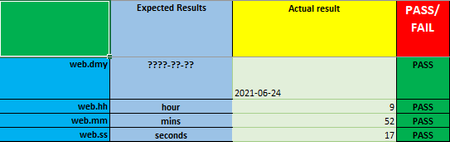
Riny_van_Eekelen Thank you. As you would expect, your suggestion works perfectly ...the simplest solution is often the best. Not knowing that Get Data actually is Power Query (on PC). https://support.microsoft.com/en-us/office/about-power-query-in-excel-7104fbee-9e62-4cb9-a02e-5bfb1a6c536a I am however at a bit of a loss as to how PQ can be used for validation. Perhaps this is just a basic understanding of what I mean by validation. As an example, I want to validate 'field one' is the correct date format. I use =IF(COUNTIF(C2,B2),"PASS","FAIL"), with my expect result being ????-??-?? This results in PASS which I can easily see, especially with conditional formatting. As PQ appears to be Extraction>Transform>Load, how could I validate the content of fields within a CSV?1.4KViews0likes1CommentRe: Please help! Data > Get Data (from File) is driving me insane
TBH I have never touched Power Query (at least, not that I know). Dare I say, I don't even know what it is (will need to do some googling)! NB I am only transforming the date column, however, if I view the columns in the Transform operation, I can see that each column with no content is identified as Text (not sure why it is General at the point it is loaded). Thank you for your quick reply ...I will try "" 🙂1.5KViews0likes4CommentsPlease help! Data > Get Data (from File) is driving me insane
I am forced to use Get Data to work around the insane situation with Excel reformatting dates (a centuries old problem that has been discussed to death and still no resolution since the dawn of time ...well, since MS buried Lotus 123). My scenario is importing a csv file which has been exported from a big data source. I am using Excel to validate each field, using a workbook that has been formatted over a considerable period of time. Examples being, the validation of date format(!!!!!), number of characters, calculations, pattern matching etc As mentioned, to validate the 'true' date format, I have to use Get Data to Import the CSV, then select fields to Transform to Text (highly annoying, but a workable solution). After the file is Loaded into a worksheet, I cut/copy and paste (Transposing my row into a column) the data into my validation worksheet. The problem is, the most simple validation fails .... =IF(ISBLANK(cell),"PASS","FAIL") If I view the properties of the cell, it is of type General. All I need do, is to select the cell, and press Enter ...effectively doing nothing, but then the validation PASSes. At this point, the cell type is still General, and I am not aware of any change to the content. The table has many fields. Depending on the activity, I could have a couple of hundred blank cells, and so I have to manually copy an (un)modified blank cell into all the FAILed cells ... all because I want to validate the date!!!!! This is plain ridiculous. Does anyone know why on earth the blank cells fail ISBLANK, and if there is a simple way to resolve the issue (without having to manually select each cell, or column from Get Data/Transform)? Many thanksSolved1.6KViews0likes6CommentsRe: Add an EVENT to Channel Calendar
I am unsure why you have taken my comments in regard to the article personally. I presume it is because I replied to you directly, giving my thanks for supplying the URL, but also including my comments. I have corrected this, and apologies for upsetting you. Forums generally only give the option for Reply, which I chose for continuity. However, I will 'reply to myself' so there is no misunderstanding (as the posts are chronological, I believe this item will still make sense).64KViews1like0CommentsRe: Add an EVENT to Channel Calendar
Hi Matt, just re-read your response. Do you only need a Calendar for the Team? My question was specifically in regard to the Channel capability, ie I would like to have a FULL calendar capability for a channel. This would allow me to have events specific to each channel activity. Teams is effectively a front end to several MS products. I guess you could think of a Team being a Group with added capability providing collaborative working (see the link within the support URL provided by ChristianBergstrom). Being a Group, it 'automatically' has a Group Calendar, which your Team can access. This is discussed as the Highly Requested Feature that Christian refers to. As mentioned, there is a workaround in place. You will need to open the Group Calendar in O365, copy the URL, and add it as a web page to Teams. Hope that helps.64KViews0likes0CommentsRe: Add an EVENT to Channel Calendar
ChrizK In my opinion, the support page provided is very unclear and confused document. Add a shared calendar to a channel Now that you have a shared calendar, you can add meetings that all members can join. >>>>Personally, in the context of the document, I do not consider this explicit, but it is understandable why some may deduce that it is the only capability, despite the Button saying "Add Event". To elaborate on the context... Things to know about channel calendars To add a channel event to your personal calendar, open the event and select Add to calendar. >>>>The heading is in regard to Things to know about channel calendars, so why does it switch to personal? Channel events can only be scheduled and viewed from the Teams app. >>>>so, are there Channel Events or not??????? Thanks to the contributions, I believe we have decided there is no such thing as a Channel Event, despite the terrible implementation indicating that there is. A channel calendar is a filtered view of the Microsoft 365 group calendar that is associated with the team. It only shows the events for a specific channel and not the entire team. You can read up on how Teams and Microsoft 365 groups work together at https://docs.microsoft.com/microsoftteams/office-365-groups#ability-to-add-group-as-attendee-while-scheduling-meetings. >>>>I had done my research before posting this question. As stated in the update to my initial post, I had come to the conclusion that this implementation was a merely a view of the Team calendar. It is good to see that the article confirms my analysis was correct. However, I am unsure why you can add a Meeting but not an Event. It indicates that there is insufficient meta data in an Event to separate it into a Channel View, whereas the a meeting has the ability. If it is simply meta data, surely MS could investigate and propose a product change? It could possibly be a fairly simple enhancement, if someone considers it. However, I believe being a view of the Team/Group calendar is short sighted. I am unsure why any Team would want a global picture of all meetings across all channels. To my mind, this would simply make the Team/Group calendar unmanageable. I believe it is unhelpful for an MSFT to mark an incorrect response as the best answer, as it just shows a lack of understanding, and more importantly, causes more confusion with the people that understand/have the same question, and have ended up here. (it looks like that has now been removed, but without any acknowledgement or answer) Anyway, without any input from Microsoft, I believe the question has been answered. Hopefully those with the same question will find this useful.64KViews2likes3CommentsRe: Add an EVENT to Channel Calendar
Sorry, either people don’t seem to comprehend the difference, or Microsoft are just choosing to ignore it. My guess is that MS have not implemented Channel Calendars properly, as it appears to be integrated with the Team Calendar. I suspect they have inadvertently ended up with a limitation due to poor design, but just choose to ignore it ...just noticed an MSFT has marked 'Best Response Confirmed' above ...kinda illustrates that some people don’t get the basic concept of an event based calendar. IMO the best response appears to simply be, ‘no, you can’t add an event’ ....go figure! It is disheartening that someone from MS Engineering doesn't acknowledge the problem.64KViews6likes11CommentsRe: Add an EVENT to Channel Calendar
Thank you for your reply. Can you direct me to where MS have stated the limitation/intended use of Channel Calendars? It is disappointing that they have not considered that users would like to have full calendar functions per channel. From my point of view, I do not want integration with the Team/Group Calendar, I need an independent Calendar per Channel (as mentioned originally, I would like to add events with colour coding). I am not sure that the feature you mention fulfils this requirement, as it appears to simply ask to see the Team/Group calendar within Teams (isn't the 'accepted' workaround to use the URL to O365?).64KViews0likes8CommentsRe: Add an EVENT to Channel Calendar
Apologies, I completely missed the initial response. I very much appreciate anyone taking the time to help, but the video clearly shows someone selecting ‘add EVENT’, adding a MEETING, and then proceeding to join that meeting. This clearly illustrates my whole point ... it is nit an event, it is a meeting. A simple example of a calendar event ‘Leave now to go to dentist’ ... it isn’t a meeting in which I am inviting the dentist, it is an event in my calendar telling me to leave. I am a little unsure why the basic concept of an event is proving difficult to understand.64KViews4likes0CommentsRe: Does it take an Admin to override Check Out?
I have half answered my question. I have opened Library Settings > Manage Files which have no checked in version (you need to be viewing Documents to see Library Settings). I was prompted to request permissions to view this option. I thought this request would go to Global Admin, but strangely, it went to one of my colleagues. I find this strange, as I thought I was listed as an owner of the site, but he accepted it, and I received an email "Administrator has responded to your request, Good news. You now have access to ...". Now that I have access, I see a list of all Checked Out Files. Instead of choosing to override checkout (check-in/discard), it appears I have to Take Ownership of a file. I am guessing this takes ownership of the pending changes, rather than the last checked in file. Not quite what I had in mind, but it is a workable solution. This would answer my question, but I have since found a file that is locked by check out from SHAREPOINT/system. This file is not shown in the list of Checked Out Files, and so I am trying to find a way to contact the elusive Global Admin. NB the file is MP4, I can see properties of Duration, Bit Rate, but I cannot open in Teams as it is reported as having no content, and Chrome just says that the video can't be played.5.3KViews0likes0CommentsRe: How to pick email addresses in MS Forms
I totally agree. My purpose would be slightly different, to have fill in a form that triggers a flow, using the (VALID!) internal email addresses to send out a notification. I appreciate community members offering suggestions, but it is frustrating when they do not acknowledge they are answering a different question. IMO It would be more beneficial to have a categorical answer that something cannot be done, so 'you and I' can stop looking for the impossible. (I am assuming that you never found a method to add email addresses to a Form, or any other similar MS application?)25KViews1like1CommentHow to Automate Approval of a Document using Flows
NB I have posted the same question on powerusers.microsoft.com, but noticed that some questions have been unanswered for a year, and I am confused why there appear to be two forums. This forum appears to be more active, and so I hope you don't mind me double posting. ---------------------------------------------------------------------------------------------------------- I am just starting out with Flows (absolute beginner), and so I would appreciate some help. There are templates for Approvals, which illustrates that they are a key requirement. However, I haven't found a method to request a dynamic list (internal email) of approvers, and to track the Approval Status of a document. The scenario is fairly basic, as a team, we have various documents which need recorded approval for compliance reasons. Generally, these are MS Word documents, although I assume the method could be the same for any type. The list of approvers will depend on the document, and the project teams. In my case, they are expected to be internal/on the company MS Exchange server. The documents will be stored on Sharepoint (modern/O365). My first thought is to have a visible Approval Status as a document property/field in Sharepoint, initially being "No Status". I would like to trigger a workflow by changing the status to "Requested". By doing this, I would like to be prompted to add a distribution list (email), and for the recipients to receive the Approval Notification. In my case, it would only change the Approval Status to Approved once unanimously accepted (it would be even neater if the named Approver could delegate). The document should be available to anyone throughout (before and after approval) as per the granted permissions. I guess there would be a need for 're-approval' so that I can change the list, and also a method to prompt those that have not responded. I briefly tried the above, but failed immediately, as there does not appear to be a file property for Approval Status. NOTE TO MICROSOFT: Given the templates, wouldn't it be a good idea to have this as a default? So, looking at the templates, I spot that Forms can be used. This instantly had my mind racing. I could add the following to a form, which would trigger the workflow, collecting the required data from the form ...brilliant! · Owner (email) · Document name and location · Approvers (email) · Notes (to be sent as a 'cover letter') Additionally, if workflow accepts it · Required by (date) I think it is fairly obvious what the intention is, to fill in the form, save it, trigger workflow, and wait for my document to be Approved (or otherwise). Would be great if workflow can also send out reminders if the approvers do not respond, but I doubt there is a method to trigger this(?) Anyway, I look into forms, and see several youtube videos showing doing the same thing over and over again ...sending out a questionnaire Are there forms that are more business orientated, that integrate with MS Exchange / Teams (allowing me to select valid email recipients)? Would the idea of using a form in this scenario work? If not, has someone achieved the scenario using a different method? Thank you in advance of some much needed help.Re: Does it take an Admin to override Check Out?
Thanks for your response ChristianBergstrom , I understand the concept of Checking, my question is more so, who/what is 'Admin'? As discussed, I believe this should be a Team owner, but this does not appear to be the case. Can a 'user' (I guess, as defined by Outlook/Exchange, or perhaps Active Directory?) become a site owner to perform this role? The problem being, I have no sight of 'high level' Admin in a multi-national company. Less so, as the IT function is not local. In a world of amalgamation, this is obviously not uncommon, hence my point of view that a Team Owner should have the ability to Discard Check In. I would appreciate an explanation of what Admin is in this regard, and if the Discard ability can be delegated to a 'mere user'.5.4KViews0likes0CommentsHow does Version History work WITHOUT Check Out?
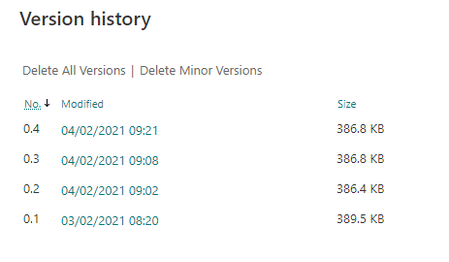
Hi, I have found the concept of Checking Out/In easy to understand, and have always chosen to use it. It appears Sharepoint Modern/O365 provides intelligent co-authoring, which may negate the need for Check Out, but I have concerns with version history/control. I have removed the need for Check Out in Library settings, and edited a document (Excel workbook). To my dismay, it appears that the AutoSave is resulting in a new Minor version every time I make a change. Is my observation correct? Surely that would make no sense, as the potential impact on storage could be huge. It also makes versioning cumbersome and unclear, as many versions would have no 'purpose'. As an aside, could someone tell me if complete documents are saved for each historic version, or if there is intelligent differential being applied? The listed Size in Version history indicates that it is a full document...1.3KViews1like0Comments
Recent Blog Articles
No content to show