User Profile

JeremyTBradshaw
Steel Contributor
Joined Jun 24, 2017


User Widgets
Recent Discussions
Re: Display Name Spoofing very often recently - how to prevent it
For DisplayName spoofing you definitely want User Impersonation protection, and you can only protect up to 350 users (per Anti-Phish policy, not sure if/how well it scales up if you try to do as many policies as necessary to cover all users). User Impersonation Protection You'll get more than just DisplayName spoofing protection. Even similar email addresses will be detected. You will likely need to then add some Trusted Senders as well, to avoid certain external senders being falsely detected as impersonation attemps. Trusted Senders and Domains To close the loop on Domain Impersonation - that is focusing on the domain portion of the email address, so it is not going to cover you for DisplayName spoofs. Things like M1crosoft.com would be detected as impersonating Microsoft.com.713Views0likes0CommentsRe: Marking Quarantine Notice senders as safe for entire tenant
Definitely room for lots of subjectivity but I like to use Transport Rules for things like this (org-wide, system like stuff, such as quarantine notifications), and stick to the TABL for allows/blocks otherwise. You could make a transport rule that when messages from that sender come in, it bypassed spam filtering (which will bypass the basic stuff, apart from things like URL reputation, file reputation, malware, and other high-confidence-by-default detection techs. You can also use the same or another transport rule to make sure some messages are always in the Focused view for Focused Inbox users.85Views0likes0CommentsRe: Help me understand why this email was quarantined?
This page - View email security reports in the Microsoft Defender portal - states this about "Advanced Filter": Advanced filter: Phishing signals based on machine learning. ...and it has that exact statement 3 times. So I hope they're correct. It seems correct when we look at their definition for "General Filter": General filter: Phishing signals based on analyst rules.170Views0likes0CommentsRe: user-reported phishing emails
Less than concreteness to offer here, but here goes... Typically when the Inbox is greyed out, the message is thought to already be in Inbox. Sometimes that's not the case and the UI is clearly flawed. They introduced that "Show all response actions" slider sometime in the last year or two, and that helped to unlock the options when the UI is confsued. Even still the UI is confused often. But it totally could be that the emails in your screenshot's case, are already sitting in Inbox (or some other folder that is not Junk/Deleted Items). When somebody reports a message as Junk/Phish, the message is moved to the Deleted Items folder. When the verdict comes back as "No threats found", the message is NOT moved back to Inbox. As it relates to the Take Action menu where we can move items, to Inbox for example - I believe (cannot guarantee) it will only let you move to Inbox if the system hard previously moved it to Junk or Quarantine.143Views0likes0CommentsRe: Expose ResourceDelegates in OWA Settings > Calendar > Resource Scheduling
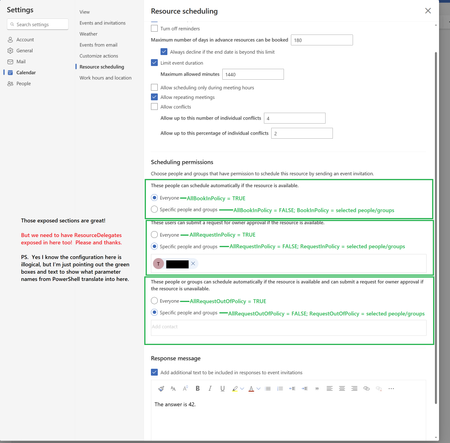
Those are OK suggestions, however #1 and #2 are for admins. The solution I'm after is trying to let us delegate control over the "Resource Scheduling" settings that are exposed in OWA, to regular users who we refer to as "owners" of rooms. #3, and #6 are giving out calendar folder permissions but that's not what I'm after either. I'm after exposing the settings from your #2, but in the "resource scheduling" section of OWA > Settings > Calendar > Resource Scheduling. They've already exposed many of the settings there which you can administratively control via Set-CalendarProcessing. But they've yet to expose the ResourceDelegates over in the OWA settings UI. That's what I'm trying to suggest/request here.108Views0likes0CommentsExpose ResourceDelegates in OWA Settings > Calendar > Resource Scheduling
Expose ResourceDelegates in OWA Settings > Calendar > Resource Scheduling · Community I'm posting this here in hopes of getting votes over at the feedback site. What I'm after as a solution is this: 1.) Room "Owners" be granted FullAccess (ideally with AutoMapping disabled). 2.) Room "Owners" open room mailboxes in OWA and manage both Calendar permissions, and Resource Scheduling options (a.k.a., Booking Options), entirely themselves. 3.) Admins are relieved of the burden of having to do all this work for Room "Owners" because some of the settings are hiding in PowerShell only. We're almost there in EXO's OWA options > Calendar > Resource Scheduling. We're just missing ResourceDelegates: I suppose additional checkboxes could also be added to cover off all the other settings available in Get-/Set-CalendarProcessing, but for me ResourceDelegates is the most vitally important one. In large orgs, the ability to truly hand off responsibility of these settings to a room owner will be a huge administrative overhead relief.305Views0likes2CommentsRe: Guidance with Outlook App Configuration Policies and Conf.Keys for Android
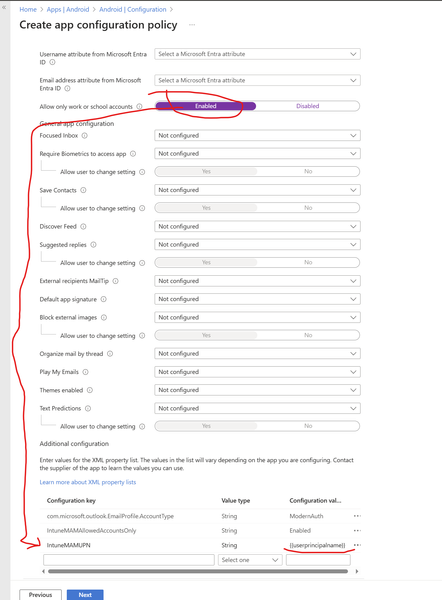
Here's a quick screenshot from my current lab env. Still looks mostly the same. Once you turn on Work Accounts only, you will see the AllowedAccountUPNs configuration key show up. In the view I am showing below, the value type is just "string" (not "valueString"), so that is different from what I described back in 2020. Nonetheless, it is the {{UserPrincipalName}} area which I was referring to that takes semi-colon-delimited UPNs: I should state, I'm a little out of touch on this topic right now and it is 5 years later so things may have changed some. I'm scratching my head on this one a little bit trying to remember the exact use case I had. I feel like it must have been a decidated app configuration profile to deploy to a specific set of users who need to have a specific additional mailbox(es) added to their mobile Outlook. Hope this answer clears up what you were after.46Views0likes1CommentRe: Using the Get-RecoverableItems Cmdlet to Report Recoverable Items
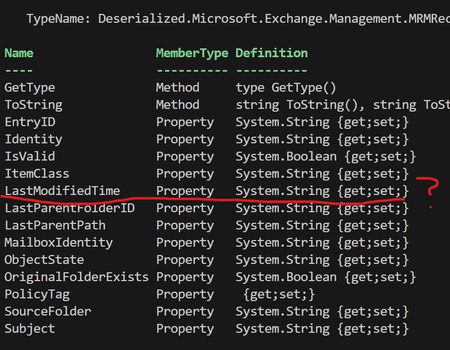
You know, I just realized this morning that the output of Get-RecoverableItems actually stores "LastModifiedTime" as a string, rather than as a datetime object. This makes sorting in PowerShell a game of text twist. Really annoying to see this kind of thing happen in real life: At one point in time, the Exchange team were almost like the pioneers of PowerShell.106Views0likes1CommentRe: SMTP XOAUTH suddenly failing for Outlook personal with '535 5.7.3 Authentication unsuccessful'
Actually no. I'm currently working on learning MailKit usage in PowerShell, but using EXO/M365/Entra to do this, rather than personal Outlook. I just came across this page as I was earlier having the same 535 5.7.3 Authentication Unsuccessful error. I got past it, and it was unrelated to your original issue's solution. But couldn't help but notice how you were getting actively deflected and want to let you know I could see that and thought it was ridiculous.727Views0likes0CommentsRe: Exchange online migration fails with various errors
Sankaperera thanks for the tip. My issue ended up being super simple and the on-prem object's ExchangeGuid needed to be set to match the EXO mailbox'. This problem used to get a nice and easy error message but now gets this new odd and unhelpful one. Nonetheless I was stung by my own weak blinders.1.3KViews0likes0CommentsRe: Exchange online migration fails with various errors
Seeing this week all of a sudden that offboard migrations aren't working for us. Similar error except our migration endpoint is fine, works for onboarding and passes with "SUccess" on the Test-MigrationServerAvailability in EXO PowerShell "rror: CommunicationErrorTransientException: The call to 'net.tcp://yt2pr01mb10469.canprd01.prod.outlook.com:9821/Microsoft.Exchange.MailboxReplicationService YT2PR01MB10469.CANPRD01.PROD.OUTLOOK.COM (15.20.8069.20 ServerCaps:FFFFFFFF, ProxyCaps:1FFFFFFFFFFFFFFFC7DD2DFDBF5FFFFFCB07EFFF, MailboxCaps:, legacyCaps:FFFFFFFF)' failed. Error details: . -->"1.6KViews0likes2CommentsRe: CDX - Terms Of Use Last Updated - March 12, 2024
JeremyTBradshaw Mandatory Microsoft Entra multifactor authentication (MFA) - Microsoft Entra ID | Microsoft Learn Kind of silly to think the terms used to prevent and threaten against MFA, let alone even a password reset. Now MFA is mandatory for admins. Nice to see the common sense come back around.1.3KViews0likes0CommentsRe: How to KQL query *live* EmailEvents table and NOT the streaming API
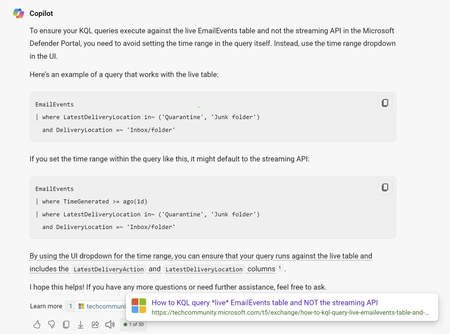
I tried Bing Chat today to see if it might help me. It has already seen and uses this very post to confirm my theory as fact (i.e., time range in query = streaming API / time range set via selector dropdown in UI = live table). I guess me and Copilot are taking the cake on this one. It's now "documented" as truth :).486Views0likes0CommentsRe: List all DL's in on-prem Exchange with Zero members
For on-premises, you can use Get-MessageTrackingLog and put the DL into the -Recipient parameter, should work, but only looks back as far as your logs go. In EXO, Message Trace will work too, goes back 90 days max. Keeping an eye on some DL's periodically and tracking over time, is the only way I can think of.291Views0likes0CommentsHow to KQL query *live* EmailEvents table and NOT the streaming API
EmailEvents table in the advanced hunting schema - Microsoft Defender XDR | Microsoft Learn - this page tells us: Note * The LatestDeliveryLocation and LatestDeliveryAction columns are not available in the Streaming API. I've found that a lot of my queries come back with blank LatestDeliveryLocation. This means I'm searching via the streaming API. But I don't want to do that, I want to search the live EmailEvents table and even want to filter based on LatestDeliveryLocation. I am working in Defender portal, within the Advanced Hunting section. Example query: // Works (time range set in UI dropdown): EmailEvents | where LatestDeliveryLocation in~ ('Quarantine', 'Junk folder') and DeliveryLocation =~ 'Inbox/folder' // Does NOT work: EmailEvents | where TimeGenerated >= ago(1d) | where LatestDeliveryLocation in~ ('Quarantine', 'Junk folder') and DeliveryLocation =~ 'Inbox/folder' So it seems as though if your query sets the time range, you're searching the streaming API. Can anyone please confirm I have this understood correctly? My next question would be, can I add something else to my query to ensure I'll be searching the live table? Microsoft 365 Defender Streaming API: Identity and CloudApp Events in General Availability - Microsoft Community Hub - I asked this in the comments over there too.Solved622Views0likes1CommentRe: RecipientEmailAddress but recipient information BEFORE DL expansion
Hey there, I've found EXO Message Trace is the only place to see the DL expand event itself. Note that if you try to get an enhanced report, and only choose the show the Expand event, the report will still have every effective recipient's details within the Recipient_Status column, so it's sort of a disaster anyway. The <=10 day searches are more friendly for this one particular task (expand events).244Views0likes0Comments
Recent Blog Articles
No content to show