User Profile

lmstearn
Brass Contributor
Joined Apr 10, 2020


User Widgets
Recent Discussions
Web Sign-In: Alert QR Code/Code for Mobile
Had 2FA turned off in the work account, on the web login screen a reminder only a few logins allowed without the Authenticator. Fair enough so instead of logging in, got out the Android tablet and installed the Authenticator and logged in with the account there, no problems. A few minutes later attempted to log in to the account on web, this time it presented a QR code with the link "phonefactor:/activateaccount .... mobileappcommunicator.auth ..." which didn't seem to go well in Android using QR scanner or camera. The web login suggested an alternative to the QR code, an 8? digit code, but nothing in the Authenticator app seemed to want it. All of a sudden everything seems to work fine, the web login (with a note that 2FA was used in the login) and the Authenticator on the tablet, thus turning out as a good news ending to a slightly shaky start. :)Re: Microsoft Teams Error Code 0xcaa80000
Same here with attempting to login to Teams (free, classic). Is the Crypto folder only available for paying subscribers? Also related to password changes: https://www.reddit.com/r/sysadmin/comments/166kcf0/unable_to_login_to_outlookteams_after_password/ As this older personal issue (ew! tech community link tags are broken with Your post contains invalid HTML. ) https://techcommunity.microsoft.com/discussions/microsoftteams/ms-teams-free-account-types/3716415 was yet unresolved, the thing to do then was to log out of Teams (free, classic) because the email address for the MS personal account in use was changed. Somehow, a whole bunch of problems with this setup remain in situ, unfortunately. We'll get there! 😀 Ah, that was with the personal account, things are explained a bit better after attempting to login with the work account - see here: https://answers.microsoft.com/en-us/msteams/forum/all/the-service-principal-for-resource/b9214ef6-e834-4d65-8205-a38db1efaa2d Think the admin might have disabled it some time back, and Humpty Dumpty will not be rejoin ing the Team!312Views0likes0CommentsRe: The where command is broken for directory names containing spaces.
jimblye Looks broken, yes, does using https://stackoverflow.com/a/19159183/2128797 in the Path statement make a difference? Using quotes gives a result here: WHERE "C:\Program Files\7-zip\:7z" With 8.3 names: WHERE C:\Progra~1\7-zip\:7z WHERE only lists files in the directory level specified, so is pretty restrictive without the /R option. HTH 😀289Views0likes0CommentsRe: How do you merge your old account on this forum?
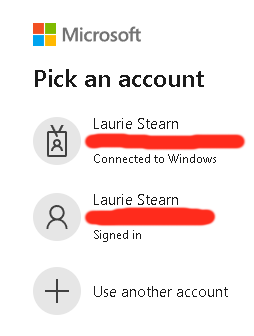
Thanks Allen for the detailed and considered responses which helped greatly. In this use case, it's more about the habit of logging in with the "work" account when dealing with issues in the O365 mailbox, so when accessing techcommunity, the following two login options present: The work account comes first, (as it probably should), so I chose that one for the last login, not realising all the previous activity here came from the personal account. This might resolve ultimately as a "feature wish" for multiple account holders in the form of site usage stats for each id in the login dialog. A partial solution with cookies, but as they are not permanent, registry keys? Thanks.786Views1like0CommentsRe: MS Teams (free) Account types
Hi Christian, thanks for the answer Yes it appears I am a guest user of the organization (or user in tenant): You have guest accounts for the following organizations. You can leave organizations you no longer work with. Right now, his invitations to the new account are not triggering anything, is that because I am using Teams (Free) and he is using Teams (Free Classic)? The issue is how to get an invitation as a guest to his organization working for my other MS email account? In upgrading, will all the content associated with the tenant be automatically transferred from Teams (Free Classic) to Teams (Free), or is there a workaround? Once the owner is using Teams (Free Classic), he will have no issue accessing the tenant at least? The point is, I'm happy to join as a guest using the other email account, (so there are two of me in there), but if the original guest account is removed beforehand, will all the channel (and wiki) content associated with the deleted account be removed as well? Now that I have (temporarily) restored the original MS email address, is it possible with that account to ever enter the organization with Teams (Free), or does Teams (Free Classic) have to be re-installed? Finally, looking at this in Azure, can the old email account be replaced with the new one by https://learn.microsoft.com/en-us/azure/active-directory/external-identities/reset-redemption-status somehow, and would that affect current content in the channel? Thanks again.2.5KViews0likes0CommentsMS Teams (free) Account types
Hi, Have a curious problem with two accounts as initiated byhttps://superuser.com/questions/1762380/replace-old-email-account-with-new-email-account at superuser. Joined up to an organization on invitation, and have been a happy contributing member of it for at least 2 years using MS email account A. Late last year, it so occurred I joined up with MS Partners, and had considerable issue signing into that space with account A, because, as it turned out, it was not a Live account. So changed the primary account on the machine to the aforesaid Live account, or MS email account B. Still all good, as still able to sign onto to the organization and its channels in MS Teams with A, until the decision was made to just use account B, and forget about account A, removing it altogether. Unfortunately, starting Teams with account B only got the basic Teams chat menus, and no login to the organization, all caused by the faulty assumption account B had access to the organization, which, by some quirk of circumstance, it didn't. Perhaps account A had extra privileges, work/school or something else? To all intents and purposes, the two accounts worked in the same way, having similar access rights. Before A was removed, the owner of the organization sent out an invitation for account B to join. So clicked the "join" button in the email, and eventually got a return email "You're on the team!" Upon clicking that was a new browser page with two buttons in a popup window. Clicked the "Continue" (or similar) button to launch the MS Teams (free) gui app. During the launch, the MS Teams gui briefly displayed the account type icon changing, after which a came a login textbox and "This user cannot access this organization" (or similar), with a login button only for account A into the organization. All the above events occurred on a W10 rig, recently changing to W11 on a different machine. On the new machine, (in response to the understated desire to access the organization), the owner sent out further invitations, unfortunately which, after clicking the "join" buttons, no "You're on the team!" automated replies in the mailbox to date. So something is held up somewhere, how to purge it? The main question is, what exactly are the account types important to Teams (free), and is it possible to elevate/modify privileges not visible in standard account settings? Thanks.3KViews0likes2CommentsRe: How to Turn Off Edge/Bing "Recommendations"
Of late, getting page snapshots of MS sites on the RH of the Bing search page when searching for MS technical material. It's kind of like a recommendation, not sure if this is the right thread to enquire. Is the above method the accepted way to turn it off? Thanks.50KViews0likes0CommentsRe: Missing OneDrive context menu in windows 10
jcdecker71 In my case OneDrive on 1909 was not running for some reason. Might have been as a result of a reboot after an WU had gone off as the auto login to Windows was nixed as well. No other issues with UAC, but as others can attest, it's a Home edition, which cuts out a lot of troubleshooting options. Just went to this directory and started OneDrive.exe C:\Users\<username>\AppData\Local\Microsoft\OneDrive\ OneDrive on the Context menu is back! Offtopic: Waddo can we have a chat- it's related to Sophos. Thanks .:)33KViews0likes0Comments
Recent Blog Articles
No content to show