User Profile

ChrisFicek
Iron Contributor
Joined Jun 06, 2017


User Widgets
Recent Discussions
Re: Filter reset when viewing document
Try accessing the view directly via URL instead of changing the view. It is believed a recent change has caused these headaches with the views, filters and the file viewer. It has progressively gotten worse over the last couple of days where the custom views doesn't load any documents on the fly (having to click on 'click to see more' 3 times before anything shows up).296Views0likes0CommentsInventory Report on Office 365 Connector Web Part in SharePoint Online
With the recent announcement made by Microsoft to retire Office 365 connector web part from SharePoint Online (MC793656) and in Use the Connector web part - Microsoft Support, is there a way we can generate an inventory of all site collections using Office 365 connector web part?363Views0likes0CommentsRe: Result Types for Modern Search
Basically, parathesis in the filename is causing the title and the URL (link to the file) to not render or work correctly. If there is a solution that would solve this issue, I am interested in learning more about the workaround if there is one (without having to rename the files without parathesis - if possible).362Views0likes0CommentsResult Types for Modern Search
Due to the recent Microsoft changes to modern search results (displays filenames instead of the title that is populated in SharePoint), we explored the use of 'Result Types' for modern search. We were able to closely replicate the search results with the properties we want to display, including the title. It works like a charm but then we stumbled across ones that uses special characters in the filename. The search adaptive card does not render the title, nor it is clickable due to parathesis used in the filename. Below is a JSON snippet used. It still works fine for filenames like 'Heat Stake Thermal Press Process Standards.pdf' but not 'Heat Stake (Thermal Press) Process Standards.pdf'. Any suggestions in allowing the results to render correctly and for it to be clickable to the actual file without having to go back and rename all the files? { "type": "TextBlock", "text": "[${title}](${Url})", "size": "medium", "weight": "bolder", "maxLines": 2 } Correct: Incorrect:423Views0likes1CommentSharePoint Cloud Search Service Application Retirement
Has there been any indication of SharePoint Cloud Search Service Application being retired in the near future? Especially for those who are still on SharePoint 2013, 2016 and 2019? I am not finding anything online indicating so but was wondering if it will retire when SharePoint 2016 and 2019 retires on July 14, 2026.290Views0likes0CommentsTitle vs Filename in Microsoft Search Results
Microsoft recently made some changes to the Microsoft Search that impacted the ability to display title metadata from SharePoint in modern search results (tenant search scope). It is now displaying the filename instead of the title in modern search results. The classic search results continues to work as expected (displays titles). We are unable to find any documentation on the recent change but was curious if anyone else had experienced the impact from this change? We've implemented some search adaptive cards to help minimize the impact but it only works for PDFs, not Office documents. Are there some options we could potentially explore that we haven't heard / seen yet that could help minimize the impact? A few additional questions came to mind regarding this situation --- 1. Was it intended for filenames to only be displayed in modern search results? A few years ago, we were able to configure the title managed property on SharePoint online to display the title instead of the filename to meet our needs and it worked until the changes Microsoft made recently. This setup is similar what can be configured for SharePoint 2013 (Show more relevant Titles in search results in SharePoint 2013 plus some other improvements | Microsoft Learn). 2. Why does the title (metadata) still show in the site level search? 3. Why does the title (metadata) of the site page show in modern search results at the root (tenant search scope)? Isn't the library set up to store site pages and documents the same? 4. Are we moving away from using search schema in modern search results?1.8KViews2likes0CommentsRe: Add O365 Group Owner to Site Collection Administration List
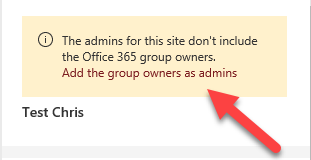
OrangeJuiceJones, its been a few years since I've encountered this issue. Have you tried going to SharePoint Admin Center > Locate the active site and select it to get to the site settings. I am curious if there is a message that is prompt to add the group owners as admins is still.6KViews0likes1CommentConfidentiality or Terms of Use Notice Dialog/Popup on SharePoint
We are current exploring options as to how we could potentially implement a confidentiality or terms of use notice dialog/popup for users to review and accept before they can access the specific site. While there are some SPFX solutions and 3rd party web parts available for modern experience, we were curious if there was an M365 service that we are not thinking of that we should look into. We did find Terms of Use service - https://learn.microsoft.com/en-us/azure/active-directory/conditional-access/terms-of-use#edit-terms-of-use-details but this appears to be applying it to all M365, not to a specific site. Any pointers would greatly be appreciated. Thank you, ChrisSolved2.9KViews0likes4CommentsEncountering 'Failed to Validate the Signature of the Actionable Message Card' Error
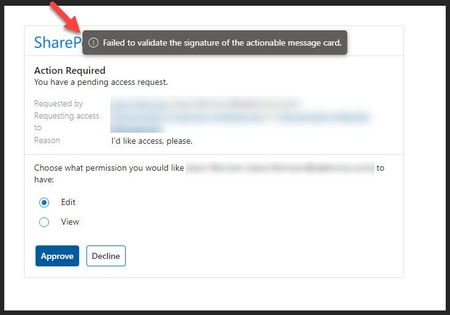
Hi, I am not sure if I am posting to the right group but would like to ask about 'Failed to Validate the signature of the actionable message card' error that we are encountering with the shared account when trying to approve / reject SharePoint access requests within Outlook (app/web). For a while, it worked fine until recently. We do not encounter this issue with standalone user account. Is this a known issue for the out of the box feature or is something not configured correctly on our end in Exchange? Any pointers would greatly be appreciated.4.1KViews0likes1CommentRe: Sharepoint list, data not showing in form but in list.
Do you encounter any issues in classic experience? I am curious if there are some issues with modern experience that is causing these headaches, including the inability update and save a different content type on an existing list item.16KViews0likes0CommentsM365 Group Apps Report
This may or may not be the right place to ask this question but it is worth a shot. I am struggle to find some answers as to how we can get a list of apps that are associated or connected to an M365 group? Currently, groups listed in Azure Active Directory and Sharegate Apricot only shows connections to Outlook, SharePoint and Teams...but it does not show if there are any connections to Forms, Planner, Stream, Power Automate, Power Apps, and a few others. The M365 or SharePoint Admin centers are not any better in providing any additional information. The reasons for generating a report is in effort to identify and clean up unused/inactive groups that may or may not be used (owned by current and former employees). Is there a way we can generate a detailed report with the use of PowerShell or Microsoft Graph on a particular M365 group with a list of associated / connected apps? Any information would greatly be appreciated.Solved1.4KViews0likes1CommentRe: SharePoint Site Level Search Verticals Limitations
Hi Euan, Thank you for confirming the limitations. Yes, I was able to create and modify the search verticals at the site level. It seems odd for you to create but not modify the custom verticals at the site level. Is this because you were expecting an 'Edit' button after selecting an item? If so, I do have that same experience as well (where the 'Edit' button is not available) but if I double click on the selected item, it takes me to the edit screen for that selected item. See if that option is available for you. I am hoping Microsoft improves that UI by adding the 'Edit' button to make it more user friendly.2.3KViews0likes2CommentsSharePoint Site Level Search Verticals Limitations
When configuring a SharePoint online site level search verticals in modern experience, we are able to return results for that same SharePoint online site/source but we are unable to pull results from another SharePoint site/source on the tenant even if it is defined in the KQL query. I suspect that this is an expected behavior but unable to confirm it. I have reviewed Manage search verticals | Microsoft Docs and did not find any limitations that would prevent us from doing so. Can anyone confirm if we are dealing with the search verticals limitations or if there is a way we can make this work without the need of creating a results source and a classic search results page?2.5KViews0likes4CommentsDynamic Filtered Page Based on URL
We've created a dynamic filtering page with a number of different machines users can choose from. This allow us to use a single page template to surface dynamic content based on the machine selected on the page. This saved us the hassle of creating a page for each of the machines as we have hundreds of them. Since we have a lengthy list of machines (managed metadata) for users to pick from, is there any possibility we could create a separate SharePoint list that will 1) allow users to search for a machine, 2) click on a link to a specific dynamic filtered page? We've tried a method of https://[name].sharepoint.com/sites/Shop/SitePages/Inventory.aspx?FilterField1=Machine&FilterValue1=TableSaw but the URL does not select and filter the dynamic page to pull all information regarding the specific machine: TableSaw -- like the specs, manual, location, etc. On older versions of SharePoint, we've been able to create dynamic or database driven pages but it is challenging to do something similar on SharePoint Online with modern experience. Any pointers would greatly be appreciated.1.3KViews3likes0Comments- 1.5KViews0likes0Comments
Governing Comments on SharePoint
While we have the ability to turn on/off comments on SharePoint, are there any chance we would have the ability to moderate comments and/or restrict specific user accounts from commenting on SharePoint? I saw an older post from about 2 years ago that had a link to the SharePoint UserVoice for a feature request to moderate comments on SharePoint but the SharePoint UserVoice site is no longer active. By any chance, does anyone know if there is an update on this feature request? Any information would greatly be appreciated. Thank you! ChrisSolved1.6KViews0likes2CommentsMissing Site Collection Administrators on Connected Channel Sites
In attempted to connect the dots with the recent Microsoft changes (MC261534 & MC282480), it is understood that the ability to edit the 'site permissions' for 'channel sites' has been removed. With this change, did that also remove the ability to edit the site collection administrators as well? I noticed that this option is no longer available on newly created 'channel sites' but it is still available on older 'channel sites'. Is this an expected behavior? Also, is Microsoft envisioning to remove 'site permissions' from 'parent team connected sites' and having it be controlled within Teams in the future? If so, this could be problematic for SharePoint administrators to access site collection administration feature as well as the ability to assist those end users without the need to be added as 'owners' of the M365 group.689Views0likes0Comments

Recent Blog Articles
No content to show