User Profile

Sesu-
Brass Contributor
Joined Feb 03, 2020


User Widgets
Recent Discussions
Azure tenant restriction headers setup
Hi, I recently read about Azure tenant restriction headers which can be used to restrict web proxies of other tenants except ours when we sign in to office.com or outlook web app and others like that. We also recently started using 'Force point' who we thought could help us restrict this although their advice was we have to white list their data centre IP addresses in our Conditional access policies blocking locations. I felt that the white listing option was a bit insecure for our tenant therefore started reading around the Azure tenant restriction which is not entirely clear to me if i will need the web proxy to achieve this or can simple set it up in the Azure portal and it immediately starts working without any third party integration. Thanks 0 LikesSolved7.1KViews0likes2CommentsOutlook not showing the AIP Protect button for classic labels
Hi, I set up AIP labels some time last year but the Protect button suddenly disappeared last month from all windows desktop apps. We can't add the classified labels anymore, and the AIP addon is not there in Outlook, not even disabled. P.S The sensitivity icon is visible but we prefer the Protect which also had advanced settings to warn users of external emails they are sending. Version is 2004 (12730.20270). Anyone know how to get the Protect button again on Outlook? Thanks4.2KViews1like1CommentAIP Outlook add-in nolonger available in Outlook, the blue Protect icon not showing anymore.
I set up AIP policies and labels last year for our company to use foe email labelling and document labelling. We were also using the advanced feature to show a warning pop-up message when sending emails to externals. This has been working for months but suddenly stopped working. The AIP add-in is nolonger there incl in disabled adds. Please assist me . Kind regardsRe: Outlook not showing the AIP Protect button for classic labels
PeterRisingthe latest version of AIP is what I force/ manually installed on one of our pcs and it seems to work. think its version 1.54.** .We were using version before that which isn't supported anymore. Looks like GPO isn't uninstalling the previous version to update it to the new version I added, that's why we don't have the protect icon .19KViews1like1CommentRe: Outlook not showing the AIP Protect button for classic labels
HiPeterRising I checked program and features but can't find it, although I used to have it. I also used wmic using cmd to check installed msi apps then it appears as installed. If I search for the AIP on start it doesn't show up neither do I find it under the roaming/microsoft/addins folder . I initially deployed the app using GPO. Thanks.19KViews0likes3CommentsRe: Outlook not showing the AIP Protect button for classic labels
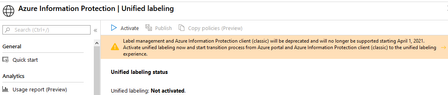
PeterRisingHi, I haven't activated the Unified labels. See attachment to prove it's still not active. I intend to do this sometime this year but not now as I still have until 2021 to migrate the classified labels.19KViews0likes7CommentsOutlook 'mark my comments by' keeps returning to an odd name I don't recognise.
Our users change mark my comments by to their names although this changes back in 2 hours to a default name that I don't recognise. Is there a setting that could be causing this within Outlook? Thanks533Views0likes0CommentsOutlook not showing the AIP Protect button for classic labels
Hi, I set up AIP labels some time last year but the Protect button suddenly disappeared last month from all windows desktop apps. We can't add the classified labels anymore, and the AIP addon is not there in Outlook, not even disabled. P.S The sensitivity icon is visible but we prefer the Protect which also had advanced settings to warn users of external emails they are sending. Version is 2004 (12730.20270). Anyone know how to get the Protect button again on Outlook? ThanksSolved19KViews0likes11CommentsRe: SharePoint List editing issues on the list created items
Hi, How did you resolve this or did you at least find a work around the issue while Microsoft is troubleshooting? I’m desperate for a resolution as we have a large backlog of work cause of failing to edit the column data. Thanks.1.2KViews0likes2CommentsSharePoint List editing issues on the list created items
Hi Our SharePoint lists are having displaying errors as existing items are overlapping. This occurs when I select an item then try and edit it by edit all . This will just open the list entry haphazardly making it difficult to see which column we want to make changes to or make it difficult to read anything at all. We also have a column with multiple lines using enhanced rich text , this cannot be completely edited as it opens a blank notes page when I select edit to change existing notes. I raised a support ticket some weeks ago and its still being worked on. Can anyone assist with this as it's a show stopper for us. Thank you1.3KViews1like4Comments- 6.9KViews0likes0Comments
Re: AIP Outlook add-in nolonger available in Outlook, the blue Protect icon not showing anymore.
ChristianBergstrom Everything still looks OK in Azure , all my settings ain't changed and the AIP agent is deployed by Intune and GPO for some users. I haven't changed anything at all. Thanks for the response, I will raise the ticket .1.1KViews0likes1CommentRe: Secure score dropped from 500 to 359 , Most Intune policies have not complete and nolonger scored.
BethJester Out of curiosity, does that mean the score will go up or it's already a done deal for now? Thank you for the feedback page, we will surely utilise it as often as possible.2.8KViews0likes2CommentsRe: Secure score dropped from 500 to 359 , Most Intune policies have not complete and nolonger scored.
Shaun WagnerHi, Read document below, check the what's coming section you will realise Microsoft decided not to score Intune policies hence reduced the secure scores. https://docs.microsoft.com/en-us/microsoft-365/security/mtp/microsoft-secure-score3.1KViews1like3CommentsSecure score dropped from 500 to 359 , Most Intune policies have not complete and nolonger scored.
Secure score dropped from 500 to 359 , Most Intune policies have not complete and nolonger scored. I haven't made any changes to our Intune policies therefore doesn't understand why. Please assist. Thanks so muchSolved3.2KViews1like9Comments
Recent Blog Articles
No content to show