User Profile

JWhiteFEI
Copper Contributor
Joined Sep 09, 2019


User Widgets
Recent Discussions
"Team: 'Person Name'" Calendar?
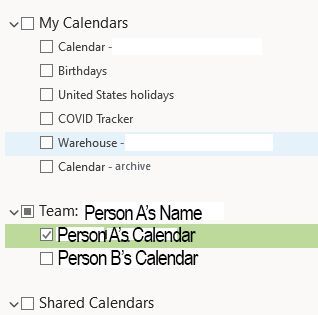
This morning, folks in our organization reported that they now see random new calendars in their list of calendars. The calendars appear to be copies of other employees' calendars. It shows in it's own calendar group titled "Team: 'Person Name'", and for me at least there are two calendars there for other people in my organization. I am seeing a new group in my outlook that says "Team: Person Name" with two calendars in the group, one that belongs to the person in group name, and another for a completely different employee. No one has shared these calendars with each other; they have appeared automatically and now employees have access to other employees personal calendars?! Please see the screen grab below.2.2KViews2likes2CommentsUnable to add existing list to Lists in Teams channel
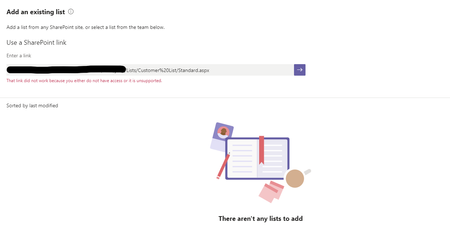
I am having an issue adding an existing list to Lists in Teams. I can add all other lists from this group/site to the desired Teams channel, except this one. I am getting an error: "That link did not work because you either do not have access or it is unsupported." The channel is private and the list is not hosted on the sub-site for the private channel; rather its hosted on the main site. However, I was able to add other Lists from other sites to this private channel with no issue. I have verified that the permissions are standard; same as all the other lists. I am an owner with Full Control. I can access and edit the list through SharePoint no problem. Any ideas as to why this may be happening?Solved36KViews0likes24CommentsRemove old StaffHub schedules from Shifts Schedule List
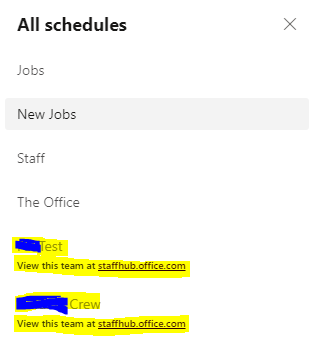
Hello, I set up a couple schedules in StaffHub back before Shifts in Teams, and didn't delete them before StaffHub was retired. These groups were later deleted, but the schedules remain. These schedules are shown in my schedule list permanently and I can't delete them trough StaffHub, Teams, or Groups Admin. Does anyone know of a way to delete these from the list?1.5KViews0likes2CommentsRe: User Logos/Photos are not loading
Alireza Rahimifarid Hello again, I installed it on another Surface device and am having the same issue. I cannot see any photos/logos for users or teams. Again, this started when I enabled 2FA on my microsoft 365 account using the MS Authenticator app. Only on desktop, mobile and web are not having this issue.1.1KViews0likes0CommentsRe: User Logos/Photos are not loading
Alireza Rahimifarid Hello, I have Teams installed on my Surface Pro 7 as well and while I can see logos/photos for individual users, I cannot see them for the teams. Although I have not tried any of the above fixes on my Surface. I will install on another machine and get back to you. Thanks!1.1KViews0likes0CommentsUser Logos/Photos are not loading
I recently enabled 2FA on my M365 account, and since then, neither user logos nor team logos are loading. I have tried the following: removing all cache in %appdata%/Microsoft/Teams Signing out and back in Uninstalling/reinstalling Teams Uninstalling/reinstalling Office 365 entirely Removing my Work account from Windows/re-adding it. No luck. This is only occurring on the desktop application, the web app looks as it should. See the screen snips below. Any ideas?1.2KViews0likes3CommentsMicrosoft Shifts Crew Capabilities
I run tech for a construction company and we transitioned to Teams and Shifts for office personnel June 2019. I'd like to deploy it for field workers as well, however we are required to have the crew leader (foreman) clock in and out for all field employees in his crew, preventing us from using Shifts in the field. I know Shifts is geared more towards the individual employee, but I'd like to see some form of crew/batch clock in, where a shift leader can clock in all employees assigned to the shift and present. This is probably a rare use-case, however it is fairly common among construction-oriented time clock software.819Views1like0CommentsFavorites sort order does not save
I cannot get the Outlook 365 desktop to keep the favorites folder/group order I set. I have tried the following to get them to display in the order I'd like: Unfavorite all and re-favorite in desired order Reset the view .xml by using Run -> Outlook.exe /resetnavpane I have not tried a new profile, however this is on a new machine that had outlook installed fresh no more than a month ago. All O365 software is up to date on my machine. Any ideas?2.7KViews0likes3CommentsUpdates to PDF not reflected on "Show on Card" Preview
After updating a PDF on my SP site that is linked to a Planner Card, and marked "Show on Card", the changes to the documents are not reflected in the show on card preview. I am encountering this both on the iOS app, and desktop website. I have tried to remove and re-add the attachment, un-check and re-check show on card. I have waited approximately 12 hours since my last update, and the change is still not reflected in preview. I was hoping that when I made changes to a pdf, I could save over the existing in SP Documents and the changes would reflect in Planner, instead of having to manually add a new attachment each time.988Views1like1Comment

Recent Blog Articles
No content to show