User Profile

4BobRandall
Brass Contributor
Joined Mar 15, 2019


User Widgets
Recent Discussions
Re: What is audienceviewgcc microsoft teams?
For everyone's benefit, here is the response / resolution to this issue that I got from Microsoft: --------------------------- This is a bot used for Dial In Conferencing. It’s the one in charge of announcing when a participant joins or leaves a meeting among other functions. There are other bots that might join calls when recording, enabling meeting transcript and other activities. Usually bots don’t show up as participants in the meeting since they join as hidden. But I’ve seen it once in a while. So while having the bot join the meeting is normal, it’s not expected for it to show as a participant. If you continue to see this behavior please go ahead and open a support incident. ----------------------------1KViews0likes0CommentsRe: Ongoing Teams / M365 App feature updates - comms and training
We have a Org Wide Team in our tenant called Connect with the CIO where we have a channel called M365 Updates. When new buttons, features, or apps are rolled out we post those new changes / updates there and they show up for everyone in our organization.3KViews1like0CommentsJoin button is gone in Teams meetings set up in a Channel
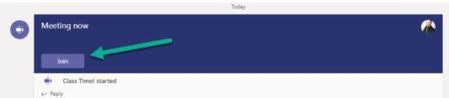
Once upon a time we used to be able to join a Teams meeting that was set up in a Channel by going to that Channel when the meeting was running and clicking Join from there. For some reason that feature isnt working now. The Join button isnt there when the meeting has already started. You have to go to your calendar to find the meeting and join it instead of going to the Channel itself. That feature worked for quite a while, then it just stopped. I tested it and it didnt work for me either. Some web searches pointed to Time Zone issues (?) but I cant find any other reason. Was that feature removed or is there something else going on? What is used to look like in a Channel when the meeting had started: What is looks like now:1.8KViews0likes2CommentsRemoving a Meeting in a Teams Channel when the organizer is gone
We have a staff member that used to be an Owner of a Team that created a meeting series in a Channel within the team. That person now has left the organization and we cannot figure out how to remove the meeting series from the Channel for everyone. f course we could ask each person to manually remove the meeting fr themselves in Teams from the Channel but that doesnt work for large groups - it is just a mess. Is there an Administrative way to fix that?Solved84KViews3likes17CommentsRe: Masking Incoming Caller Numbers in Microsoft Teams
Ethan Stern I see that as masking outgoing calls from Teams to PSTN. I am talking about masking the phone number for people who dial into Teams meetings so the other attendees dont see their whole phone number. They would only see the last three or so digits in the number. I have seen it work in other tenants.12KViews0likes5CommentsWhat is audienceviewgcc microsoft teams?
In our Government Community Cloud (GCC) Office 365 tenant a few people recently have seen an attendee named "audienceviewgcc" in their Teams meeting. Has anyone else seen this or does anyone know what that is and why it is there?? See the attached image.1.6KViews0likes1CommentMasking Incoming Caller Numbers in Microsoft Teams
Hello everyone - So we are in the Government Community Cloud (GCC) for O365 and would like to set up our tenant to mask the phone numbers for incoming callers in our meetings to protect privacy. I have seen that it can be set up to clock all of the numbers except for the last few digits. I have dug around and I dont see the clear cut method for doing that. I see how to mask our OUTGOING calls from our Teams environment but not incoming. Can you point us in the right direction?Solved12KViews0likes7CommentsRe: Chat button missing in a Teams Meeting?
HannahH2020 Unfortunately they are already using the desktop client and we are in a GCC tenant and we do not have the option for 'turn on new meeting experience'. We are resetting that person's Teams policy on the back end to see if that fixes his issue.66KViews0likes0CommentsRe: Announcement joining/leaving a team
adam11 This is especially annoying when you are trying to create a clean, company / Org wide Channel when the whole company is automatically added to it. If you want to just use the Channels for announcements and one-way communications, the clean look of the channel is always messed up when people are added or formally join the Team. Toggling this on and off for Org-wide challens would be a logical change they should make.23KViews0likes1Comment
Recent Blog Articles
No content to show