User Profile

BusyIntelligence
Brass Contributor
Joined Mar 04, 2019


User Widgets
Recent Discussions
Can the "Respons allready sent" page be customized?
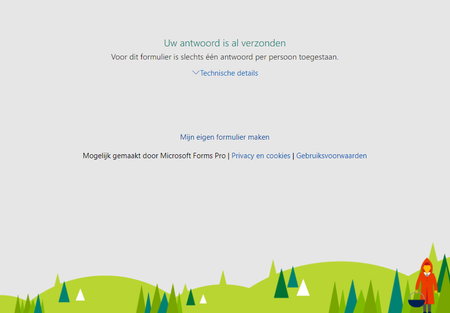
Hi, when a person tries to send the responses for a second time, there's a redirection to a page saying something like "Your response is allready sent". I don't know the exact text as I know the Dutch version. Anyway, this page, is this somehow customizable, so that it can be themed or so? Currently it's a non-branded page with Little Red Riding Hood, which scares my customers. Kind regards, Maurits Vlasman847Views0likes1CommentCalendar view filtering no longer working
Hi, last week was the first time I created a calendar view and guess what, I was really enthusiastic! The view had two filters created by default and I was able to add additional filters using the view settings. BUT, today this no longer works, on the same tenant, same site, same data in same list. The default filters just don't work anymore and additional filters neither. Was I dreaming last week? Anybody else noticed this? Do your filters still work? Kind regards, Maurits513Views0likes0CommentsRe: URGENT HELP NEEDED!!! Forms are automatically deleted from Ms.Forms!!!!!!!!
Hi Mhassan88 , maybe a very silly respons, but I've had the same experience some time ago. And no matter how much I love Microsoft products, I was deperate and tried the Firefox browser... And there the forms were as if nothing happened. Both the new Edge and Google Chrome pretended as if they were not there, even after cache refresh etc. But they were right there when using Firefox. I hate that. Currently have such a situation with Power Canvas Apps too where things suddenly don't work in Edge/Chrome anymore, but work perfectly in Firefox.... So advise is to try different browsers!1.8KViews1like1CommentRe: Forms Pro and Entity
Hi BruceDemont , not fully sure if I understand you correctly, but maybe this will help. We have created a survey in Forms Pro using data from the contact entity as variable (e.g. the firstname, lastname). We have a flow in Power Automate to send out the survey invitation to a "selected contact" using the CDS trigger "When a record is selected". The user in Dynamics selects the contact(s), then selects to run that specific flow from the Flows menu, and that's about it. As the survey invitation is automatically related to the record in the Contact entity, we can see the responses as related data from the contact record. In fact we created a seperate tab with a subgrid showing the responses directly. Is this a bit what you are looking for? Kind regards, Maurits762Views0likes0CommentsDeleted invitations are still counted on the tile
Hi, I've deleted a number of invitations from a Forms Pro survey. They are no longer visible in Forms Pro and also not in the CDS. But, the tile that shows the number of invitations still counts those deleted records. Is there a way to reset the tile or so? Kind regards, Maurits589Views0likes0CommentsRe: Deleting Forms Responses >300
Thank you RobElliott. Great to post the video with your tip. I didn't know that and will help for sure. I will test it with Forms Pro to check if the response is also deleted from the CDS environment. If that's the case, it will do. Kind regards, Maurits105KViews0likes1CommentRe: Deleting Forms Responses >300
Oh my, I didn't know this was not possible. This means, Microsoft, that FORMS IS NOT GDPR COMPLIANT!!! We are unable to delete all person related data if someone requests for that. Keep my fingers crossed this will not be the case before Microsoft fixes this.106KViews1like3CommentsRe: MS Forms Pro – Unable to update connection string after deployment
Anish4269 Hi Anish, I think this has to do with the ownership of the survey. I have posted a similar question on this forum this weekend. I expect your user B can also not see the survey on the DEV environment as that user is not the acutal owner in the Forms Pro Services. Hope your issue will be solved soon, cause maybe mine will be solved by that too 🙂 Good luck!653Views0likes0CommentsStruggling with Forms Pro Survey ownership
Hi, I can't find any good information about the ownership of survey data in Forms Pro. I've created a survey with user A. Shared for collaboration with user B. So far so good. Now user B wants to user Power Automate to create invitations, but cannot select the survey, only user A is able to do that. I think that's because of the ownership. Now, question is: How can we transfer the ownership of a survey to another user? I've read some things about transfering ownership to a group, or to another user done by an Admin. But it seems these admin tasks concern the regular Forms and not Forms Pro. As a test I've changed to owner of the survey record in CDS (assigned it to user B). For Forms Pro that looked logical to me, but it did not do the trick. Hope someone can point me in the right direction.690Views0likes0CommentsPower Automate Create Invitation action requires Firstname of Contact
Hi, not a question, but more a tip or bug report. I use Power Automate to create a new invitation for Contacts in the CDS, but received error messages about Blank/Null values on some contacts. Turned out the Firstname of the contact may not be empty with this Power Automate action. The workaround was easy, just changing the expression that fills the Firstname field of the invitation. Nevertheless I thought I'ld share this with you628Views0likes0Comments
Recent Blog Articles
No content to show