User Profile

ShareCloud
Brass Contributor
Joined Mar 01, 2019


User Widgets
Recent Discussions
Re: SP List issue: For some users not all listitems are visible in SP list
Thanks NikolinoDE But I'm afraid thet AI tools give too generic answers for such problem. I have a threads open about the same issue here also: Re: Sharepoint News 'See all' link gives 'We didn't find anything to show here' - Microsoft Community Hub https://answers.microsoft.com/en-us/msoffice/forum/all/for-some-users-not-all-listitems-on-sp-list-are/68bcd987-cfd9-4e5c-9d73-7c4efd68b15d I hope MS support will come back soon with some solution... All the best, Mihkel3.8KViews0likes0CommentsRe: Sharepoint News 'See all' link gives 'We didn't find anything to show here'
Hi bnerd , We haven't got any solution to this yet. But I did a service request to Microsoft from Office 365 admin portal. But we know so far that clearing cache or specificly clearing 'Local storage' helps to get the correct data visible. I also posted about the issue here: https://answers.microsoft.com/en-us/msoffice/forum/all/for-some-users-not-all-listitems-on-sp-list-are/68bcd987-cfd9-4e5c-9d73-7c4efd68b15d Also it appears in some tenants only. Specifically in tenants that get new features first. Right now MS support is handling this case and are investigating. We have contacted with support and have ticket open. Right now we are waiting for some feedback from MS... Also a trick I used to get MS attention - create the service request under some larger client tenant. It appears that tenant size prioritizes these service request to higher position 😄 I still have ticket from my company since 22 September and answer for it from MS. :s I'll add the steps i used to create service request: 1. Use the 'Help & support' link from the right-bottom: 2. ask your question and then appears a button 'Contact support' 3. Then you can fill all the information: I hope that will help you a bit. 🙂 But I'll update this subject her if we get some new information about it... All the best, Mihkel1.7KViews1like2CommentsSP List issue: For some users not all listitems are visible in SP list
Problem: for some users not all listitems on SP list are visible. Scenario: user A creates a new listitem, user B opens up the same list but does not see this new listitem. After clearing browser cache for user B, new listitem becomes visible. List and listitems does NOT have special permissions set. Some observations of this problem: * listitems become visible after clearing browser cache, but then after a day are not visible again. * mainly users that are actively working with this list and listitems have this problem. When admin account opens the list, all listitems are visible * problem is more related to larger lists 5000+ listitems in list * problem occurs on multiple sites with multiple lists * users are mostly using Edge browser (as this is set default by company policy) Have anyone experienced something similar? Have anyone any ideas how to resolve it or what could cause such behaviour?4.5KViews0likes2CommentsSharepoint News 'See all' link gives 'We didn't find anything to show here'
Hi, I have a situation, where News webpart is configured to display news from multiple sites (7 sites total). News WP in configured on the Sharepoint rootsite. After clicking on 'See all' link user land on an empty page displaing: "We didn't find anything to show here". After investigating this issue, I found that: issue occured with rootsite newsfeed (even if rootsite was the only site selected for news source) All the users in this tenant are seeing the same issue Site Pages library contains about 430 items total, 310 of them are News items changing the 'newsSource' value on URL ..._layouts/15/news.aspx?newsSource=3&... to 1, 2 or 4 I see the results, but its not all the excpected news displayed in the console there is an error message: POST 'https://mytenant.sharepoint.com/_api/v2.1/getMultiSiteNews?$expand=analytics($expand=allTime),thumbnails&$top=50' 400 creating a new site page and setting up News wp to display news feed from rootsite gives me the same result (even tried configuring News wp on another site) other tenants I manage does not have this issue Any ideas? Any help is much appreciated 🙂 BR, Mihkel Moorats3.4KViews0likes4CommentsSearching for "ContentType:Invoice" gives no results?!?
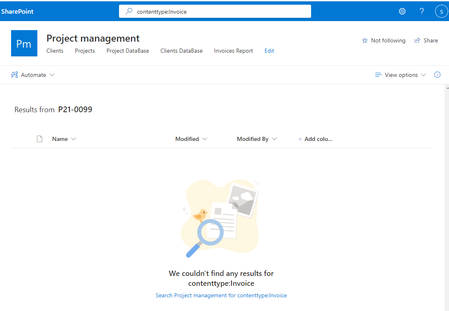
Hi, does someone have an idea why SP Online search have stopped showing results for "ContentType:Invoice"? I have implemented a solution that relies on SP Search and should display all documents that have ContentType equal to 'Invoice'. It worked fine until one day... Tried out different ways for the query: contenttype:Invoice ContentType:Invoice SPContentType:Invoice Have tested the "ContentType:Invoice" on one folder only, but still no results. I have tested the same search on another tenant where it works fine. Could there be some issue with search service in this particular site or tenant? Any ideas are welcome...456Views0likes0CommentsRe: How redirect clicking on user to Delve
Hi jcgonzalezmartin It happens wherever I click on user name in SP default lists and libraries. And also, when using SP default modern search, it still redirects me to old mysite page. I have researched many hours about it, but still haveno clue...1.5KViews0likes0CommentsHow redirect clicking on user to Delve
Hi everyone, I have an issue with SP Online, where clicking on User name will redirect me to the old mysite page (https://{tenantname}-my.sharepoint.com/PersonImmersive.aspx?accountname={accountname}) In all the other tenants I will be redirected to Delve profile page. How can I accomplish redirecting user links to Delve not MySite? Any help is much appriciated Mihkel1.6KViews0likes2CommentsRe: For News Web Part - Thumbanail is not showing
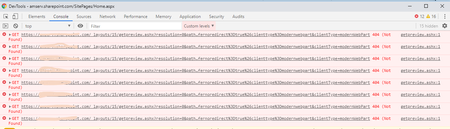
Hi, We are seeing the same issue in several tenants. It seems that issue occurs only on rootsite with News webpart. When you open news itself, then picture is displayed correctly. When looking at the console, I see following: Given error message cannot resolve: https://[tenantname].sharepoint.com/_layouts/15/getpreview.ashx?resolution=0&path=%2F_api%2Fv2.1%2Fsites%2F[tenantname].sharepoint.com%2C2b197a1e-4ad8-4169-9f34-c07da56b0253%2C8f005fe1-4d69-4623-8403-dd001ac8ae5b%2Fitems%2Fe9056bc1-5794-439e-85b8-d1dbe345a5a5%2Fdriveitem%2Fthumbnails%2F0%2Fc400x99999%2Fcontent%3Fprefernoredirect%3Dtrue%26clienttype%3Dmodernwebpart&clientType=modernWebPart We reported an issue to MS also. Hoping it will get fixed soon... Mihkel8.2KViews0likes6CommentsRe: @mention for groups in Sharepoint NewsFeed
Hey HerveDup, OK, I understand your point. And I'm assuming that users of that group do not get the email that is sent for group email? What I would think next is to use Flow for that. So you can trigger Flow on getting this Group email and the iterate through group members and forward this email to each user. I hope it makes sense for you? Good luck, Mihkel4.7KViews0likes1Comment


Recent Blog Articles
No content to show