User Profile

w4C777
Copper Contributor
Joined Sep 13, 2023


User Widgets
Recent Discussions
Re: Blocked senders are being filtered as spam
I still would appreciate help from somone on this. I removed the email addresses from the Anti-spam Inbound Policy in Blocked Senders and added them to the Tenant Block List. However, they are still being treated as Spam. Why is this happening? I just want them blocked and not sent anywhere and I can't seem to find a way to do that. How do I set it up so that these addresses an totally blocked and rejected?966Views0likes0CommentsBlocked senders are being filtered as spam
I have explicitly entered an email address to be blocked in Microsoft Defender Anti-spam Inbound Policy in Blocked Senders, however, mail from this email address is being filtered as spam. Why aren't messages from this email address being blocked and rejected? Instead, they are being filtered as Spam and being delivered according to the spam message action. I don't want emails that are listed in Blocked Senders to be delivered anywhere. What is it about "Blocked" that Microsoft doesn't understand? To me, "Blocked" has always meant block. Period. Is there a way for me to handle these emails the way I define "Blocked?"1.2KViews0likes5CommentsReceived an email that was sent from my own email address to my own email address
Hello. Today, I received an email that was sent from my email address to my email address saying it was undeliverable. I didn't send it. I logged into EAC and looked went to Message Trace to view any failed delivery messages. I found this one and the reason for non-deliver is: "Error: 550 5.7.509 Access denied, sending domain toddpierpoint.com does not pass DMARC verification and has a DMARC policy of reject" I'm fairly new to this stuff, but I did set up DMARC on my DNS a little over a month ago. Does this mean that someone tried to send an email to someone on my behalf and the DMARC policy of reject worked properly? I'm not sure what to think about this. Is there something I need to do to take more precaution? Thank you.Solved919Views0likes2CommentsRe: Spam being delivered to Junk folder
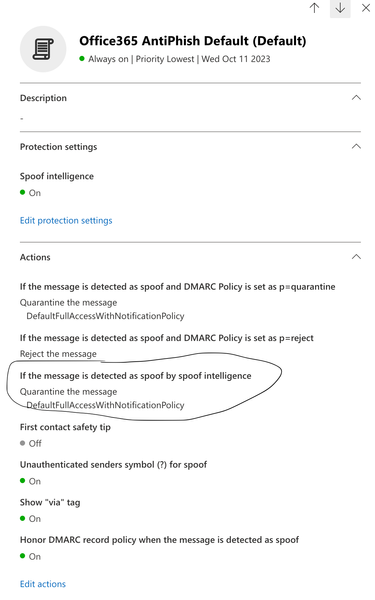
So far I have not received any email into my Junk folder. Maybe this was finally resolved by changing the 'If the message is detected as spoof by spoof intelligence' settings was switched to Quaritine the message. I'll continue to monitor for another week. At that time, I will accept this as resolved. Thanks a lot for your help.2.3KViews0likes0CommentsRe: Spam being delivered to Junk folder
elieelkarkafi Yes, I did check that as well. Thank you. The setting 'If the message is detected as spoof by spoof intelligence' was set to deliver to Junk folder, but I don't believe that was the issue. I changed it to Quarantine the message, which was the only other option. Again, I don't believe these are spoofed emails. I'll let you know if some spam keeps getting delivered to the Junk folder. Thanks again!2.3KViews0likes3CommentsRe: Spam being delivered to Junk folder
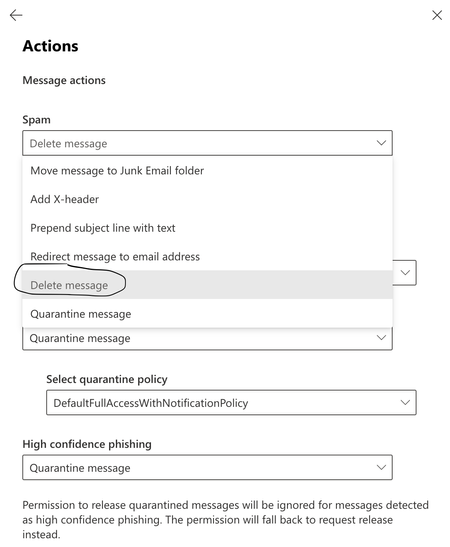
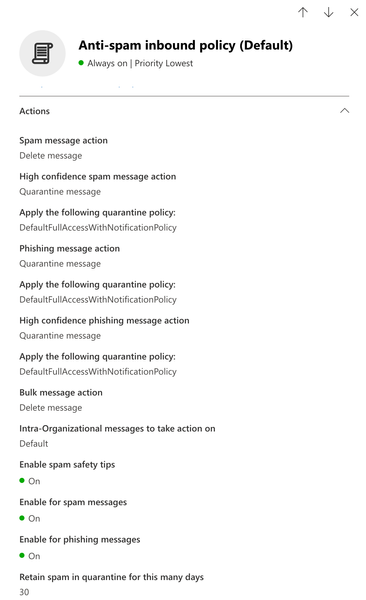
Look at my very first post, and below. The Anti-spam Inbound Policy has several options, one being Spam message action. I have set it to Delete Message, and not all Spam message are being deleted. Some messages are ending up in my Junk folder and I don't know why. Where else can I go to troubleshoot this?2.4KViews0likes7CommentsRe: Spam being delivered to Junk folder
OK. So there is no other way for me to troubleshoot this? I'm running a message trace in Exchange Admin Admin Center, but don't know if that is going to give me the information I need. Do you have any other suggestions? BTW, I appreciate all of your help. 🙂2.4KViews0likes9CommentsRe: Spam being delivered to Junk folder
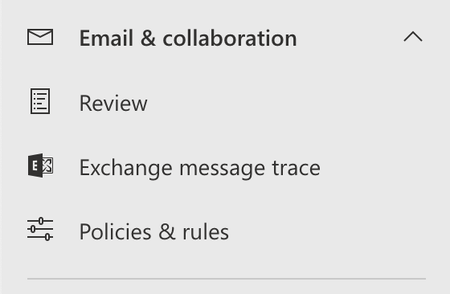
elieelkarkafi Thank you for your response. Please excuse my lack of knowledge, but where would I go to check which policy was used for this specific email. I just received another email into my Junk folder this morning and I don't know how they are sent there when I have the Spam policy set to delete spam messages. Thank you.2.5KViews0likes17CommentsSpam being delivered to Junk folder
I am still having spam messages being delivered to the Junk folder, even after setting Spam Message Action to delete the message (see first image below). I also ran a message trace and found that the message was filtered as spam and delivered to the Junk folder (see second image below). Why am I getting spam delivered to my Junk folder when I explictily chose to have it deleted?Solved3.1KViews0likes19CommentsRe: Anti-spam inbound policy working differently without intervention
UserID144294 No I haven't. However, I turned off the Preset Security Policies in Threat Policies and am managing this on my own. I don't have much faith in that right now. So far I haven't had any more issues. Maybe that was part of it.1.1KViews0likes0CommentsRe: Anti-spam inbound policy working differently without intervention
I don't believe this is a DMARC issue. For example, I received two emails from the same Verizon email address. One was filtered as spam and the other one was delivered normally. This is happening with other email addresses, and seems to be happening at random. This has me baffled, but I would like it fixed. What do you suggest?1.1KViews0likes2Comments
Recent Blog Articles
No content to show