Forum Discussion

Spam being delivered to Junk folder
- Oct 11, 2023
w4C777 check your anti phishing policy settings in the action section as well


- w4C777Oct 23, 2023Copper ContributorI still have not received any emails to my Junk folder. The problem may (hopefully) be resolved. Thank you again for your help.
- w4C777Oct 17, 2023Copper ContributorSo far I have not received any email into my Junk folder. Maybe this was finally resolved by changing the 'If the message is detected as spoof by spoof intelligence' settings was switched to Quaritine the message. I'll continue to monitor for another week. At that time, I will accept this as resolved. Thanks a lot for your help.
- Oct 11, 2023let check this, maybe they are considered a phishing emails.
- w4C777Oct 11, 2023Copper Contributor
elieelkarkafi Yes, I did check that as well. Thank you. The setting 'If the message is detected as spoof by spoof intelligence' was set to deliver to Junk folder, but I don't believe that was the issue. I changed it to Quarantine the message, which was the only other option. Again, I don't believe these are spoofed emails. I'll let you know if some spam keeps getting delivered to the Junk folder. Thanks again!
- Oct 11, 2023
w4C777 check your anti phishing policy settings in the action section as well
- w4C777Oct 11, 2023Copper ContributorOK. It was set to Quarantine, so the spam should not have been going into the Junk folder. I'm not confident that changing this to Delete will work, but I will give it a try.
- Oct 11, 2023
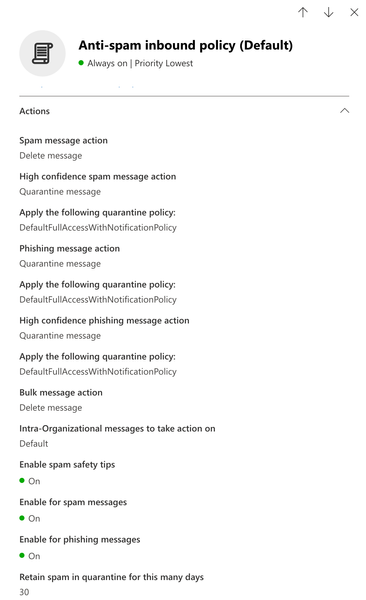
w4C777 ok try to set also the high confidence spam as delete message also , maybe your emails are considered as high confidence spam
- w4C777Oct 11, 2023Copper Contributor
Look at my very first post, and below. The Anti-spam Inbound Policy has several options, one being Spam message action. I have set it to Delete Message, and not all Spam message are being deleted. Some messages are ending up in my Junk folder and I don't know why. Where else can I go to troubleshoot this?
- Oct 11, 2023With your current license i dont think EOP will protect your users . So your anti spam policy wont protect your users . So any spam email will be moved to the junk but will not be quarantined as EOP is not active in your case . You have to get a license that include EOP. From the end users you can just block the sender but still not enough . Protecting your users requires EOP
- w4C777Oct 11, 2023Copper ContributorOK. So there is no other way for me to troubleshoot this? I'm running a message trace in Exchange Admin Admin Center, but don't know if that is going to give me the information I need. Do you have any other suggestions? BTW, I appreciate all of your help. 🙂
- Oct 11, 2023
w4C777 yes because threat explorer is part of the defender of o365 plan2. the Exchange online protection requires the below licenses to protect your users