User Profile

BriWork
Copper Contributor
Joined Aug 31, 2023


User Widgets
Recent Discussions
Plan marked as deleted, when I did not delete it
Hi! I just went to open a plan of mine that I use quite often, to see the message shown in the screenshot below: This plan has been deleted. At the top of the screen, I see "We couldn't load your plan. Please try again later," with the following info: Correlation Id: 9b1ad5a0-b760-4517-88f2-55c51d1d5bd1 Time Stamp: 2025-06-03T14:35:07.183Z Im worried that it's not just a bug that will get fixed with me trying again later, but actually that the plan was deleted. Is there any way to recover a deleted plan? These are the only buttons I see in Planner and none to a trash bin or something of the sort. I don't even know how a plan could be deleted since that is not even an option when the three dots next to a plan is clicked: Has anyone experienced this?83Views1like0Comments- 949Views0likes0Comments
How to link pivot tables
Hi! I distributed a survey and aggregated the results in Excel where each question and it's answers is its own pivot table. I would like to make the same type of changes to all pivot tables (e.g. move the order of the answer options to all the same thing) but so far, I have had to move them individually for each pivot table. Is there a way to link the pivot tables so that the change I make to one is carried over to all the other ones in the sheet?Solved1.1KViews0likes4CommentsShowing count of zero with pivot table
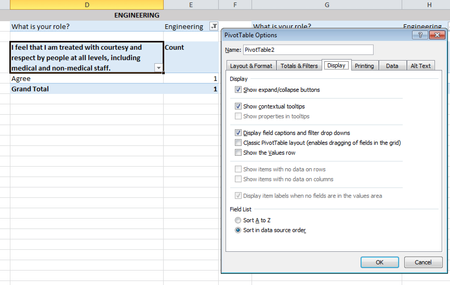
Hi! I am aggregating survey responses and so each question has multiple choice answers "Strongly Agree, Agee, Neutral, Disagree, Strongly Disagree". When creating a pivot table, I want all of these options to appear even if the count of them for a particular question (i.e. pivot table) is zero. When I go to PivotTable options > Display, the button "Show items with no data on rows" is greyed out and I cannot select it. Can someone help me?2.5KViews0likes1CommentFormula: Sum two different cells over two different sheets
Hi! Question 1: I am looking for a way to sum two different cells over two different sheets in a spreadsheet with multiple sheets. See example below: Spreadsheet contains 10 sheets. In sheet 1, I want for a cell to be the sum of the cell C2 from sheet 2 and D12 from sheet10 only. I do not want cells in sheets between 2 and 10 to be included in the sum. What formula should I use? Question 2: I am looking for a way to sum two cells over two different sheets (in this case, the cell number is the same in both sheets). I found the formula = SUM(first:last!cell) but the problem is that if there are sheets between the first and the last one, it will sum every value within the selected cell over all the sheets, but I only want the specific cell in ONLY the two selected sheets to be summed, not every sheet contained within as well. What formula should I use? Thank you!Solved6.1KViews0likes2Comments

Recent Blog Articles
No content to show