excel for web
2025 Topics
How to get form submissions from my website automatically into Excel?
Hi everyone, I have a contact form on my WordPress https://chimneysolutionsplano.com/ (built with Fluent Forms plugin) with fields like First Name, Last Name, Email, Phone Number, Service, Location, and Message. Right now submissions are supposed to send an email notification, but I'm not reliably getting those. Since I can easily access an Excel file from my desktop, I'd rather have the submissions go directly into a spreadsheet instead of relying on email. I looked into it a bit and found that Fluent Forms has a Google Sheets integration but only in their paid Pro version, and nothing built-in for Excel directly. I'm wondering if there's a way to do this using Power Automate or some other Microsoft tool, ideally without paying for extra plugins if possible. Has anyone set up something similar? Would appreciate any pointers on where to start. Thanks!136Views0likes2Comments
Excel Nested Arrays: Find the Nesting Depth of Uniform and Ragged Arrays ARRDEPTH() & ISRAGGED()
Hey everyone! I’ve been diving deep into Excel’s new nested arrays features lately, and I absolutely love the flexibility they bring to data structuring. However, managing them can get a bit tricky, so I figured I’d build some specialized tools to handle them seamlessly. Public Interfaces & Arguments =ISRAGGED(array) Argument Description Default Behavior array Target nested structure to validate. Required =ARRDEPTH(array, [is_ragged]) Argument Description Default Behavior array Target nested structure to measure. Required [is_ragged] TRUE: Scans all branches for the deepest path. FALSE: Speed test on the first path only. FALSE (Omitted) TL;DR (What makes it tick): Function Name Type What It Does ARRDEPTH Public UI Returns nesting depth. Supports deep checking or fast linear testing. ISRAGGED Public UI Structural validator. Returns TRUE if array branches have uneven nesting. ANALYZE_NESTING Hidden Core Engine Multi-process recursive parser that tracks tree structure geometries. LINEARDEPTH Hidden Utility High-speed depth checker that evaluates the first element path exclusively. You can get both functions from my GitHub Gist: https://gist.github.com/Medohh2120/9cdf939036942c9672c57ccd6de696d3268Views1like6Comments
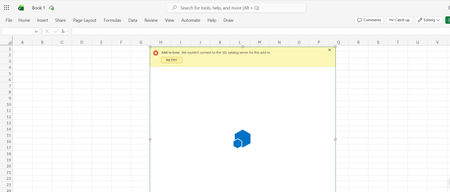
Getting error when adding Add-ins in Excel
Hi all, I have trying to install add-ins to microsoft excel using a M365 Personal Account, and i keep getting an error "Add-in Error: We couldn't connect to the '{0}' catalog server for this add-in" screenshot attached below. I have tried on both Excel Web and and on the desktop Excel app and still the same issue, I have already had a session with microsoft support and they were not able to resolve this for me and directed me to this forum, Any help will be appreciated thanks in advance.426Views0likes3Comments
Referencing data in my formulas from specific file names in SharePoint.
We have a company SharePoint site with multiple subfolders each containing monthly excel spreadsheets. In one of the folders, I have my master spreadsheet that where the formulas are pulling in data from the files that are being uploaded. This works when I open my master spreadsheet and one of the monthly sheets, (e.g., East-February, or West-January and then link the two cells with an = and click on the source cell. On my Master spreadsheet the formula looks something like this: ='[West-February.26.xlsb]MontlyBudget'!A1 There are about 17 different folders however and instead of opening each one and redoing this every time one in uploaded. I would rather just copy the formula on my master spreadsheet i.e. ='[East-February.26.xlsb]MontlyBudget'!A1 ='[North-February.26.xlsb]MontlyBudget'!A1 ='[South-February.26.xlsb]MontlyBudget'!A1 etc. Ideally when the North area uploads their spreadsheet the formula just pulls in that data. What is happening is that I am copying the exact formula over to my new cell, I end up with a #REF error message and cannot seem link. 2 questions: Can I link these without opening up each spreadsheet separately and copying and pasting the link each time? Can I link these to future files that aren't yet created, e.g., Once West-December.26xlsb is uploaded, the data automatically pulls in?323Views0likes3Comments
What's the simplest way to make a genuinely random name selection system using Microsoft tools?
For example, suppose I have a list of participants in Excel and want to randomly select one winner without manually choosing from the list. Would you use RAND/RANDBETWEEN in Excel, Power Automate, or another Microsoft 365 approach? I'm also interested in preventing the same person from being selected twice when several winners are needed. I'd appreciate an approach that's easy for someone without much Excel or Power Automate experience to understand.361Views0likes5CommentsRounding Issues
I am trying to create a "change maker" spreadsheet. We have a need to determine monetary denominations for several clients for refunds... A B C D E F G H I J K L Random Money 100 50 10 5 1 0.25 0.10 0.05 0.01 775.1047 775.10 7 1 2 1 0 0 1 0 0 $775.10 949.3219 949.32 9 0 4 1 4 1 0 1 2 $949.32 947.3099 947.31 9 0 4 1 2 1 0 1 0 $947.30 1231.75 1231.75 12 0 3 0 1 3 0 0 0 $1,231.75 1180.4836 1180.48 11 1 3 0 0 1 2 0 2 $1,180.47 1486.3901 1486.39 14 1 3 1 1 1 1 0 4 $1,486.39 59.166 59.17 0 1 0 1 4 0 1 1 2 $59.17 1450.5418 1450.54 14 1 0 0 0 2 0 0 3 $1,450.53 1042.6726 1042.67 10 0 4 0 2 2 1 1 2 $1,042.67 88.9004 88.90 0 1 3 1 3 3 1 1 0 $88.90 457.3006 457.30 4 1 0 1 2 1 0 1 0 $457.30 The formulas: A: ROUND(RAND()*(1500-30)+30,4) - random number generator to create random money amounts between $30 & $1500 B: ROUND(A3,2) - round A to 2 decimal places for money C2: INT(B3/$C$2) - Calculate $100's (simple) C3: =INT(($B3-(SUMPRODUCT(ROUND($C$2:C$2,2),ROUND($C3:C$3,2))))/D$2) - Calculate each other denomination - requires keeping track of current balance.. D3:K3 - Similar to C3 adjusting for col/row... D3-K3 are same as D2 adjusted for col/row... L3: ($C$2*C3)+($D$2*D3)+($E$2*E3)+($F$2*F3)+($G$2*G3)+($H$2*H3)+($I$2*I3)+($J$2*J3)+($K$2*K3) - Error Checking... The problem is in the Pennies column. Sometimes it is off by $0.01 as in rows 4, 6, & 9 A secondary problem that I am having is copying formulas with $... Sometimes when I copy a formula down that has ROUND($C3:H$3,2) for example, the H$3 turns into H3 and the $ is removed. In other cases it is added where it didn't exist. Is this normal behavior? I thought the $ was there to fix the row/col reference? MKSolved293Views0likes3CommentsI'm looking for a practical way to calculate Pakistan salary income tax in Excel.
The goal would be to enter a monthly salary and have the spreadsheet estimate the applicable tax and resulting take-home amount. Ideally, the calculation should be easy to update when the applicable tax slabs or salary-related rules change. For someone building this in Excel, would you recommend keeping the tax slabs in a separate lookup table and using formulas against that table, rather than hard-coding the rates into one large formula? I'm particularly interested in approaches that make the spreadsheet easier to maintain when tax rules change.320Views0likes1Comment
GLSU Excel add-in fails to load after Office update from Version 2607 to 2608
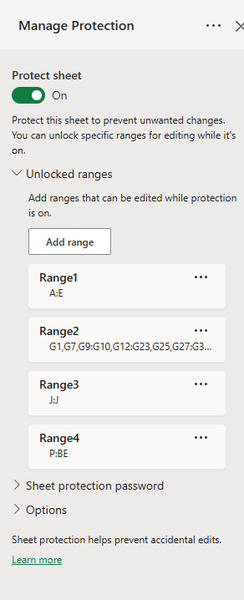
Our Excel add-in, Process Runner GLSU , fails to load after Microsoft Office updates from Version 2607 to Version 2608. This started August 17, 2026 and is actively growing in scope. Error messages: Excel: Cannot run the macro 'onLoad' VBA: System Error &H80004005 (-2147467259). Unspecified error VBA: Compile error in hidden module: ThisWorkbook Has anyone encountered similar issue with their own custom add-on. If yes, any pointers to fix it. We are seeking help on priority. Thanks, Vrushali Pawale, Sr. Manager, Insightsoftware.991Views0likes1CommentExcel Protected Sheet: Cells Still Editable Even Though They Aren’t in the Unlocked Range
I’m having an issue with sheet protection in Excel where certain cells remain editable even though they are not included in any of my configured Unlocked Ranges. I have sheet protection enabled and have specifically configured the following ranges as editable: A:E G:G J:J P:BE Based on that configuration, I would expect columns F, H:I, and K:O to be protected. However, the behavior is inconsistent: Column F/G is correctly locked and cannot be edited. Columns K:O can still be edited, despite not being included in any of the Unlocked Ranges. I’m trying to understand why F/G are respecting the protection as expected while K:O remain editable under seemingly the same protection configuration.Solved331Views0likes4Comments