excel for web
2025 Topics
Autocomplete not working for data validation
At work we have a shared excel sheet (we open it on the web) and we use it to store data. We had it set up with data validation list's and when we typed into the boxes, it would autocomplete one of the options. Now, you have to click the down box then start typing because autocomplete has stopped working. Autocomplete is still checked in options, and everything is still the same setting that it was previously as far as anyone can tell. Please help!56KViews23likes73Comments
Protected sheets with unlocked cells shows all cells as protected in Excel Online
Hi, I first noticed this today with Excel Online. I have a workbook with a protected sheet, some cells are locked and some aren't. On the desktop, this works fine. On Excel Online, when editing cells on the protected sheet, as of today it says the cell is protected, even when it's not part of the set of cells that are locked. Under 'Review - Manage Protection' in Excel Online, there is a new(?) option to add editable ranges, but this isn't visible in Excel Desktop. This seems to override this behaviour where unlocked cells on a locked spreadsheet can't be edited in Excel Online. Is this an intended change to the way these locked cells on protected sheets work for Excel Online, or is it a bug that has been introduced? Is this the correct venue for reporting something like this? There is a Reddit thread started earlier today that first noted this, I've been using this functionality as described (protected sheets with locked and unlocked ranges) for over a year this way with no issues, with this change happening today: https://www.reddit.com/r/excel/comments/18laym6/office_365_issue_with_cells_randomly_locked/. Thanks, RobSolved10KViews9likes18CommentsExcel Online - All Sheets Menu Option Greyed out.
Hello - I have an issue where the Excel Online is showing the All Sheets Menu greyed out for all excel sheets. This was not an issue yesterday. The only way Ive found to turn it back on was to Activate Viewing Mode, then flip it back to editing mode which should not be the way its done, if yesterday it worked just fine when i opened the file. How do i get the All Sheets button to turn back on permentantly?14KViews9likes30Comments
Disable Auto-Fit/Auto-Wrap on Web?
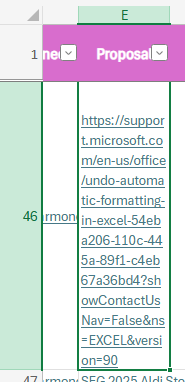
About a week ago Excel rolled out a new feature to me that offered to auto-fit my cells whenever needed. Not knowing what it was, I accepted it and turned it on. Now, I want to turn it off and cannot find it anywhere. I've tried following https://support.microsoft.com/en-us/office/undo-automatic-formatting-in-excel-54eba206-110c-445a-89f1-c4eb67a36bd4?showContactUsNav=False&ns=EXCEL&version=90instructions, but these instructions are for the app, not web, and the issue doesn't replicate on the app. Below in E46 is an example of the issue. I want to paste links without them auto-wrapping my text or auto-fitting the column. I have tried turning wrapping on and off again in this column, but it doesn't work. I could manually disable the wrapping every time I enter a link, but I would much rather just turn this feature off.5.2KViews6likes7CommentsHow to optimize a large XLOOKUP table with volatile data sources?
I'm working with a fairly large Excel workbook (around 100,000 rows) that relies heavily on XLOOKUP functions to fetch data from multiple sheets. The problem is that performance has started to slow down significantly, especially when I open or save the file, or make changes that trigger recalculations. To envision it : Each lookup table ranges from 10k to 30k rows. Some of the source data is linked to external workbooks or updated via Power Query. I've disable automatic calculation for now but that's not ideal for the final users. I'm not using any array formulas or dynamic arrays intentionally, but the sluggishness persists. is there a best practice for optimizing XLOOKUP performance in large datasets ? Are there alternatives (like INDEX/MATCH) or Power Query Joins) that perform better in these situations ?3.2KViews4likes3CommentsFill BLANKs down, up or both in column(s) - similar to Power Query
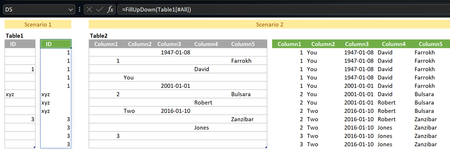
Hi Looked at +/- replicating Fill Down and Fill Up functionnalities in Power Query with a LAMBDA. My attempt below: // FillDownUp: =LAMBDA(array, LET( Data, DROP(array, 1), DataCols, COLUMNS(Data), FillCol, LAMBDA(array, SCAN( IF( ISBLANK( TAKE(array, 1) ), XLOOKUP(FALSE, ISBLANK(array), array, ""), "" ), array, LAMBDA(seed,x, IF( ISBLANK(x), seed, x)) ) ), FillStack, LAMBDA(seed,col, HSTACK( seed, FillCol( CHOOSECOLS(Data, col) ) )), DataFilled, IF(DataCols = 1, FillCol(Data), DROP( REDUCE(0, SEQUENCE(DataCols), FillStack),, 1) ), VSTACK(CHOOSEROWS(array, 1), DataFilled) ) ) Open to alternatives...Solved4.7KViews3likes15Comments
External Links in shared file (Excel for Web)
Hi, I have a master spreadsheet with external links to other spreadsheets. The master spreadsheet is shared with several users including some external users. The users within my organisation have no issues to enable the external links and update the values, however the external users are not able to enable the links. Instead they see this message and the values remain the same: "Links Disabled: Links to external workbooks are not supported and have been disabled." I have further tested the above by sharing the master spreadsheet with a (free) Microsoft outlook account and I was actually able to enable the external links. Is it possible that non-Microsoft accounts are not permitted to enable external links in Excel Online? Does anyone know a workaround for this? Ben1KViews3likes0Comments
Office Scripts does not refresh Power BI Query live connections in Excel Online
Hello everyone, I've got the following problem and am nearly going insane because it's causing so much problems 🥲 Summary The Office Scripts method workbook.refreshAllDataConnections() no longer refreshes a live connection to a Power BI Semantic Model in Excel Online. Environment Excel Online Office Scripts Power Automate ("Recurrence" + "Run Office Script") Live connection to a Power BI Semantic Model (Analyze in Excel) Expected behavior Calling workbook.refreshAllDataConnections(); should trigger the same refresh as manually selecting Data → Refresh All in Excel Online. Actual behavior The script completes successfully without any error, but the workbook does not requery the Power BI Semantic Model. Additional observations The same workbook worked correctly for approximately two years. The issue started around mid-July 2026. Manual Data → Refresh All in Excel Online refreshes successfully. Refreshing in Excel Desktop also works correctly. The problem occurs both: when running the Office Script manually from the Automate tab in Excel Online when running the same Office Script from Power Automate ("Run Office Script") This suggests the issue is specific to the Office Scripts implementation of refreshAllDataConnections() rather than the workbook, authentication, or the Power BI connection itself. Steps to reproduce Create an Excel workbook with a live connection to a Power BI Semantic Model. Confirm that manual Data → Refresh All refreshes the data successfully. Create an Office Script containing only: function main(workbook: ExcelScript.Workbook) { // Refresh all data connections workbook.refreshAllDataConnections(); } Run the script. Result The script finishes successfully but no refresh is performed. Expected result The workbook should requery the Power BI Semantic Model exactly as when using the manual Refresh All button in Excel Online.484Views2likes2Commentsunpivot data and handle merged cells without using Power Query (Unpivot_Toolkit)
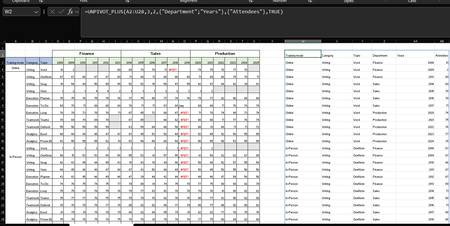
Hey, guys!! I’ve been working on a set of functional Excel Lambdas to solve a common headache: transforming "Wide" human-readable data into "Long" database formats without having to open Power Query every time. =UNPIVOT_PLUS(table, [no_of_cols], [no_of_headers], [attribute_names], [value_name], [remove_errors], [remove_blanks],[pad_blanks_with],[pad_errors_with]) Don’t worry about the full list, most use cases only require 5 arguments. I've included a table of default values at the end. Merged Cell Support: Automatically handles fill-down/fill-right logic for merged headers/columns. Bonus Helper: SPLIT_INJECT =SPLIT_INJECT(array, target_indices, delimiter, [ignore_empty], [match_mode], [pad_with]) It targets specific columns, splits them by a delimiter (like TEXTSPLIT), and expands the entire table horizontally while keeping all other columns perfectly stable. Optional arguments match TEXTSPLIT defaults. Feel free to tear this apart or adapt it for your own edge cases. I’d love to hear how you end up using it! You can grab both functions from my GitHub Gist https://gist.github.com/Medohh2120/f8553c149684e39bb499249e39f01017 File with use cases https://1drv.ms/x/c/6c310c8fd1669a94/IQCscpo3yh7jR5XdGZe2AQGyAf4-vCd8K6BvLZQgrP2V8Oo?e=gPdbOd Argument Description Default Behavior table The array or range of data to unpivot. Required argument (no default) [no_of_cols] Fixed left columns to keep as identifiers. 1 [no_of_headers] Top rows used as headers, handling merged cells. 1 [attribute_names] Header name for the unpivoted attributes . "Attribute" [value_name] Header name for the unpivoted values. "Value" [remove_errors] Excludes grid rows with formula errors. FALSE [remove_blanks] Removes grid empty cells and empty strings. TRUE [pad_blanks_with] Value to substitute for empty cells. Leaves cell blank [pad_errors_with] Value to substitute for errors. Leaves error as-is850Views2likes5Comments