User Profile

Hilla_Mantyomena
Copper Contributor
Joined Sep 20, 2018


User Widgets
Recent Discussions
HTTP requests handling files giving random (and incorrect) "Access denied" errors
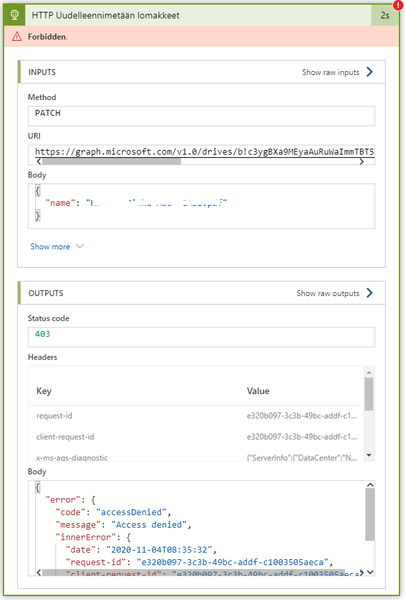
I have been experiencing mysterious issues with my Logic Apps flow since yesterday. The flow does many, many things but all of the problems have something to do with files. 1. Many of my file related HTTP requests suddenly stopped working, giving me "access denied" even though nothing in the flow had changed. I was using application rights and Active Directory OAuth as an authentication type. I solved this problem by using delegated rights and the authentication type Raw. So this one is somehow solved, though I think there is a deeper problem somewhere since it has been working for months until this. 2. I have a loop that renames ten files using PATCH. Out of the ten, roughly half of the files get renamed and the rest give me "access denied". Mind you, it is the same HTTP request in all of these cases, using the very same method of authentication. All of these files are in the same folder, have no unique user rights and have not been checked out. It is also completely random which files get renamed and which give access denied. These examples are from the same run: This flow is very critical to my client, and I am out of ideas how to fix it since the same requests works and... does not. Has anyone else experienced the same mysterious problem, or have any ideas of what I could try to fix this file renaming problem?427Views0likes0CommentsRe: Deleted team sites don't stay deleted
I think there is something funny going on with the admin portal. For example there are several sites with group association but the associated groups don't seem to exist. I cannot figure out how you can get rid of a group without getting rid of the site... Since deleting the group deletes the site and the other way round. Also there is no way to add owners to sites that don't have any owners previously. I have several sites without any owners, yet I cannot add myself as owners. The "add owners" button doesn't do anything. I can only add owners to sites that But the good news: the associated groups seem to be missing indeed, so I guess it's save to say that deleting the sites with PowerShell don't leave orphans behind :D1.1KViews0likes0CommentsDeleted team sites don't stay deleted
I've deleted multiple sites through the new SharePoint admin portal and everything seems to work fine. The sites I've deleted disappear from active sites and go under deleted sites. However, the next day all the deleted sites are back as active sites. Has anyone else experienced this same problem? Is deleting not yet fully supported or what? Additional information about the deleted sites: Most of them are just test sites users have created in order to test something. They're all modern team sites. The sites have never been properly used, they don't have any content or activity. They are associated with a group, but the groups don't seem to exist anymore (I cannot find any groups with a matching name). The sites don't have any owners. Since I've already deleted these 42 sites twice, I really want to know how I can delete them permanently.1.1KViews0likes2CommentsRe: Document in "Read-only" mode all the time
I experienced this same problem (everything opened in read-only mode) and after I tried all the tips and tricks I could find, this is the only one that worked for me: I stopped syncing the document library. I re-synced the document library, and now the status of the files is clearly "read only": I have never seen this "read-only" status before and I just cannot figure out why these files are locked while other libraries are just fine. The only difference between the files is that the locked files are from a communication site and the files that work okay are from team sites. Otherwise the settings are the same and I have full ownership to all of them. Ugh. This drives me crazy.172KViews2likes3Comments

Recent Blog Articles
No content to show