User Profile

Rod_Falanga_DOH
Brass Contributor
Joined Jun 22, 2023


User Widgets
Recent Discussions
Could my new Windows 11 Enterprise desktop have CrowdStrike issues?
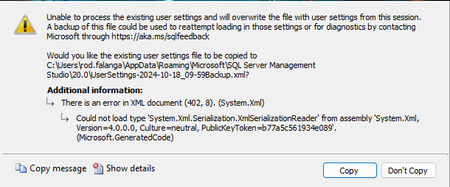
I received a new desktop computer this March. For the last several months, I have been experiencing at least weekly BSOD issues. And other problems as well. I cannot use SQL Server Management Studio 2019 or 2022, without getting errors: I have clicked the Copy button many times, only to have the issue come back again and again. I've clicked the Don't Copy button, which just results in SSMS closing. Azure Data Studio has similar problems. The BSOD problems are caused by several different drives failing, such as pcw.sys, ntfs.sys, FLTMGR.sys. I can be in any application at all, like Visual Studio, Word, VS Code, Excel, MS Edge, etc., when suddenly that app will freeze, then close. But the one thing that my new PC doesn't do is never allow me to log in, such as is suggested by this link https://www.crowdstrike.com/en-us/blog/falcon-update-for-windows-hosts-technical-details/ So, I'm wondering, with all the numerous and seemingly unrelated issues that my machine has been experiencing over the last several months, could it be experiencing a CrowdStrike issue from July?485Views0likes2CommentsBlazor has turned out to be a massive disappointment, will it ever get Windows Authentication?
Blazor is a technology I've been hearing about for a couple of years. It sounds like it would be great, especially for not having to write any JavaScript code, unless it is absolutely necessary. I maintain a very old classic ASP.NET WebForms application which has a lot of issues that greatly add technical debt. I have finally convinced my management to let me rewrite this application, and it was my intention to use Blazor in .NET 8. I started a few weeks back. The number one thing is this app MUST use Windows Authentication as it is an Intranet app, working within our corporate firewall. No exceptions!!! I thought at one point that I had found a solution, but then I discovered that when creating the project and selecting Windows Authentication, Visual Studio was changing it from .NET 8 to .NET 6. That took me more than a week to discover that had happened. I have tried, multiple ways of getting Windows Authentication with IIS to work with a Blazor Server App and .NET 8. However, today I realized that is a broken dream. That I am wasting my time and need to give it up. Perhaps someday Microsoft will get around to bringing that back to a current version of .NET, but I need a solution today, not in November when .NET 9 comes out and hope that it brings Windows Authentication with Blazor Server, or some year in the future. This is very disappointing. So, I think the only choice I have at this point, is to go back to ASP.NET Core with .NET 8. I have heard that it is possible to embed Blazor components into ASP.NET Core/Razor pages, so that is an option, I hope. That way I can have ASP.NET Core MVC do the Windows Authentication and use Blazor components here and there. But I don't know how to do that and trying to find some training on how to do that is difficult. I am asking for recommendations/guidance to training either on Microsoft Learn, Pluralsight, or YouTube so I can learn how to do this and move forward. Thank you very much in advance, for your help.1.2KViews0likes1CommentRe: How do I get to Azure Code Signing?
Hi Latha1595, It's my understanding that this new Azure Code Signing is something that can sign a Windows application, such as a WPF application, so it can be deployed and installed on users' machines, in an enterprise environment, so the users can trust it.4KViews0likes0CommentsWill TFS 2015 work with SQL Server 2019/2022?
(I realize that this question may not be pertinent to this group. If someplace else would be better, please direct me to it.) We still have an old TFS 2015 instance running on-prem. It uses SQL Server 2012 for the TFS database. The DBAs want to upgrade that database to SQL Server 2022. I wasn't around when whoever it was that setup our TFS environment. I have no idea if TFS 2015 will work with SQL Server 2022. Can anyone please tell me if this is going to cause us problems?885Views0likes0CommentsEstimating the monthly cost of Key Vault
I have created a proof-of-concept app using Azure Key Vault, in my Azure Portal using my Visual Studio Subscription benefits. With that I've convinced my management that we should use Azure Key Vault for storing secrets, like database connection strings, etc. Now they want me to give them an estimate of the cost of Azure Key Vault. I've found the billing page listing the cost of Standard and Premium Key Vault services. That's nice, but I really still don't have an idea what it will cost. And management isn't content with just that page. I realize that an answer I'm likely to get is, "It depends". Well, OF COURSE it depends, but it's that which I don't have a feel for. Let me illustrate. I know that web sites are, by nature, stateless. So, every page that needs to read something from a database is likely to open a new connection to perform the read, or any other CRUD operation. And I can see that component technologies like Blazor or React may open the database multiple times when rendering the page. So, is there a way of coming up with a ballpark estimate, based upon the size of the website, number of connections a page is likely to require, relative usage of the website, etc., that will give me a range of invocations of the Key Vault so I can suggest a range of cost per month? My experience with websites has all been on-prem, so I've never considered how often any component is called to retrieve the database connection string from appSettings.json.Solved5.5KViews0likes2CommentsCan Azure Key Vault be used by older .NET Frameworks?
I have begun experimenting with Azure Key Vault to gain experience at securely saving secrets. I've got a Console app I wrote using .NET 8, to read an Azure Key Vault, which for me was thrilling. However, I am wondering if using the Azure Key Vault, at least for Microsoft technologies, is restricted to .NET Core maybe going back to .NET Core 3.1 and above? I ask this because where I work, we have a LOT of applications all written using .NET Framework 4.5.2 and older. (Even down to .NET Framework 2.) None of the libraries I used would work with those older .NET Frameworks. Is there a way to make those older .NET Frameworks also work with Azure Key Vault?Solved879Views0likes1CommentRe: How do I specify a folder on my D: drive?
I'm sorry, I wasn't clear. What I mean is there some inherit advantage to be made by changing where OneDrive is located? For example, the C: drive is normally the primary drive on a machine. Is moving OneDrive to some other location better, because it isn't the drive the operating system is installed on? Or is that irrelevant?4.2KViews0likes1CommentHow do I specify a folder on my D: drive?
I want to set up backing up a folder on my 😧 drive. I'm using OneDrive, related to my Family Edition license. However, when I try to set it up all Microsoft OneDrive gives me are the following special folders: Documents Pictures Desktop Music Videos I don't want any of those. I want a folder on my system's secondary drive, it's 😧 drive. And just one folder and it's sub-folders. I've tried for 30 minutes to figure out how to do it but cannot figure it out. If there's a way of doing it, it isn't easily discoverable. So, can it be done? If so, how is it done?Solved4.9KViews0likes5CommentsHow do I find where OneNote stores files locally?
Recently we changed domains. This has had a negative impact upon my OneNote notebooks, because it's storing the notes locally, rather than on OneDrive. It has affected OneNote for Windows 10, and possibly OneNote. Now, I cannot get to some of the notes I've previously saved. For example, I just tried to go to a link I saved in a note, but I got this error message: Sorry, opening locally stored section files are not supported. Please upload your notes to OneDrive and then open them from there. I would gladly do this, only I have no idea where OneNote is storing them locally. And I don't know what they're named. OneNote for Windows 10 doesn't have anything like a File menu, so I don't know how to find out where the files are stored locally. How do I find that out?10KViews0likes2CommentsHow do I get to Azure Code Signing?
(I hope this is the correct place to ask this question. If it isn't, I'm sorry and please refer me to where I should post this.) We have an old TFS server on prem. We're working on migrating off of it, but at least for a while longer we've got to work with it. We have some ClickOnce applications which get built and deployed from our TFS server. Today our signing certificate expired. I've been working on replacing it for weeks. It was suggested that we could use Azure Code Signing and the link at Azure Code Signing, democratizing trust for developers and consumers was recommended to me. This looks like it will work. Only problem, I have no idea at all how to get to that page, to create an signing certificate using Azure Code Signing. Please, where do I go? How do I get there?Solved18KViews0likes5Comments
Recent Blog Articles
No content to show