User Profile

MSchmittnaegel
Brass Contributor
Joined Jul 16, 2016


User Widgets
Recent Discussions
SharePoint Remote Event Receiver will stop firing 2026?
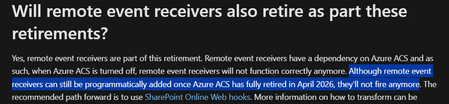
I just stumbled over a section in the FAQ of the ACS retirement, which made me really, really sad: https://learn.microsoft.com/en-us/sharepoint/dev/sp-add-ins/add-ins-and-azure-acs-retirements-faq#will-remote-event-receivers-also-retire-as-part-these-retirements We have various solutions that utilize Remote Event Receivers as a central component because they fire quickly and allow for synchronous event handling. For instance, we use synchronous events to prevent users from deleting files, while still allowing them to move or rename files. I am surprised that the Microsoft 365 Assessment Scanner does not display the Remote Event Receiver. If these were to spontaneously cease functioning in 2026, it would immediately impact various business applications and Power Automate Flows, disrupting their functional services.591Views0likes0CommentsRe: SharePoint On-Premises Event Receiver migration to SharePoint Online
We start using Remote Event Receivers + Azure Functions a few years ago to check and block ItemDeleting events. It was tricky to get the response right, but it works quite well. In a nutshell, it is: 1. Provide something which can handle HTTP POST from SPO (e.g. an Azure Function) 2. Use Add-PnPEventReceiver and point to the URL of (1) Depending on what your Event Receiver should do, it might be necessary to access SP from your code -> CSOM or Graph API. When using *ing events, it is important to return the correct response. Here's a snippet to give you an idea of the response: string responseString = $"<s:Envelope xmlns:s=\"http://schemas.xmlsoap.org/soap/envelope/\"><s:Body>" + $"<ProcessEventResponse xmlns=\"http://schemas.microsoft.com/sharepoint/remoteapp/\">" + $"<ProcessEventResult xmlns:i=\"http://www.w3.org/2001/XMLSchema-instance\">" + $"<ChangedItemProperties xmlns:a=\"http://schemas.microsoft.com/2003/10/Serialization/Arrays\">" + $"</ChangedItemProperties>" + $"<ErrorMessage>{this.ErrorMessage ?? string.Empty}</ErrorMessage>" + $"<RedirectUrl>{this.RedirectUrl ?? string.Empty}</RedirectUrl>" + $"<Status>CancelWithError</Status>" + $"</ProcessEventResult></ProcessEventResponse></s:Body></s:Envelope>"; This articles might help too: https://spblog.net/post/2021/09/14/how-to-use-remote-event-receivers-with-net-core-or-net-5-and-pnp-framework https://www.linkedin.com/pulse/sharepoint-remote-event-receivers-using-azure-function-rakhi-jain841Views0likes0CommentsIcon of Document Sets changed to default folder icon - Support claims it is "by design"
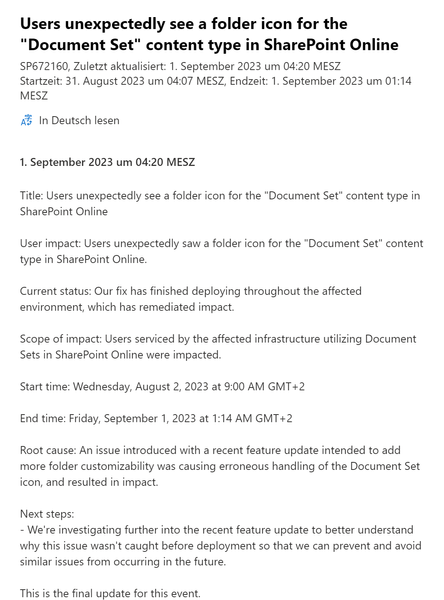
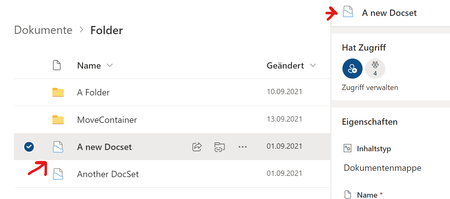
Some of our customers heavily rely on the Document Set functionality. Last week we noticed that the icon of Document Set has changed within a list view from to This seems somehow to be related to the new functionality to change the colour of the folder. All tenants which already received this new feature show the wrong icon for Document Sets. All other locations ("New" menu, Details pane) are still using the Doc Set icon, so the list view seems the only place where the icon has changed for a Doc Set. I had a call with MS support today, and they told me (like on many SP-related issues before) that this is "by design". I am using Document Sets since 2010 - claiming that it is "by design" to change the Doc Set icon to the folder icon is like changing the icon of a Word file to the generic file icon.4.5KViews0likes3CommentsRe: "Move to" within the same library breaks document sets
Breisgauer After this post last year, I had several more support calls and tickets regarding this issue - always with the same frustrating result even beyond first level support: MS is considering this as "by design". Best statement of one of these support guys: "Document sets are different, so it cannot be expected that Move To work the same way as it does with folders". If anybody can somehow sort this out with MS, I'll buy her/him a beer. But at least it is good to know that I am/my clients are not the only one, who is struggling with this issue.4.2KViews0likes0CommentsRe: "Move to" within the same library breaks document sets
Just to give you an update if anybody else stumbles across this behaviour: MS Support still sticks to it, that it is intentional and is documented under "Manage permissions on a document set": https://support.microsoft.com/en-us/office/create-and-manage-document-sets-c71d5796-d559-48de-b1b3-42383bdd13ea The main tag line of MS support: "Document sets are different from files or folders". The next thing they are now investigating is, why the document set captured versions are broken after the "Move To" within the same library. I'm guessing the answer: This is by design...4.8KViews0likes0Comments"Move to" within the same library breaks document sets
I just had another call with Microsoft Support and it seems that they just don't get the issue. Try the following: 1. Activate document sets site collection feature 2. Add document set content type to a library 3. Create a document set 4. Show the ID column in the list view 5. Add some folders or files to the document set 6. Use the "Move To" function (not drag & drop!) to move the document set to a new location within THE SAME LIBRARY! What basically happens is, that it is not an actual move but a copy and delete of the document set. This leads to the point, that the following things are broken after the "Move to" of the doc set: - Unique permissions & sharing links on the document set or files/folders within the set are broken (Move To doesn't move permissions, so every item within the doc set gets reset to inherit permissions) - Document set captured versions are broken (the links to the file versions) - Lookups to the document set are broken - Durable links are broken - When using the Document ID service -> The links are broken too When using drag & drop to move the file to a new folder -> everything is fine. This also only occurs on document sets. When using "Move to" on normal folders, the folders gets moved as expected and doesn't copy & delete. I am a bit frustrated about this because Microsoft Support just keeps telling me that this is by design. That might be true when moving the document set to another library or site. But moving within the same library, it can't be by design that drag & drop behaves differently as "Move to". Or that moving documents sets with "Move to" behaves differently as "Move to" on folders. Is there anybody else faces this issue or are document sets such an exotic feature, that we are the only ones who struggling with this?5.3KViews0likes3CommentsDatasheet view broken when accessed by URL
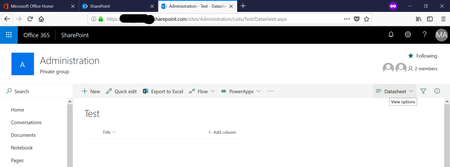
It seems there was a change regarding datasheet views. When linking to a datasheet list view by URL, the list isn't loading the grid view but the normal list view. When I switch to another list view and back to the datasheet view, everything works just fine. The issue seems to be related to the initial page load. I've checked in 3 tenants by creating a new datasheet list view (List settings -> Create view -> Datasheet view -> Name: Datasheet -> Save). Broken when directly calling Lists/Test/Datasheet.aspx Working when switching the view to All Items and back to Datasheet (or clicking the "QuickEdit button, but this is not the point) The main issue is, that we already have a lot of datasheet views which are accessed by direct links within the left or top navigation. All of these views currently open up in the normal list view, so the user has to switch to datasheet / quickedit by himself - this is quite confusing do to the fact, that the top/left nav node is named "Quickedit" or "Datasheet", but doesn't open up as datasheet view. Is anyone else also experiencing this issue?670Views0likes0Comments

Recent Blog Articles
No content to show