User Profile

Clause9
Copper Contributor
Joined May 14, 2022


User Widgets
Recent Discussions
Re: Yet Another Conditional Formatting Query
Just to close this one out - I resolved by creating an additional calculated column, ReviewDue, that uses: =TEXT([Next Review],"dd/mm/yyyy") to create the date in my preferred format. The original NextReview calculated column has been amended to: =IF(ISNUMBER(VALUE([Review Frequency])),TEXT(DATE(YEAR([Issue Date]),MONTH([Issue Date])+[Review Frequency],DAY([Issue Date])),"yyyy/mm/dd"),"N/A") and hidden from the view. As a result, the conditional formatting logic works perfectly and the date is displayed in the format I want to see - having an extra hidden colun isn't a big issue.....997Views0likes0CommentsRe: Yet Another Conditional Formatting Query
Wow, even more confused now 🙂 I closed my browser, cleared history and cache then reopened the list - formatting was perfect - rows with Next Review < today were in severeWarning, rows due in next 30 days were in Warning, all other rows were alternating no format / light grey. Happy days 🙂 I then did some work in another list before reopening the first - Aaaarrrggghhhh, the formatting is "broken" again. Here's code I'm using in Format View - grateful if anyone could debug and let me know what I've done wrong.... { "$schema": "https://developer.microsoft.com/json-schemas/sp/v2/row-formatting.schema.json", "additionalRowClass": { "operator": "?", "operands": [ { "operator": "<=", "operands": [ { "operator": "Date()", "operands": [ { "operator": "toDateString()", "operands": [ { "operator": "Date()", "operands": [ "[$Next_x0020_Review]" ] } ] } ] }, { "operator": "Date()", "operands": [ { "operator": "toDateString()", "operands": [ { "operator": "Date()", "operands": [ "@now" ] } ] } ] } ] }, "sp-field-severity--severeWarning", { "operator": "?", "operands": [ { "operator": "<=", "operands": [ { "operator": "Date()", "operands": [ { "operator": "toDateString()", "operands": [ { "operator": "Date()", "operands": [ "[$Next_x0020_Review]" ] } ] } ] }, { "operator": "Date()", "operands": [ { "operator": "toDateString()", "operands": [ { "operator": "+", "operands": [ "@now", 2592000000 ] } ] } ] } ] }, "sp-field-severity--warning", { "operator": "?", "operands": [ { "operator": "==", "operands": [ { "operator": "%", "operands": [ "@rowIndex", 2 ] }, 0 ] }, "sp-css-backgroundColor-BgLightGray30", "sp-css-backgroundColor-noFill" ] } ] } ] } } Clause9995Views0likes1CommentRe: Yet Another Conditional Formatting Query
Hi Sven and thanks for the very swift response. All sorted but quite strange 🙂 Good old ChatGPT suggested using toLocaleDateString in the JSON, I tried it and it didnt work - it actually removed the conditional formatting that had worked. Removed and saved back to JSON that uses toDateString. I still had the error so thought I'd add another calculated column to validate what the other columns were returning - when i added the column, all formatting started working "properly". Have now removed column and its still working.. Modern technology never fails to confuse me 🙂1.1KViews0likes2CommentsYet Another Conditional Formatting Query
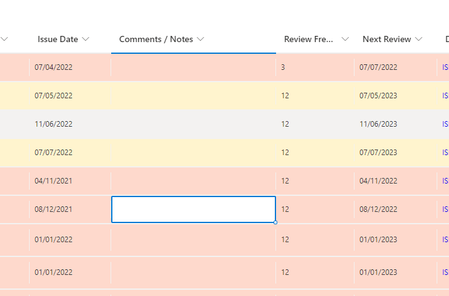
Hey folks, I have an SP list with 3 relevant columns - IssueDate, ReviewFrequency, and NextReview. IssueDate is for manual date entry, ReviewFrequency is a choice of N/A, 3, 6, 12, 24, 36. NextReview is a calculated column that adds number value in ReviewFrequency to IssueDate. I have applied JSON formatting in Format View to format rows where NextReview is less than today (@now) in sp-field-severity--severeWarning, rows where next review is due within 30 days (2592000000ms) in sp-field-severity--Warning, and all other rows in alternating sp-css-backgroundColor-BgLightGray30 and sp-css-backgroundColor-noFill (giving zebra alternate banding). All works well apart from an issue with dates being read by conditional formatting as MM-dd-yyyy not dd-MM-yyyy as illustrated here: How do i ensure dates in the columns are seen / interpreted as dd-MM-yyyy in the conditional formatting rules? Thanks in advance,1.4KViews0likes4CommentsRe: ISO/IEC 27001 ISMS in SharePoint Online - Mapping controls to risks
PowerAutomate is pretty useful for flowing actions / data out of SP to other resources - there's a bunch of connectors to other systems if simple email isnt sufficient. As far as mapping to other standards, I'm sure you're aware that there's already heaps of resources available for mapping controls - just be aware that many these mappings forget that ISO 27001 is more than just the controls in Annex A. The management system processes in clauses 4 - 10 also need to be mapped...12KViews0likes0CommentsRe: Create a list of columns with value per row
Once again, thanks very much for your assistance ! Transpose worked a treat. As background, the formula is being used in a risk assessment spreadsheet whhich now details the controls selected per risk and the risk associated with each control. These provide a direct link between risk assessment and risk treatment/security controls and help support audit and assessment of the risk process.2.2KViews0likes0CommentsRe: Create a list of columns with value per row
Blast; I spoke too soon 😞 The formula works perfectly in the example I provided however, the real use case is slightly different. A table similar to my example is one tab of a workbook named Assessment, the IDs are in cells A7:A130, the header values are in cells L7:CZ7 so the range of cells is L7:CZ130. Another tab named SOA contains a list of the header values in 'Assessment'!L7:CZ7 in Col A (cells A7:A95). The SOA tab contains a range of information associated with each header value in Cols B:K. I'd like to get the IDs per header value column using the transposed formula in my last reply and insert these into a new column in the SOA tab. I put the example formula into cell 'SOA'!L7 and it returned the expected results but these are inserted into 'SOA'!L7:CZ7. I need the IDs going down Col L from L3:L95 aligned with the relevant entry from 'Assessment'!L7:L130 I've tried simply changing to BYROW which does fill Col L but only returns a "#VALUE!" error. My amended formula in 'SOA'!L3 is: =BYROW('Assessment'!L7:CZ130,LAMBDA(column,TEXTJOIN(",",TRUE,FILTER('Assessment'!A7:A130,NOT(ISBLANK(column)))))). Sorry for not explaining my use case properly; I incorrectly assumed that transposing the desired results would have little impact on the formula. thanks in advance if anyone can help2.3KViews0likes2CommentsRe: Create a list of columns with value per row
OliverScheurich Vielen Dank!!! That works perfectly - I won't pretend to follow the logic or understand what a LAMBDA function is but the formula does exactly what I asked. I've even managed to transpose it so I get the IDs per column as follows: =BYCOL(B2:I10,LAMBDA(column,TEXTJOIN(CHAR(10),TRUE,FILTER(A2:A10,NOT(ISBLANK(column)))))) Your help is very much appreciated!2.4KViews0likes3CommentsCreate a list of columns with value per row
Subject probably makes no sense so let me explain with an example: A.1 A.2 A.3 A.4 A.5 A.6 A.7 A.8 DESIRED RESULT #001 1 3 4 A.1, A.4, A.5 #002 1 A.8 #003 1 1 3 2 A.1, A.2, A.3, A.6 #004 2 A.4 #005 1 A.7 #006 3 3 3 A.2, A.5, A.8 #007 2 A.3 #008 2 1 2 A.2, A.4, A.8 The desired result illustrated in the table will probably be in another tab of the worksheet. Oh, the commas as seperators are optional 🙂🙂 What form of lookup formula do I need to do to get the header value and how do I ensure that only cells with a value are considered? Thanks in advanceSolved2.7KViews0likes5CommentsRe: ISO/IEC 27001 ISMS in SharePoint Online - Mapping controls to risks
Sorry again GuVdv, missed seeing that you'd responded due O365 quarantine 😞 I'll take a look at creating a seperate list and inserting a lookup column - sounds within my very meagre capabilities 🙂 Re SP-based ISMS - based on my experience supporting SMEs on their ISMS, I reckon there's a potential market. I work with a range of clients, all of which find M365 a useful platform for managing the ISMS. I've migrated various elements of client ISMS to SP lists, set up Planner boards and configured PowerAutomate to create scheduled tasks and reports. Examples of how used include document registers with alerts on doc reviews, supplier risk assessment and review lists with alerts to relationship owner when review is due, Planner boards for risk treatment and improvement actions with usual To Do, In Progress, Blocked, and Complete boards, Info and HW asset registers etc. There's so much more that could be done if you know SP and the other integrated M365 apps such as PowerAutomate, Planner etc. One area that I think would go down well is an ISMS dashboard with some pretty graphs and charts (risk position, open actions, overdue actions, actions per ISMS team/role, etc). Happy to discuss sometime if you want to explore scope of what could be done - I have some knowledge of 27001 - I've implemented in a number of companies, I provide ISMS management and support on a freelance basis, I audit ISMS (internal and CB), and (for my sins) I sit on IST/33/1, the UK National Standards Body Committee that help develop the standard.12KViews0likes0CommentsRe: ISO/IEC 27001 ISMS in SharePoint Online - Mapping controls to risks
Hi Rob, really sorry for the lack of response to your post; good old O365 filter blocked the message informing me that I had a response and I havent visited my email quarantine page since the Christmas break!! Anyhoo, have now seen it.... Re PowerApps customised form - sounds great but I've no idea what this would look like or how it would work so any guidance would be greatly appreciated. As far as a screen shot of as-is, not sure if this would help as I dont have anything worth referencing. There's a simple multi-line text column for a description of the current controls (e.g. "We carry out pre-employment screening, all personnel have contracts of employment") but nothing (yet) for recording the actual controls selected from (in this case) Annex A of ISO 27001 (e.g. A.6.1 - Screening, A.6.2 - Terms and conditions of employment) that would align with the text-based description. Any guidance or tips would be really useful...12KViews0likes0CommentsISO/IEC 27001 ISMS in SharePoint Online - Mapping controls to risks
After some guidance on an approach to the following challenge please... I'd like to extend the very basic functionality of a simple risk register SP list by recording existing or required ISO 27001 Annex A information security controls for each risk entry - as there are 114 controls in ISO/IEC 27001:2013 and 93 controls in the newly released 2022 version, I dont think a simple choice column is going to be appropriate. In my current list, I have a multi-line text column that is used to describe the current control environment - ideally I'd like to have another column with some form of multi-select pick list that could be used to map the text descriptions to one or more ISO 27001 Annex A controls. Similarly, I have a multi-line text field for describing necessary risk treatment actions and I'd like to have another column mapping these to one or more Annex A controls. The nirvana would be to the ability to use the controls selected in these new columns to populate another list recording all controls that have been selected. Any suggestions on how this could be implemented in M365 SharePoint would be gratefully received. Thanks in advance14KViews1like7Comments
Recent Blog Articles
No content to show