User Profile

ACE555175
Copper Contributor
Joined Dec 07, 2021


User Widgets
Recent Discussions
Re: Windows 11 Home - Update - Bitlocker
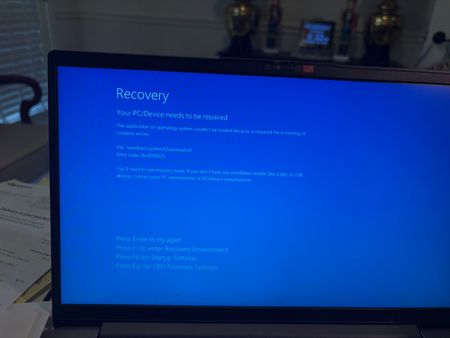
thank you. Note that the original bit locker recovery key is not known. Microsoft sent me another recovery key after a 30 day wait. That is the key I typed in when it gave me the error message. (see attached pic) I will use a USB to boot and try the elevated CMD prompt. Thanks. DH62Views0likes0CommentsWindows 11 Home - Update - Bitlocker
Lenovo laptop Windows 11 Home Around November 15 my Lenovo laptop installed a update. When the laptop rebooted it asked for a Bitlocker key. Logging onto the Windows recovery website it wanted to send a validation code to a phone I no longer have. I did the 30 day wait for a Bitlocker recovery key to be emailed. When it arrived I entered the Bitlocker key. On restart it now states 'The application or operating system couldn't be loaded... File: \windows\system32\winload.efi. Error code: 0xc0000225'. Have I lost all the data on the hard drive? Should I disable anything in BIOS - Secure Boot? Windows Boot Manager? Intel Platform Trust Technology? Clear Intel PTT Key? Thanks for the help. DHSolved348Views0likes2CommentsStart - More - shows recent files
A staff member noticed that her OneDrive files were showing up under recent files and also under the Start - More button on two other computers she used temporarily (staffing issues so she moved around). I was able to remove history in File Explorer. But the Start - More button still has her OneDrive files there. I unsynced OneDrive and uninstalled the OneDrive program. Still those files are there and worse accessible. Solution? Thanks! Darryl511Views0likes0CommentsServer 2012R2 - Evaluation Download
We are still using a 2012R2 Server. I need to test a software patch so I downloaded the 2012R2 evaluation copy to install on a spare. When installing in a VM I get the error message Windows cannot find the MS Software License terms. Make sure the installation sources are valid and restart the installation. Suggestions? Thanks.Solved766Views0likes1CommentOutlook 2010 to Outlook 2021 - Folders Disappear
New Computer Setup Windows 11 Pro, Office 2021 I copied the Outlook 2010 .PST file to a external drive. On the new computer I loaded Outlook 2021 and setup the email account for the user. It downloaded emails from the cloud. But not the user folders that had been created. I then went to File - Open & Export - Open Outlook Data File - and I could see the user email box with their folders. I then moved the folders, 1 by 1, to the users primary email (the new one setup when I started outlook). This seemed to have worked. But I noticed that as it was 'synchronizing' - the folder would disappear. Then all of them would disappear. Note the folders were under 'inbox' so when i tried to import the .PST it would crash at the subfolders saying something about folders in inbox are not supported by the IMAP server. What am I doing wrong? Suggestions for doing this a better way? Note this is happening on a number of new computers with new Outlook 2021. As a side note - when Outlook starts I get a error message about the certificate "The server you are connected is using a certificate that cannot be verified. "The target principal name is incorrect." "Do you want to continue using the server?" I click 'Yes'. Suggestions? Thanks, Darryl622Views0likes0CommentsTransfer Outlook 2010 to Outlook 2021 Desktop
New Computer - Windows 11 Pro, Outlook 2021 Desktop Old Computer - Windows 10 Pro, Outlook 2010 Desktop On the old computer with Outlook 2010 I exported the Inbox to a CSV file. When I imported into 2021 it did not contain any folders within the Inbox. Should I import the PST instead? Or did I overlook something in the CSV file export. Thanks, Darryl6.2KViews1like3CommentsOutlook 2016 - Contacts and Calendars - Disappeared
Outlook 2016 Desktop Windows 10 Pro Updates are current length of use: this computer was new 4 years ago, Outlook exported and imported without issue 5 days ago, the user noticed that her contacts have disappeared, and her calendar is blank all email is present as far as she can tell I looked at her contacts and the only contacts on her computer (local computer) is checked Safe mode doesn't change anything Suggestions please? Thanks, Darryl648Views0likes0Comments
Recent Blog Articles
No content to show