User Profile

Eds1989
Brass Contributor
Joined Jul 14, 2021


User Widgets
Recent Discussions
Re: HOW-TO: Import Out of Band Updates to WSUS using Microsoft Edge Chromium IE Mode and PowerShell
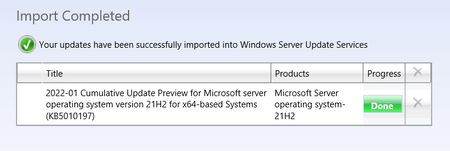
So on my laptop from which I was testing, the ActiveX control was already installed. I have just gone onto our management server, running Windows Server 2022, which has RSAT installed but has not previously had the WSUS ActiveX installed. When clicking import updates, it takes me to the site and prompts me to install the control. I did so, and imported an update successfully. I did get a couple of UAC prompts along the way, but otherwise no issue. I checked, and this machine has the same Edge version 104.5.9KViews1like3CommentsRe: HOW-TO: Import Out of Band Updates to WSUS using Microsoft Edge Chromium IE Mode and PowerShell
Just as a test, I picked a Windows 7 update (KB4533005), which imported ok. Also tried KB5016138 and KB4486153, and they also imported ok. Perhaps you guys have Windows or Edge updates installed that I do not yet, which have introduced the issue?142KViews0likes5CommentsRe: HOW-TO: Import Out of Band Updates to WSUS using Microsoft Edge Chromium IE Mode and PowerShell
kwester-ebbinghaus-business I've not had need to import anything for a while. What update are you trying to import, and I'll use that as a test, as well as picking some other random update to try and import. Cheers James142KViews0likes7CommentsDeploying synced signatures
Hi, So I've recently enrolled into the Office Insider program, and see that the current Dev channel build has signature sync support. Frustratingly, I can see my original signatures under "Signatures on this device", but can't set them as defaults. I suppose I can manually copy them into the section for my account specifically, but I was wondering if there is going to be a way for us to deploy signatures as we do now, but deploy them into someone's profile? As we deploy signatures automatically, it would be nice to continue to be able to do so (save users the hassle of setting them up manually or modifying them when their details change) but deploy them into their profile so they are available on all of their devices. Thanks. James841Views0likes1CommentRe: ISSUE: Cannot import updates to WSUS, due to erroneous redirection in Windows Update Catalog
I've added those entries to my WSUS server and am testing from there. It says that the ActiveX failed to run though: If I re-run my test my from my client machine, I assume I also need to add those entries and reboot? Cheers James8.5KViews0likes1CommentRe: ISSUE: Cannot import updates to WSUS, due to erroneous redirection in Windows Update Catalog
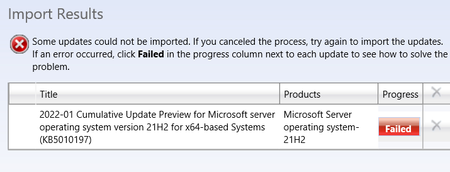
Scratch that, just tried once more before bed, and can confirm this does now seem to be loading the correct URL, however.... When trying to complete the import process, it fails: Error page: Have I done something wrong?8.5KViews0likes1CommentRe: ISSUE: Cannot import updates to WSUS, due to erroneous redirection in Windows Update Catalog
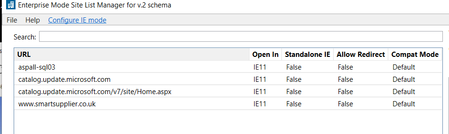
kwester-ebbinghaus-business We use enterprise site manager to add our IE mode sites to a centrally stored XML files, that Edge group policies are set to load. We have these two URLs configured as below: We do not see these in Edge settings, but they should be effective: When I click on the import updates button, it still loads a www. URL without the v7 in the path: It's gone midnight now, so I'll try updating policies and from another machine in the morning to see what happens. Thanks8.5KViews0likes2CommentsRe: ISSUE: Cannot import updates to WSUS, due to erroneous redirection in Windows Update Catalog
Hello, We too seem to be experiencing this issue. WSUS server is Windows Server 2022. Client machine is Windows 11 running RSAT and managing/importing updates remotely. Edge 96 is my default browser, but running the update catalogue site in IE mode with the ActiveX control installed. We can search for and add updates to our basket, but when proceeding to the basket, we are told they could not be imported because they are not compatible with our version of WSUS. The update we are trying to import is KB5010197. I have tried to add the /v7/site part to our catalogue URL as a workaround, but I get a site/page error. Our URL loaded when clicking import updates is of the format: https://www.catalog.update.microsoft.com/Home.aspx?SKU=WSUS&Version=10.0.20348.143&ServerName=OUR_SERVER_NAME&PortNumber=8530&Ssl=False&Protocol=1.20 Are there any other potential workarounds to this issue at this time? Many thanks James8.6KViews1like0CommentsRe: HOW-TO: Import Out of Band Updates to WSUS using Microsoft Edge Chromium IE Mode and PowerShell
Karl-WE This didn't work for me. I am using a Windows 11 client machine with RSAT installed and Server 2022 WSUS box. We have enabled IE mode via group policy, and have added the catalogue URL to the IE site mode list XML file we have stored centrally (not the full URL, but just the base http://www.catalog.update.microsoft.com) I can see when clicking "Import Updates", the site is opened in IE mode. I have set the "Allow sites to be reloaded in Internet Explorer mode" option to allow and restarted my browser. I had already browsed to the site and installed the ActiveX control, but when going to my update basket, I still get an error about version compatibility: "This update cannot be imported into Windows Server Update Services, because it is not compatible with your version of WSUS" Any ideas? Thanks James151KViews1like2CommentsRe: How do I print a SharePoint list?
It doesn't look like they tried or mentioned printing multiple items. Do you know if it supports selecting all items and printing in one template? It may be an option, but it's a case of trying to train users to "select all items" before hitting print, which I'm sure we all know is sometimes challenging. Cheers26KViews0likes0CommentsRe: How do I print a SharePoint list?
Yep, print options much better and more aligned with what I'd expect when done in Chrome. Must be an Edge specific problem......c'mon Microsoft. EDIT: Nevermind, I refreshed the page and now all 3 pages are selected. Page width not perfect, but now only requires a 5% adjustment26KViews0likes2CommentsRe: How do I print a SharePoint list?
Shame. I can't find any way to submit feedback to Microsoft on SharePoint online, and of course all searches for "SharePoint Feedback" just give me articles on how to "Collect feedback through SharePoint" I'm using Edge, and attempting to print the list requires manual adjustment of scale as it doesn't automatically scale to fit all columns or the width of the page, and only prints 1 page of the list up to what fits on the page. I'll try in Chrome see if it is an Edge specific issue.26KViews0likes3CommentsRe: How do I print a SharePoint list?
Kind of bonkers, seems like a pretty basic function to be omitting. I was hoping to avoid exporting to Excel, as the whole point of the list is to replace the use of an existing spreadsheet that gets distributed to all staff. We might as well not use the list if they are just going to have to convert it back into a spreadsheet 😞 Any idea if MS are planning to add print functionality in the future?28KViews1like5CommentsHow do I print a SharePoint list?
Hi, We use Office365 and have a number of SharePoint sites sitting behind our various MS Teams. I have a list in one of these sites I want to print, but default print dialogue in Edge makes the page look like a** Can someone tell me how I print this list just as a table? Before people go advising of lots of options around custom code, I'm not a developer and want to avoid code based solutions as I'm not in a position to deploy or troubleshoot them over time. Many thanks JamesSolved29KViews0likes9CommentsRe: How are you keeping Teams Machine-Wide Installer updated?
Has there been any update from MS on what the hell we are supposed to do here? It's bonkers that they are now including the machine wide installer with Office, but then not keeping it up to date. Almost all of our users are now being prompted to update Teams as soon as they log in for the first time, and there is no advice on MS's documentation page on how to keep the Office bundled machine wide installer up to date. Why can't they do an ACTUAL machine wide install, and bundle it into C2R, so it can keep itself up to date in the same way Office does?150KViews0likes0Comments

Recent Blog Articles
No content to show