Forum Widgets
Latest Discussions

power apps free subscription-cancel
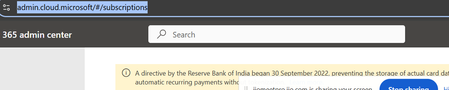
Hi All, I am using below id for power apps(email address removed for privacy reasons) using free subscription. with in one month i have cancelled my payment in bank. As of now i am not able to log in admin.cloud.microsoft. Microsoft authentication is not working . I can not delete and re add again. cancel subscription by bank side only enough or we need to do it in microsoft account (email address removed for privacy reasons)muthurajrpaApr 21, 2026Copper Contributor7Views0likes0Comments
Power Automate - iAuditor integration to Excel for business
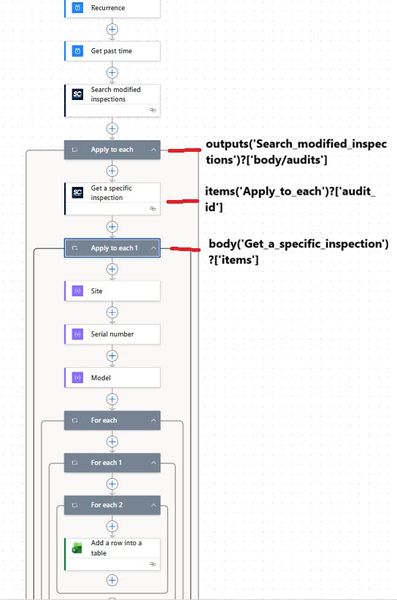
Hi all, I'm trying to build a flow in Power Automate to feed data in Excel file (located on SharePoint) used for my Power BI report but i don't know why it does not want to work. This is my flow as shown in the photo In the first "For Each" action i have " body('Site') ", second " body('Serial Number') "..... When i test this is how it looks like If i remove the second and third FOR EACH, it goes to the excel action and stops there. Does anyone have a similar flow or does anyone know what i'm doing wrong? Thank you in advance if anyone has a solution.Danche1Apr 15, 2026Copper Contributor36Views0likes0CommentsFlow Action - Convert Word Document to PDF
I'm trying to use the Convert Word Document to PDF action in a Flow. There are three parameters that have to be entered: Location - the SharePoint Site Document Library - Library where the document is located. File - The document to convert The parameter that I'm having an issue with is the File. The flow works if I choose the specific document from the library but I want it to be dynamic so that when the user starts a Flow on the document it will convert that one, so I don't want to hardcode the document name. For the File property I'm using the property from a previous step with the file name called File name with extension. When I run the flow I get an error, "There was an error accessing the file. Please try again or select a different file." Can I not use dynamic content for the File property? ThanksRich KonevalApr 08, 2026Brass Contributor45KViews7likes37Comments
Could you tell me about how to trigger power automate for desktop on windows 11 free version?
Hi, friend! I from Japan. just coming spring season right now. by the way. Could you tell me about when it executes command of power automate, but it couldn't succuss. according to the error message it doesn't know like this flow ID. but actuary on the other hand. in my hose case, like this method was succussed. if you know how to fix better, could you suggest it?hiro3Mar 31, 2026Copper Contributor32Views0likes0Comments
Unable to cleanup the connections from Power automate flow
The power automate flow have some connections that is not able to remove from the action card. I already removed the connection from 'Connection in use' section, but it's still appearing in the action card in flow, and this makes the powerapp listing all connections.Maneesha_ChembraMar 24, 2026Copper Contributor749Views1like1Comment
Can we fill *.pdf in File Identifier on Get file metadata
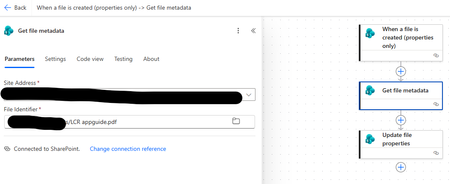
Sir, I'm a rookie of Power Automate, so i'm tried to created flow to automatic fill metadata column in SharePoint Library as below. So, if i have specific file identifier, the flow was running successful, but if i have fill *.pdf then the flow was running fail. In fact, i cannot specify file identifier was uploaded in SharePoint but this flow must run automatically. My question is how to fix on this an issue? Many thanks for advice. Sonchai M. Flow Running failsmalaichanMar 03, 2026Copper Contributor110Views0likes1CommentPower Automate JSON add co-organizer
Hi, I can create a Teams meeting using JSON and an Azure AD HTTP request but is it possible to add co-organizers as part of the request. I can't figure it out but hope someone can suggest a method. Cheers, JonjonlakeFeb 02, 2026Iron Contributor6.5KViews0likes16Comments
Repeating Table
All, i am creating a new Form for a Sharepoint list. I have one table with three fields that I only want to be filled out once. I have a second table with 7 fields. i would like for this table to be repeating, giving the person filling it out the option to add another set of the same 7 fields. Then upon saving/submitting, a new item is created in the SP list for each row in the repeating section. I have seen a couple of links in this forum but none of them includes a usable solution for someone like me who is very new to PowerApps.2.7KViews0likes3Comments NandaPraveen35Jan 09, 2026Copper Contributor67Views0likes0Comments
Power Automate 'When an appointment is cancelled' flow
I am using the Power Automate flow for "When an appointment is cancelled" and putting the Bookings information into a SharePoint list so I can track the cancellations and reasons for cancellations. However, when using the 'cancel reason' item in the dynamic content, it does not work. Looking at the output of the information that comes from Bookings, the 'Cancel reason' information is not part of the output. Could this please be fixed as it is a vital component of that Flow template.TimBonifaceJan 05, 2026Copper Contributor2.9KViews0likes5Comments


Tags
- Microsoft Flow1,481 Topics
- sharepoint1,390 Topics
- PowerApps1,225 Topics
- power automate84 Topics
- PowerAutomate26 Topics
- excel16 Topics
- Lists14 Topics
- microsoft forms13 Topics
- forms12 Topics
- SharePoint Online11 Topics