Forum Discussion

Aaapo
Nov 05, 2020Copper Contributor
Teams audio (input and output) not working with Remote Desktop, audio input/output in other apps OK
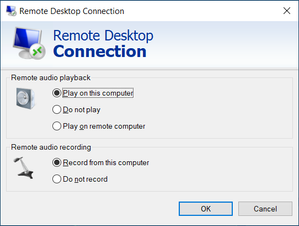
Hello, Microsoft Teams does not play (output) or record (input) audio, when trying Teams call on a remote PC (connected with Windows Remote Desktop client). Sony WH-1000XM2 headphones connected...
 AnonymousNov 05, 2020

Andrew1525
Jan 10, 2023Copper Contributor
Ok. so I *maybe* have a resolution here. At least in my situation. (Bose QC45)
It seems like the bluetooth headphones go into "call" mode. which means it switches the output from "headphones" to "headset". (For the microphone to function on my machine, devices were set to "output: Headphone" and "input: headset".)
Once a call is activated, headphones change mode, output gets swapped to headset, and remote desktop doesn't get updated.
Using the sound control panel I my primary machine I set the default device and default communication device to the headset. Theoretically this means my sound quality when I go back to using it normally this evening will be terrible. But initial testing seems to show it working in a Teams call now.
This has been an incredibly frustrating journey, and I will not at all be surprised if they stop working for my afternoon meeting.
It seems like the bluetooth headphones go into "call" mode. which means it switches the output from "headphones" to "headset". (For the microphone to function on my machine, devices were set to "output: Headphone" and "input: headset".)
Once a call is activated, headphones change mode, output gets swapped to headset, and remote desktop doesn't get updated.
Using the sound control panel I my primary machine I set the default device and default communication device to the headset. Theoretically this means my sound quality when I go back to using it normally this evening will be terrible. But initial testing seems to show it working in a Teams call now.
This has been an incredibly frustrating journey, and I will not at all be surprised if they stop working for my afternoon meeting.

mkrob
Sep 14, 2023Copper Contributor
Andrew1525Thanks! This worked. Kind of a hassle but I will take it.