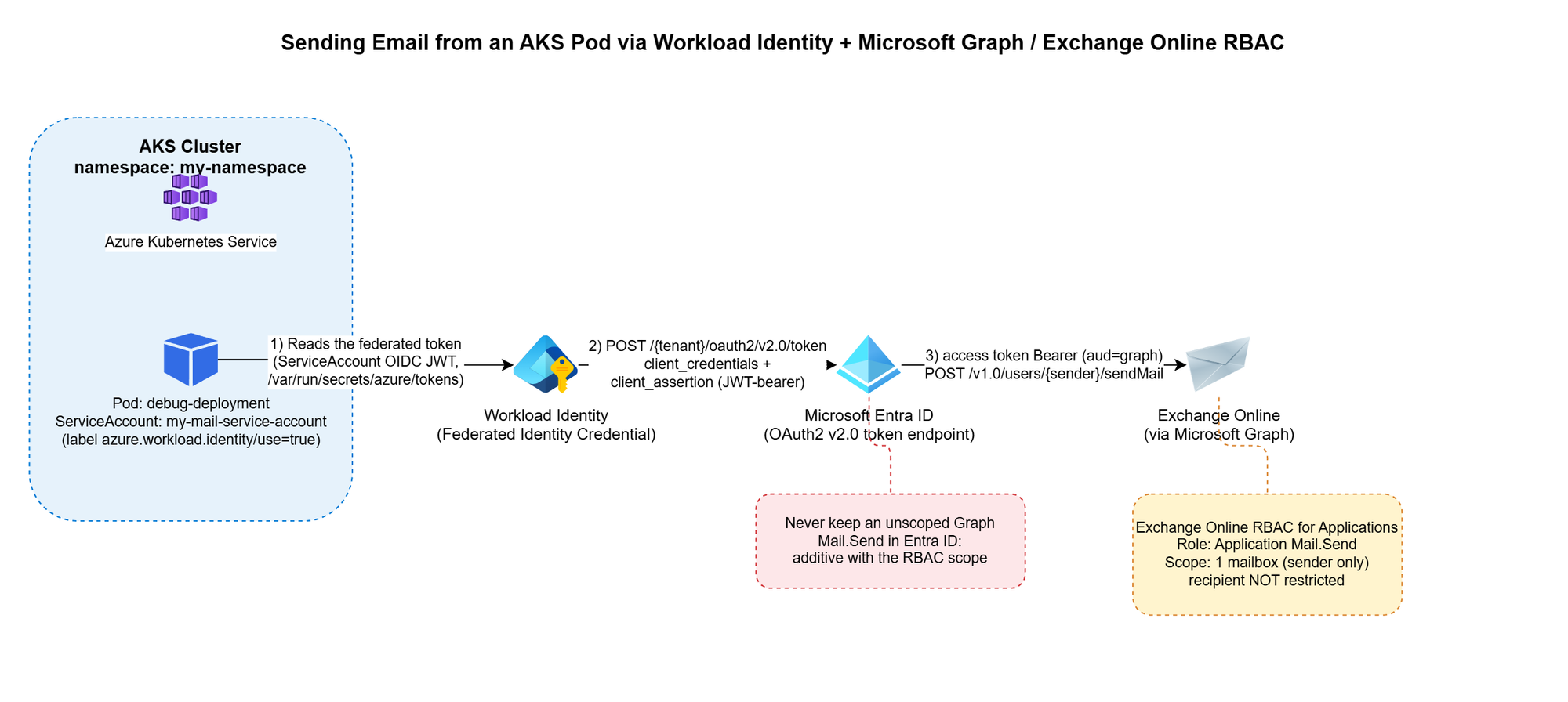
Workload Identity + Microsoft Graph + Exchange Online RBAC
The problem
You have a workload running in AKS that occasionally needs to send an email — a notification, an alert, a report. The obvious options all come with baggage:
- An SMTP relay means yet another credential to store, rotate, and eventually leak.
- A shared "app password" mailbox account means an identity nobody really owns, that can authenticate as itself forever.
- Granting Mail.Send as a Microsoft Graph application permission is tempting — until you realize it lets your app send email as any mailbox in the entire tenant, not just the one you intended.
This post walks through a pattern that avoids all three: Azure Workload Identity for the pod, Microsoft Graph for sending, and Exchange Online RBAC for Applications to scope the identity down to exactly one authorized mailbox. No secrets stored anywhere in the cluster, and no tenant-wide send permission.
Architecture
Pod (AKS) -- federated OIDC token --> Workload Identity
Workload Identity -- client_credentials + client_assertion--> Microsoft Entra ID
Entra ID -- access token (aud=Graph) --> Pod
Pod -- POST /v1.0/users/{sender}/sendMail (Bearer token)--> Microsoft Graph --> Exchange Online
The pod never handles a password or a client secret. It reads a federated identity token that Azure Workload Identity's webhook mounts automatically, exchanges it with Entra ID for a Graph access token, and calls sendMail directly. The only thing that determines which mailbox it's allowed to send as is a role assignment on the Exchange Online side — not anything configured in Kubernetes.
Step 1 — Get a Workload Identity bound to your namespace
This is a platform-team request, not something you self-service from inside the cluster: you need a Managed Identity (or App Registration) with a Federated Identity Credential issued for your specific Kubernetes namespace and ServiceAccount subject. Give your platform/identity team:
- The target namespace (e.g. my-namespace)
- The target ServiceAccount name (e.g. my-mail-service-account)
- The intended use case (application email via Microsoft Graph)
They hand you back a Client ID — that's all your manifest needs.
One important thing to not ask for: don't request the Graph Mail.Send application permission on this identity. That permission, if granted directly in Entra ID, is unscoped — it lets the identity send as anyone. The actual sending restriction is going to live in Exchange, not in Entra ID (see Step 2).
Step 2 — Restrict sending to one mailbox with Exchange Online RBAC for Applications
Microsoft's currently recommended way to scope application email-sending rights is RBAC for Applications in Exchange Online — the modern replacement for the deprecated Application Access Policies. The short version:
- The Managed Identity gets no unscoped Graph Mail.Send grant in Entra ID. (Entra ID and Exchange RBAC authorizations are additive — if you leave an unscoped grant in place, it defeats the whole point.)
- Exchange Online registers a pointer to the Managed Identity's service principal (New-ServicePrincipal), then assigns it the Application Mail.Send role, scoped to a Management Scope that resolves to exactly one mailbox (or one security group of mailboxes).
- The identity can now call /users/{authorized-mailbox}/sendMail and get a 202. Any other mailbox returns 403.
This part is usually owned by whoever administers your Exchange Online tenant, not by the application team — it's a five-minute PowerShell runbook for them (New-ManagementScope, New-ServicePrincipal, New-ManagementRoleAssignment), fully documented in Microsoft's RBAC for Applications docs. For reference, here's the actual runbook:
# 0. Make sure no unscoped Graph Mail.Send grant exists on the identity first
$mi = Get-EntraServicePrincipal -ServicePrincipalId $MiObjectId
$graphSp = Get-EntraServicePrincipal -Filter "appId eq '00000003-0000-0000-c000-000000000000'"
$mailSendRole = $graphSp.AppRoles | Where-Object {
    $_.Value -eq "Mail.Send" -and $_.AllowedMemberTypes -contains "Application"
}
Get-EntraServicePrincipalAppRoleAssignment -ServicePrincipalId $mi.Id |
    Where-Object { $_.ResourceId -eq $graphSp.Id -and $_.AppRoleId -eq $mailSendRole.Id } |
    ForEach-Object { Remove-EntraServicePrincipalAppRoleAssignment -ServicePrincipalId $mi.Id -AppRoleAssignmentId $_.Id }

# 1. Connect to Exchange Online
Connect-ExchangeOnline

# 2. Scope to exactly one mailbox (filter on ExternalDirectoryObjectId, not SMTP address)
$mbx = Get-EXORecipient -Identity $AllowedMailbox -Properties ExternalDirectoryObjectId
New-ManagementScope -Name $ScopeName `
    -RecipientRestrictionFilter "ExternalDirectoryObjectId -eq '$($mbx.ExternalDirectoryObjectId)'"

# 3. Register the service principal pointer (this is NOT a new identity, just a reference)
$exoSp = New-ServicePrincipal -AppId $MiAppId -ObjectId $MiObjectId -DisplayName $MiDisplayName

# 4. Assign exclusively Application Mail.Send, scoped
New-ManagementRoleAssignment -Name $AssignmentName `
    -App $exoSp.ObjectId -Role "Application Mail.Send" -CustomResourceScope $ScopeName

# 5. Validate both directions
Test-ServicePrincipalAuthorization -Identity $exoSp.ObjectId -Resource $AllowedMailbox   # expect InScope = True
Test-ServicePrincipalAuthorization -Identity $exoSp.ObjectId -Resource $BlockedMailbox   # expect InScope = False
Two things that trip people up here: -App in step 3/4 expects the Object ID of the Enterprise application / service principal, not the App Registration object — and never fall back to Application Mail Full Access or an exclusive management scope, since Microsoft explicitly notes exclusive scopes don't restrict application access.
Worth calling out explicitly: this RBAC scope restricts the sender only. It has no concept of a recipient allowlist. Once your identity is authorized to send as a mailbox, it can send to anyone, inside or outside your tenant. If you need recipient-side restrictions, that has to be application logic — Exchange RBAC won't do it for you.
Step 3 — The Kubernetes manifest
Three resources: a ServiceAccount annotated with the Client ID from Step 1, a ConfigMap holding the send script, and a Deployment that mounts it. Here's the complete manifest:
---
apiVersion: v1
kind: ServiceAccount
metadata:
  annotations:
    azure.workload.identity/client-id: <CLIENT-ID-FROM-YOUR-IDENTITY-TEAM>
  name: my-mail-service-account
  namespace: my-namespace
---
apiVersion: v1
kind: ConfigMap
metadata:
  name: send-email
  namespace: my-namespace
data:
  send-email.sh: |
    #!/bin/bash
    set -euo pipefail

    if [ $# -lt 2 ]; then
        echo "Usage: $0 <sender-email> <recipient-email> [recipient-email...]"
        exit 1
    fi

    SENDER_EMAIL="$1"
    shift
    RECIPIENTS=("$@")
    TENANT_ID="${AZURE_TENANT_ID:-}"
    CLIENT_ID="${AZURE_CLIENT_ID:-}"
    FEDERATED_TOKEN_FILE="${AZURE_FEDERATED_TOKEN_FILE:-}"

    if [ -z "$TENANT_ID" ] || [ -z "$CLIENT_ID" ] || [ -z "$FEDERATED_TOKEN_FILE" ]; then
        echo "ERROR: Workload Identity variables not set"
        exit 1
    fi

    FEDERATED_TOKEN=$(cat "$FEDERATED_TOKEN_FILE")

    TOKEN_RESPONSE=$(curl -s -X POST \
        "https://login.microsoftonline.com/${TENANT_ID}/oauth2/v2.0/token" \
        -H "Content-Type: application/x-www-form-urlencoded" \
        -d "client_id=${CLIENT_ID}" \
        -d "scope=https://graph.microsoft.com/.default" \
        -d "client_assertion_type=urn:ietf:params:oauth:client-assertion-type:jwt-bearer" \
        -d "client_assertion=${FEDERATED_TOKEN}" \
        -d "grant_type=client_credentials")

    ACCESS_TOKEN=$(echo "$TOKEN_RESPONSE" | grep -o '"access_token":"[^"]*' | cut -d'"' -f4)

    if [ -z "$ACCESS_TOKEN" ]; then
        echo "ERROR: Failed to get token"
        echo "$TOKEN_RESPONSE"
        exit 1
    fi

    RECIPIENTS_JSON=""
    for r in "${RECIPIENTS[@]}"; do
        if [ -n "$RECIPIENTS_JSON" ]; then
            RECIPIENTS_JSON="${RECIPIENTS_JSON},"
        fi
        RECIPIENTS_JSON="${RECIPIENTS_JSON}{\"emailAddress\":{\"address\":\"${r}\"}}"
    done

    cat > /tmp/email.json <<EOF
    {
      "message": {
        "subject": "Test from AKS",
        "body": {
          "contentType": "Text",
          "content": "Test email from Workload Identity"
        },
        "toRecipients": [${RECIPIENTS_JSON}]
      },
      "saveToSentItems": "true"
    }
    EOF

    HTTP_CODE=$(curl -s -w "%{http_code}" -o /tmp/response.json \
        -X POST "https://graph.microsoft.com/v1.0/users/${SENDER_EMAIL}/sendMail" \
        -H "Authorization: Bearer ${ACCESS_TOKEN}" \
        -H "Content-Type: application/json" \
        -d @/tmp/email.json)

    if [ "$HTTP_CODE" -eq 202 ]; then
        echo "Email sent successfully"
    else
        echo "ERROR: HTTP ${HTTP_CODE}"
        cat /tmp/response.json
        exit 1
    fi
---
apiVersion: apps/v1
kind: Deployment
metadata:
  name: debug-deployment
  namespace: my-namespace
  labels:
    app: debug
    azure.workload.identity/use: "true" # Required. Only pods with this label can use workload identity.
spec:
  replicas: 1
  selector:
    matchLabels:
      app: debug
  template:
    metadata:
      labels:
        app: debug
        azure.workload.identity/use: "true" # Required. Only pods with this label can use workload identity.
    spec:
      serviceAccount: my-mail-service-account
      serviceAccountName: my-mail-service-account
      containers:
        - name: debug
          image: <your-registry>/az-init:0.1
          command: ["sleep", "3600"]
          readinessProbe:
            exec:
              command: ["ls"]
          livenessProbe:
            exec:
              command: ["ls"]
          resources:
            requests:
              memory: "256Mi"
              cpu: "250m"
            limits:
              memory: "512Mi"
              cpu: "500m"
          volumeMounts:
            - name: script
              mountPath: "/script"
      volumes:
        - name: script
          configMap:
            name: send-email
            defaultMode: 0555
Two details that will bite you if you skip them:
- /me/sendMail doesn't work here. In a client_credentials flow (app-only, no signed-in user), /me returns 400 BadRequest: /me request is only valid with delegated authentication flow. You must call /users/{sender}/sendMail and name the sender explicitly.
- configMap.defaultMode matters. 0500 only grants execute to the file's owner (root); if your container runs as non-root, you'll get a Permission denied on exec. Use 0555.
Step 4 — Test it
kubectl apply -f email-pod.yaml
kubectl exec -n my-namespace -it deploy/debug-deployment -- \
  /script/send-email.sh authorized-sender@yourcompany.com \
  recipient1@yourcompany.com recipient2@yourcompany.com
A 202 and Email sent successfully means it worked. Try it again with a sender mailbox that isn't in your RBAC scope — you should get a clean 403. If you don't, go back and check that no unscoped Graph Mail.Send grant is still sitting on the identity in Entra ID; that's the most common way this containment silently fails.
Conclusion
This solution addresses an application email-sending need without introducing static credentials into the cluster or broadening permissions beyond what is strictly necessary.
Full cloud, with no on-premises dependency or manually managed secret:
- No password, API key, or certificate is stored in Kubernetes (Secret, ConfigMap, or anywhere else). Authentication relies entirely on OIDC federation between the Kubernetes ServiceAccount and Microsoft Entra ID (Workload Identity) — the federated token is issued and mounted automatically by the webhook, never manually generated or distributed.
- The entire authentication and sending chain (Entra ID, Microsoft Graph, Exchange Online) goes through Microsoft-managed HTTPS endpoints; no on-premises component is involved in the application path (section A.3 covers a pitfall related to Exchange hybrid setups on the target mailbox side, not the authentication path itself).
- Provisioning the sender mailbox and the RBAC configuration are themselves managed natively within Microsoft 365 / Exchange Online, with no extra script or infrastructure to maintain on the client side.
Secure by design (least privilege):
- The OIDC federated token is short-lived (limited lifetime, automatically renewed by the webhook) and scoped to the my-mail-service-account ServiceAccount in the my-namespace namespace — it cannot be reused outside this specific context.
- No tenant-wide Microsoft Graph Mail.Send permission is granted to the identity: without this precaution, the identity could send as any mailbox in the tenant. Exchange Online RBAC for Applications carries the real authorization, strictly scoped to the mailboxes that are members of the dedicated Exchange group.
- The containment is verified both positively and negatively before going to production — not only tested on the case that must succeed.
- Known and documented limitation: this RBAC model restricts only the sender, never the recipient — application-side control is still required if recipient restriction is ever needed.
See You in the Cloud
Jamesdld
