microsoft teams
1805 Topics
Static Tab and Chat Tab Order Is Not Persisting in Microsoft Teams
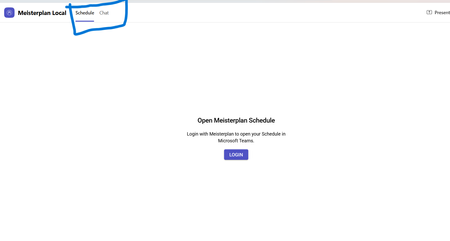
manifest file: "staticTabs": [ { "entityId": "schedule", "name": "Schedule", "contentUrl": "...", "websiteUrl": "...", "scopes": ["personal"] }, { "entityId": "conversations", "scopes": ["personal"] } ] the Schedule tab is intentionally place before conversations: it initially appears correctly, but after navigating away from the app and returning, Teams places Chat/Conversations before Shcedule. I'm using schema version 1.12. The tabs are configured in the specified order in the manifest file, and the expected tab order is displayed correctly when the app is initially opened. However, when I navigate to the Chat section, the tab order changes and does not persist as defined in the manifest file.122Views0likes0Comments
API: get video recording link via Microsoft Teams
Hi teams. What are some ways to get video recording link URLs of a teams meeting via API (Graph/Sharepoint/OneDrive)? Is it possible to get the recording URL from the calendar event? I do see the embedded video link when I am editing a recorded event in my calendar. Saw some previous post of getting access via Chat messages - callRecordingUrl: https://techcommunity.microsoft.com/t5/microsoft-365-developer-platform/get-the-link-to-the-recording-of-teams-meeting-from-the-graph/idi-p/2675306 (what are the auth required to make function calls to get this?) Wondering if there are any update on this, thanks1.6KViews0likes4CommentsHow to Download Video Clip from Microsoft Teams Programmatically
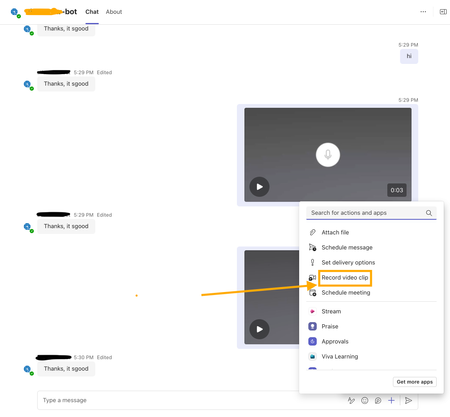
I’m developing a bot app for Microsoft Teams, and part of its functionality involves handling videos recorded using the Teams widget(see screenshot attached). I am receiving a video clip link in the bot app's backend message. Where is this video file uploaded and how can I download the video clip using that link? I have attempted the SSO auth via Entra ID to fetch the auth token and attached it against the GET request to the video clip link as the bearer token. But still getting 401 errors? Need help and guidance in this matter. Thanks.677Views0likes7Comments
App Validation failing for no clear reason
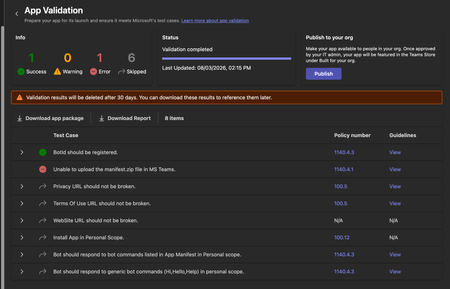
We're trying to get our (very simple) Teams App listed on the app store, but during the App Validation we keep getting the same error: "Unable to upload the manifest.zip file in MS Teams." as seen below: Downloading the report doesn't give any more information, it only lists the only successful validation step ("BotID should be registered") and the error doesn't appear there. I've validated the manifest.json file against the schema, tried reuploading the same manifest to a different org (creating a new app and bot) - validation fails there too. Does anyone have any pointers? Here is my (anonymized) manifest file: { "$schema": "https://developer.microsoft.com/en-us/json-schemas/teams/v1.19/MicrosoftTeams.schema.json", "manifestVersion": "1.19", "version": "1.1.1", "id": "[redacted]", "developer": { "name": "[redacted]", "websiteUrl": "https://www.[redacted].com", "privacyUrl": "[redacted]", "termsOfUseUrl": "[redacted]" }, "icons": { "color": "color.png", "outline": "outline.png" }, "name": { "short": "[redacted]", "full": "[redacted]" }, "description": { "short": "[redacted]", "full": "[redacted]" }, "accentColor": "#4A3AFF", "bots": [ { "botId": "[redacted]", "scopes": ["personal"], "supportsFiles": false, "isNotificationOnly": false, "commandLists": [ { "scopes": ["personal"], "commands": [ { "title": "help", "description": "Show what this bot does and how to connect your account" }, { "title": "connect", "description": "Get a fresh link to (re-)connect your account" } ] } ] } ], "staticTabs": [ { "entityId": "conversations", "scopes": ["personal"] }, { "entityId": "about", "scopes": ["personal"] } ], "permissions": ["identity", "messageTeamMembers"], "validDomains": ["app.[redacted].com", "auth.[redacted].com"] }375Views0likes2Comments
Teams Personal Bot Identity Cache issue
Hi all — looking for guidance on a Teams custom app + bot naming issue. We have a custom Teams app with a bot. The app catalog/admin/dev portal surfaces show the correct app name, and the manifest + Azure Bot configuration appear correctly aligned, but the Teams personal chat surfaces still show the old/wrong bot name. What looks correct: Teams app manifest name.short / name.full have the correct app name Manifest bots[0].botId points to the expected bot ID Azure Bot resource → Configuration → Microsoft App ID matches that bot ID Azure Bot resource → Bot profile display name has the correct name Teams Developer Portal basic information shows the correct name Teams Admin Center shows the correct app short name What is still wrong: Teams left sidebar chat name shows the old/wrong name Chat top header shows the old/wrong name Inline bot sender/name in the conversation shows the old/wrong name The issue reproduces for multiple users It persists after sign out/sign in, uninstall/reinstall, republish, and retesting We may also be seeing a package/version propagation issue: after publishing an updated app package with a newer manifest version, Teams Admin Center still appears to show the previous version. Has anyone seen this before with personal bot apps? Specifically trying to understand: What is the authoritative source for the personal bot chat roster/header/sender display name?366Views0likes1Comment
Unable to submit Teams app update
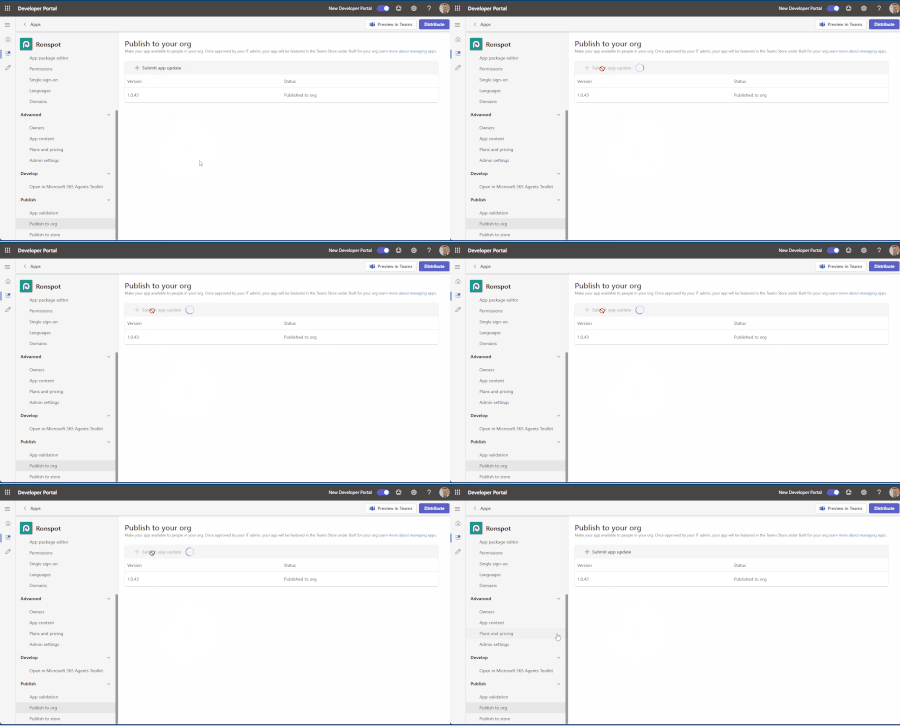
Hello, We have been attempting to submit an update to our Teams app, but we’re experiencing an issue with the submission process. When we click “+ Submit app update,” the loader appears for a few seconds, but then nothing happens. No error message is displayed, and the app update is not submitted. I’ve attached a short video demonstrating the issue. Could you please advise on how we can resolve this? Thank you for your help.279Views0likes1CommentTeams Powershell Module: [Get|Set|New|Sync]-CsOnlineApplicationInstance and App-Based authentication
Hello there, as stated in the documentation: https://learn.microsoft.com/en-us/microsoftteams/teams-powershell-application-authentication it is not possible to create a new teams application using New-CsOnlineApplicationInstance, if application based authentication is used for the PS Module. Is this planed and/or on the roadmap to implement this? We would desperately need this. Thanks in advance!Solved1.7KViews0likes11Comments
Teams iOS custom tab not appearing in Safari Web Inspector
Hi, I’m trying to debug an intermittent white screen in a custom Teams tab on iPhone, but I am unable to get "DevTools" to work as described here https://learn.microsoft.com/en-us/microsoftteams/platform/tabs/how-to/developer-tools My setup: Teams iOS 8.14.1 iOS 26.6.1 and iOS 27.0 Beta 6 macOS 26.6.2 Developer Preview enabled My user has been in Microsoft 365 Targeted Release for >24 hours Safari Web Inspector enabled on iPhone Safari pages on the same iPhone are inspectable from my Mac However, with the custom tab open in Teams, Safari → Develop → iPhone shows “No Inspectable Applications.” I’ve already signed out/in, force-quit Teams, cleared app data, re-enabled Developer Preview and tested on two different iPhones/Macs. Is Safari Web Inspector for Teams iOS tabs currently supported, and is there any additional setting required to make the Teams WebView inspectable?Solved356Views0likes2Comments
Workflows - Posting a Card
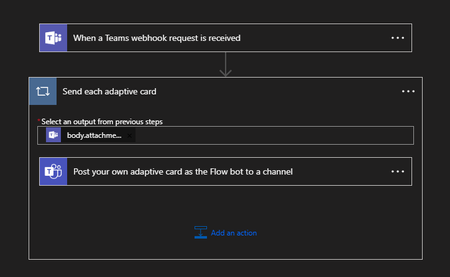
I'm in the process of migrating our Jira integration with teams from using the soon to be deprecated Connectors, to Workflows. I have two problems that I can't see to overcome. 1. All the messages are posted as '[My Name] via Workflows posted a new message'. Is there any way the message can come from another user or no user? 2. The preview for the messages (in the notification popup and Activity screen) is 'Card', instead of anything useful. Together this makes the notifications not very useful. What I have done: The workflow is set up And what is being posted to the webhook is (for example). { "type": "message", "attachments": [{ "contentType": "application/vnd.microsoft.card.adaptive", "contentUrl": null, "content": { "type": "AdaptiveCard", "$schema": "http://adaptivecards.io/schemas/adaptive-card.json", "version": "1.4", "body": [{ "type": "ColumnSet", "columns": [{ "type": "Column", "width": "auto", "items": [{ "type": "Image", "url": "https://i.imgur.com/FrVumxY.png", "size": "Medium" } ] }, { "type": "Column", "width": "stretch", "verticalContentAlignment": "Center", "items": [{ "type": "TextBlock", "size": "Medium", "weight": "Bolder", "text": "Component Missing [ADP-xxx]" } ] } ] }, { "type": "TextBlock", "text": "Initiator: ", "wrap": true }, { "type": "TextBlock", "text": "ADP-xxx: Fixing reset password validation", "wrap": true, "weight": "Bolder", "color": "Accent", }, { "type": "TextBlock", "text": "Status: QA Ready", "wrap": true }, { "type": "TextBlock", "text": "Type: Bug", "wrap": true }, { "type": "TextBlock", "text": "Assignee: ", "wrap": true } ], "actions": [{ "type": "Action.OpenUrl", "title": "Open in Jira", "url": "https://xxx.atlassian.net/browse/ADP-xxx" } ], "$schema": "http://adaptivecards.io/schemas/adaptive-card.json", "version": "1.4" } } ] } I have tried posting various different combinations of summary attributes with no effect. Is there a whole better way of doing this, or is there a few tweaks I can make?3.2KViews0likes4Comments