Forum Widgets
Latest Discussions

Can't connect with GDAP using ExchangeOnlineManagement 3.7.0/3.8.0, but 3.6.0 works
Since upgrading to ExchangeOnlineManagement version 3.7.0, I've been unable to connect to any of my clients using GDAP. I thought I'd try upgrading to 3.8.0, but I still get the same error: PS C:\Users\username> connect-exchangeonline -userprincipalname email address removed for privacy reasons -DelegatedOrganization contoso.com ---------------------------------------------------------------------------------------- This V3 EXO PowerShell module contains new REST API backed Exchange Online cmdlets which doesn't require WinRM for Client-Server communication. You can now run these cmdlets after turning off WinRM Basic Auth in your client machine thus making it more secure. Unlike the EXO* prefixed cmdlets, the cmdlets in this module support full functional parity with the RPS (V1) cmdlets. V3 cmdlets in the downloaded module are resilient to transient failures, handling retries and throttling errors inherently. REST backed EOP and SCC cmdlets are also available in the V3 module. Similar to EXO, the cmdlets can be run without WinRM basic auth enabled. For more information check https://aka.ms/exov3-module Starting with EXO V3.7, use the LoadCmdletHelp parameter alongside Connect-ExchangeOnline to access the Get-Help cmdlet, as it will not be loaded by default ---------------------------------------------------------------------------------------- The role assigned to user email address removed for privacy reasons isn't supported in this scenario. Please check online documentation for assigning correct Directory Roles to User. At C:\Users\username\OneDrive - MSP\Documents\WindowsPowerShell\Modules\ExchangeOnlineManagement\3.7.2\netFramework\ ExchangeOnlineManagement.psm1:758 char:21 + throw $_.Exception; + ~~~~~~~~~~~~~~~~~~ + CategoryInfo : OperationStopped: (:) [], SystemException + FullyQualifiedErrorId : The role assigned to user email address removed for privacy reasons isn't supported in this scenario. Please check online documentation for assigning correct Directory Roles to User. You'd think there'd be something wrong with my GDAP permissions, but there doesn't appear to be. I can do anything via the Microsoft 365 Admin Center. Plus, most notably, if I manually load ExchangeOnlineManagement 3.6.0, everything works perfectly. I'm running Windows 11, and this behavior is reproducible on Windows PowerShell 5.1 as well as my preferred PowerShell 7.5.2. How can I troubleshoot this?dontneedausernameApr 01, 2026Copper Contributor423Views1like3CommentsiOS 26.4 iPhone Contact Sync with Microsoft Exchange Online
For the past 2–3 weeks, several of our iOS users have been experiencing synchronization issues with Exchange contacts. Contacts intermittently disappear from their devices and then re-sync after some time. In some cases, the re-synchronization process is significantly delayed. Anyone else experiencing the same issue?fbatunsApr 01, 2026Iron Contributor16Views0likes0Comments
Preserving permissions during EXO migration
Hi, Can you help me understand the outcome of preserving the permissions in our scenario. Exchange Server 2016 (soon Exchange SE) in a hybrid with Exchange Online. We are moving 75% of the mailboxes to Exchange Online. What ways will preserve or break the full-access or sendas permissions? I guess best way would be to migrate both the user and the shared mailbox at the same time in the same batch to keep the permission? If we migrate the user in batch 1 and shared mailbox in batch 2 will that preserve/break the full access/send as? If we migrate the shared mailbox in batch 1 and usermailbox in batch 2 will that preserve/break the full access/send as? If the permission is linked directly on the shared mailbox or via a security group is there a difference? Thanks!NaxiuMar 31, 2026Copper Contributor8Views0likes0CommentsOAB download fails after hybrid mailbox move.
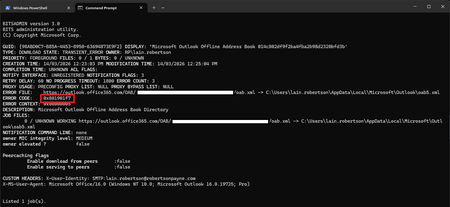
Hi folks, I'm posting this query here as I doubt anyone in the Outlook forums would have the necessary Exchange hybrid knowledge. I run a classic hybrid Exchange environment where Exchange Server 2019 CU15 is the on-premise platform. Authentication is provided by on-premise AD FS, with the accounts being synchronised from on-premise via AAD Connect. I've just moved my on-premise mailbox to Exchange Online via New-MoveRequest and for the most part, everything is fine. One thing that possibly isn't fine - going off the Bits-Client event log is the regular offline address book downloads, where I'm seeing regular failures in the event log and through double-checking with bitsadmin.exe. The initial address book synchronisation worked as the view in Outlook is fully populated, however, I expect that future changes likely won't come through. bitsadmin output Event log output (There's numerous events to choose from - this is the one I'm most curious about.) The BITS service provided job credentials in response to the UNIDENTIFIED authentication challenge from the outlook.office365.com server for the Microsoft Outlook Offline Address Book <guid> transfer job that is associated with the following URL: /OAB/<guid>/oab.xml. The credentials for the <sid> user were rejected. When the mailbox was on-premise, the OAB came from the Exchange Server - no surprise there, where post migration it can be seen from the bitsadmin output it now comes from outlook.office365.com. Perhaps that's also to be expected - I don't know, but it makes sense given the move. What alerted me to there potentially being an issue is the systray icon frequently gets stuck on the "synchronising" icon, and running a manual full OAB sync from within Outlook fails to complete. After an extended "hang" period, the sync window eventually times out with the error shown above (the protracted UI behaviour would appear to be due to the large number of retries). Dropping the BITS job URL into Edge simply returns a HTTP 503, which doesn't necessarily strike me as a problem. After all, I'm unable to provide a BEARER token using this method. I haven't yet tried via PowerShell as it only occurred to me now but perhaps I'll do so after posting this. Searching on this error and scenario has turned up nothing useful. I have also checked and compared event log entries from an Azure AD-native account, where it's a mixed bag of successful OAB BITS downloads and unsuccessful ones that feature the same symptoms as above, which offers up the possibility this might be a transient service-side error (though I'm not leaning heavily towards this). Has anyone else encountered this issue and resolved it? Is it even an issue to begin with, or is this expected behaviour? I'm unsure what to make of the symptoms. Cheers, LainSolvedLainRobertsonMar 27, 2026Silver Contributor147Views0likes2CommentsMicrosoft Limits App Access to Sensitive Message Properties
Microsoft has announced details of a change to app permissions to restrict updates to sensitive message properties (like recipients) without consent for a new advanced mail access permission. If tenants have apps that interact with message properties, including apps developed by third parties, they should check whether the apps are updating sensitive properties. If so, the new permission must be assigned or the apps will stop working. https://office365itpros.com/2026/03/26/sensitive-message-properties-graph/33Views1like0CommentsHTTP Response Headers Hardening for Exchange 2019 on Windows Server 2022
Category: Security Hardening Issue: Currently, Exchange 2019 running on Windows Server 2022 does not have strict HTTP response headers configured, leaving it potentially vulnerable to security threats such as MIME type sniffing, clickjacking, and cross-site scripting (XSS) attacks. Objective: Harden the security of Exchange 2019 web services by enabling the following HTTP response headers: X-Content-Type-Options: Prevents MIME type sniffing by forcing browsers to respect declared content types. X-Frame-Options: Prevents embedding of Exchange web pages in iframes to mitigate clickjacking attacks. X-XSS-Protection or Content-Security-Policy (CSP): Protects against reflected XSS attacks (X-XSS-Protection is deprecated, CSP is preferred). I have found this article; can anyone tell me if it applies to Exchange 2019 as well? HTTP Security Headers - Icewolf Blog Thank you1.4KViews0likes3Comments
Can we hide default address lists in Outlook Address Book and show only custom ones?
There are existing Custom Address Lists. When users use the MS Outlook App (Office 2019) and open the Address Book, is it possible to hide the other address lists (including domain-sg-GAL, Global Address List, and domain-sg-Rooms), and only display the Custom Address Lists (domain-HK-AL and domain-sg-AL) — the ones shown in green in the photo?Como_LMar 25, 2026Copper Contributor36Views0likes0CommentsDisabling Tenant-Wide Auto-Archiving in Exchange Online
Hello, I need to disable auto-archiving for Exchange Online mailboxes at the tenant level. Before I pull the trigger, I would like to make sure I’m looking at the right knobs and understanding the downstream effects. Where is the definitive On/Off switch for auto-archiving at the tenant level (Admin Center vs. PowerShell)? What is the actual functional difference between the Archive settings in Org Settings and a standard Retention Policy? If I disable the tenant-wide auto-archiving, what happens to the mail that is already sitting in users' archive mailboxes? Does it stay put, or does it try to merge back? Thank you in advance.SolvedIT_BeeMar 19, 2026Copper Contributor146Views0likes3Comments
Issue with certificate renewal for exchange Edge Transport Server
Hello team, I have come across a very particular problem I deployed 2 exchange server 2019 with one edge transport server When we are renewing the Certificates with wildcard certificate on both mailbox server ,and on edge transport server ,it is impossible for me to renew the edge subscription It says the cerificate is in "doublon" (repetitive) on one of the Exchange servers.I have always been using same certificate on exchange server be it edge or mailbox I tested a bogus different certificate on mailbox and on edge,only then th e edge sync works Did anybody come across this issue. Thanks39Views0likes0CommentsAdd-PublicFolderClientPermission: Object reference not set to an instance of an object.
Running into an issue with adding public folder permissions in Exchange Online. I've used this PowerShell script for a few years without any issues, but suddenly getting this error no matter what I try. I do have Owner permissions and there are Default and Anonymous permissions on the public folder, tried completely removing and reinstalling the ExchangeOnlineManagement module as well. Anyone else having this problem? $PF = Get-MailPublicFolder -Identity "\pf1" $User = Get-User -Anr "User1" $AccessRights = @( "ReadItems", "CreateItems", "EditOwnedItems", "EditAllItems", "FolderVisible" ) Add-PublicFolderClientPermission -Identity "\$($PF.Id)" -User $User.UserPrincipalName -AccessRights $AccessRights -Verbose VERBOSE: Returning precomputed version info: 3.9.2 VERBOSE: Requested HTTP/1.1 POST with 227-byte payload VERBOSE: Received HTTP/1.1 response of content type application/json of unknown size VERBOSE: Query 1 failed. Add-PublicFolderClientPermission: Object reference not set to an instance of an object. Thank youAlexFrancoMar 16, 2026Copper Contributor153Views0likes3Comments






Tags
- exchange online2,609 Topics
- Exchange Server2,369 Topics
- office 3651,260 Topics
- hybrid917 Topics
- outlook785 Topics
- 2016763 Topics
- admin699 Topics
- 2013281 Topics
- 2010161 Topics
- 201982 Topics