

Forum Widgets
Latest Discussions
 vlopez0036Jul 09, 2026Occasional Reader25Views0likes1Comment
"Allow edit range" permission on Azure AD joined device
Hello. Many of our users use "Allow edit range" permission in excel. On domain joined devcies, users can search Windows AD to select the user to assign permission. However, on Azure AD joined devcies only local system is listed and thus permission cannot be assigned to a user. Has anyone faced this issue ad have found a resolution for this? How to use "Allow edit range" permission and select a user from Azure AD?atirek08Jul 09, 2026Copper Contributor2.1KViews1like7Comments
generate list
Good day! I have a file that has list of all names on one sheet. is there a way to generate on a different sheet list of names based on the first letter of the names? like in sheet1 would be all the names, sheet2 would be names starting in A-D, sheet3 names starting in E-J... TIA!BenjonBarachinaJul 09, 2026Copper Contributor29Views0likes3Comments
how to ignore conditional formatting for a cell that is not empty but invisible (cell format ;;;)
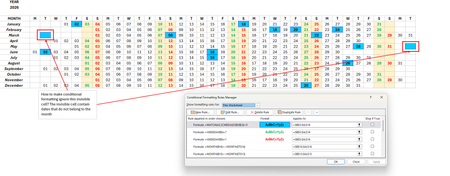
hi, i need help with a conditional formatting of cells that are not empty but invisible (cell format to ;;; (invisible)). I have a calendar where the dates are invisible (outside of the month) but the cell formatting applies to it (cuz it is that date, i.e., public holiday). i have attached the screenshots and i hope someone can help me out. thank you so much. regards, angelenghietan1986Jul 09, 2026Copper Contributor52Views0likes2Comments
Save or convert Excel spreadsheet to a Google doc
I created a spreadsheet in Excel but I need to now save it or convert it into a Google doc for someone who doesn't have MS Excel or Office. Is either way possible and how is it done? Thank you.DL0713Jul 09, 2026Copper Contributor8.2KViews0likes3Comments
Stock Data Type - SPCX
I have spreadsheet that pulls Stock data and it has been working fine. Bought some SPCX shares and added SPCX to the Stock cell. Selecting Stock Data Type does NOT find SPCX in the list of shares. This is on the deaktop app. I tried this wth Excel Online and SPCX is found and works fine? I have also made sure the Desktop apps are all up to date. Any potential fixes out there?SolvedThuleniJul 09, 2026Tin Contributor41Views0likes2Comments
Add-in Excel Labs
Da tempo sto utilizzando l'add-in Excel Labs, soprattutto nelle sua funzionalità base di "Advanced formula environment" particolarmente utile nella compilazione di formule LAMBDA che stanno avendo un così grande sviluppo in questi ultimi tempi. La facilità nella redazione e nel debug inline delle formule, i commenti e la gestione delle stesse in "Gestione Nomi" ne ha fatto per me e penso per molti uno strumento eccellente che ovviamente non può essere paragonato all'edito base di Excel. Rivolgo perciò un invito a considerare possibile la sua implementazione direttamente in Excel come strumento alternativo all'editor di base . Ritengo che tutti potranno giovarne.alberto20Jul 08, 2026Tin Contributor26Views0likes1CommentFreezing multiple rows
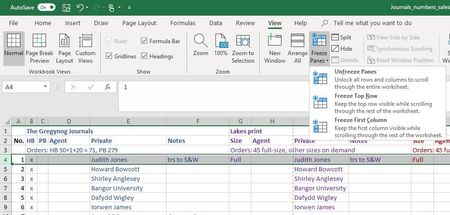
I just need to freeze the top 3 rows in a spreadsheet. Easy: select the 4th row, click 'Freeze Panes' and choose the 'Freeze rows' option. Except that the option isn't there - the only option offered is to freeze the top row. I am using Office 365, so my Excel is a current version. And I am working in Normal View. So I don't understand why I cannot freeze multiple rows any more!SolvedDavid_Townsend_JonesJul 08, 2026Brass Contributor565KViews4likes24CommentsIf formula
Dear Sirs …. Kindly need your help with below table to distinguish between + or - numbers in the result cell to take + value cell keep in mind the following If formula used in result cell ( if there is a better way , I am open ) :- =IF(SUM(O18:P18)>=0,SUM(O18:P18),IF(SUM(O18:P18)<=0,"0.000",(IF(SUM(O18:P18)<=0,O18+P18)))) looking forward to your help , thanks in advance Cell O18 Cell P18 Result cell 10.000 -214.730 0.000SolvedYousef70Jul 08, 2026Brass Contributor7KViews0likes34Comments

Tags
- excel43,876 Topics
- Formulas and Functions25,387 Topics
- Macros and VBA6,569 Topics
- office 3656,337 Topics
- Excel on Mac2,742 Topics
- BI & Data Analysis2,490 Topics
- Excel for web2,014 Topics
- Formulas & Functions1,716 Topics
- Need Help1,703 Topics
- Charting1,701 Topics