

Forum Widgets
Latest Discussions
How do you respond to...
Hello my Excellers, I wish you all a happy new year full of great things. I have a question and I am not sure if this is a purely an Excel question or something else but maybe I start here and see how it goes: As you all may have noticed the AI craze is blooming like crazy. If you want to sell lettuce slap AI on its label and step back. I use Bing to search for VBA examples. For example I typed "excel vba code to find cells with formulas" and I get AI to find or "compose" a decent example that with minimal editing will work perfectly. But then at the end of the code and its explanation I sometimes find these kind of questions: "If you want to list the addresses of formula cells instead of highlighting them, I can give you a version that outputs them in the Immediate Window or a new sheet. Do you want me to provide that listing version as well?" How do you say YES I want that code that would list the addresses in a sheet? I see buttons like "Undo" rounded Left Arrow, or "Redo" rounded Right arrow, and a "Copy, "Export", and then "Tweak Content", "Rewrite" button, A "Testing Tools" dropdown with options like "Generate test data" and "Integrate test cases", and another dropdown called "More Actions" with options like "Perform code review", "Explain the code", "Add error handling", and "Make code compliable" and the last dropdown "Work Report" with its own options. But I do not see anything that would allow me to say YES I want that code that would list the addresses in a sheet? Thanks for any insight... GiGi21Views0likes1Comment
Display Last Value in Column when certain criteria match
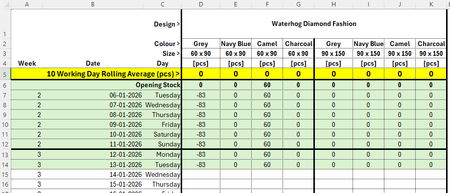
Hello all, I am trying to find a way of displaying the last value in a column when certain criteria match... Criteria that need to match would be Design, Colour and Size, so the quantity column would populate with the latest stock quantity: Thanks all! MichaelmbanksJan 14, 2026Copper Contributor29Views0likes2Comments
Converting date formatted as text to date
I have exported a file from a website which downloads into a csv file. The dates are shown as mm/dd/yyyy and is left aligned which confirms that it is text and not in date format. I want to apply a formula to those birthdates, but of course, the formula doesn't recognize it as a date. I've tried the DATEVALUE function, text to columns, nothing seems to work. Part of the problem might be that I am in Canada, and the format is US, so dates that are 07/20/1944 won't work because Canadian format is dd/mm/yyyy and there is no 20th month....but even the dates like 05/02/1947 won't convert to date format. I've attached the file. It originally downloaded as a csv, but I saved as a workbook hoping that might help....it didn't. Can somone look at this file and come up with a solution that works? Much appreciate any help on this. DennisSolveddenhouleJan 14, 2026Copper Contributor5.3KViews0likes6CommentsCertain Excel files won't open on my laptop
I have excel files that open fine on my desktop but will not open properly on my laptop. It seems to be impacted by charts that are embedded as sheets. How can I change the settings on my laptop to fix this? Thanks for your helpTyLund72Jan 14, 2026Copper Contributor47Views0likes3Comments
Populate dynamic calendar with table data
I have a dynamic calendar set up and a table with data, I need help figuring out the right formula to use to have the calendar populate with the tasks from the table. For example, one task may be 'Post video' which I would want to show up on the due date. Another task may be, newsletter campaign which I would want to post for the length of time from start date through due date, and show on each date in between. The second layer of this project is to then color code the calendar based on the column 'Post type'. For example, all newsletters in a blue cell, all videos in a green cell, etc. I've attached a sample workbook, can someone help me set it up with this functionality or explain how I should build that forumla?SolvedMthammonJan 13, 2026Copper Contributor67KViews2likes74Comments
Help with Excel Sorting
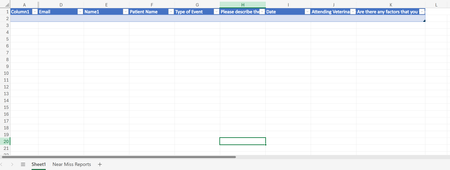
Hello! I am looking for help with sorting data on a sheet with form responses to different excel sheets. I want to filter by column G to different sheets ("Near Miss", "Adverse Event", "Sentinel Event". The data automatically goes to sheet1 via form responses, but I am trying to streamline the data into specific types of events. I'm using office 365. TIA!8Views0likes0CommentsFormula Help for Sorting
Hi all! I am looking to find a formula that will do a multitude of things. One is to sort a column of numbers by the last 2 digits of the values input but by a particular order such as 00-14, 15-29, 30-42. Secondly, once sorted by this grouping, I want to assign it to a particular department based on said sort (Dept 1, 2, 3 and so forth. I have attempted to use the VLookup formula that Google AI gave me to no avail. I received an error. Also with a IF formula and haven't been able to figure out how to make this work. Any help would be greatly appreciated!SolvedJenniL0211Jan 13, 2026Copper Contributor134Views0likes4Comments
Automatically adding the date/time to a cell when another cell is updated
I am trying to create a spreadsheet where when a specific cell is updated in anyway, the date/time stamp automatically updates in the cell right beneath the cell that was updated. I only need to have a one to one relationship with multiple cells. IOW, I have 5 cells in a row going across. When any one of the 5 cells is updated, I want an updated date/time stamp to appear in the cell directly below the cell that was updated. Is there a way to do this?Joseph HuismanJan 13, 2026Copper Contributor319KViews2likes53Comments



Resources
Tags
- excel43,520 Topics
- Formulas and Functions25,226 Topics
- Macros and VBA6,531 Topics
- office 3656,256 Topics
- Excel on Mac2,710 Topics
- BI & Data Analysis2,460 Topics
- Excel for web1,992 Topics
- Formulas & Functions1,716 Topics
- Need Help1,703 Topics
- Charting1,682 Topics