

Forum Widgets
Latest Discussions

Summary sheet, copy entire row if a cell criteria is met
https://arengio-my.sharepoint.com/:x:/g/personal/melanie_stokes_areng_io/IQC2OhPfZnKEQL6qfPj11gqfAQSh8Em3Zp95fkYbLBTZc3g?e=oNU1pEHi Can you please help me, I have a schedule for jobcards, each tab is a book that is given to someone, if that specific jobcard is invoices, then in column T where it says "Incomplete", I want that entire row to be copied to the "Outstanding Jobcards"tab. As a new book is handed out, a new tab is create and the tab is named according to the book sequence. This is updated daily as jobcards are being invoiced.31Views0likes2Comments
Formule voor zoeken tekst
Ik heb een formule FILTER die goed werkt alleen wil ik een tekst verkort invoeren zoals bij X.ZOEKEN. Probleem bij X.ZOEKEN is dat daar wordt weer niet meerdere rijen afgebeeld met dezelfde tekst zoals bij FILTER. Wie heeft een oplossing?edwin2021Jan 16, 2026Copper Contributor18Views0likes1CommentSaved CSV opens with dates even when saved as text
Hi, New to the page, have a problem with a CSV file that has hyphenated numbers which turns into dates when opened after being saved as text. How do I make sure that the changes made in the columns stay as text so it doesn't revert back to date or custom format? I know this topic is talked about in this forum and I can change it to text when I open it but the issue is I have to upload it into accounting software and think that it is defaulting when I save the file. Have tried importing the data into a CSV file and that doesn't seem to work and also got some code from an AI platform to put into the Visual Basic program to try and stop it but didn't seem to work. Any help would be much appreciated. Brian 4-1000 Income 4-1025 Income Apr-00 IncomeBrian8Jan 16, 2026Occasional Reader18Views0likes1CommentTop n vs. Others in Excel
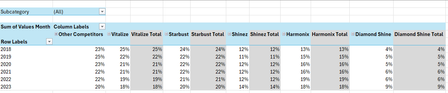
Hi all, I'm seeking some help because I'm kind of new to the more intermediate stuff in Excel. I have an Excel table with the following columns: Subcategory in column A, Brand in column B, Region in column C, Year in column D and Values Month in column E. I want to create a PivotTable and a Pivot line chart from this PivotTable that ranks the Top 5 Brands vs. Other Competitors by each region. For added context: There are 5 subcategories, 3 regions and 25 brands. Currently, I've tried grouping the remaining 20 brands as "Other Competitors" vs. the Top 5 brands within a selected region and possibly all regions (when no selection is made). I'm seeking a solution similar to this... Please mind the colours. I will sort those out later. But, the problem that I'm faced with is that upon selection of a region, the PivotTable won't update to the Top 5 brands of a selected region because they've already been grouped. How can I make this more dynamic so that I'm able to show The Top 5 brands vs. Others? Please help. EDIT: My operating system is Windows 10 (64-bit) and I use Excel 365 (Desktop version). For reference, I've attached a link to a sample file. https://1drv.ms/x/c/b2d878e32a062614/IQC1wcnwLICcQasOfnGcwKn0ASjpXp9xQ6rjnOP10Jal5cc?e=HaXEWd Thank you all once again.SolvedAnonymous29007Jan 16, 2026Copper Contributor263Views2likes10Comments
Help with Excel Sorting
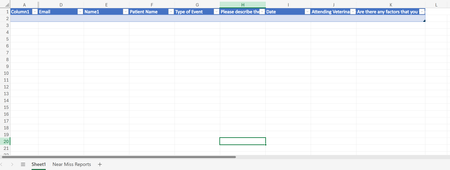
Hello! I am looking for help with sorting data on a sheet with form responses to different excel sheets. I want to filter by column G to different sheets ("Near Miss", "Adverse Event", "Sentinel Event". The data automatically goes to sheet1 via form responses, but I am trying to streamline the data into specific types of events. I'm using office 365. TIA!ahawaii87Jan 16, 2026Copper Contributor46Views0likes2CommentsWelcome to the Excel Community
The Excel Community is a place we've built for all of you. You can learn more about how to do something with Excel, discuss your work, and connect with experts that build and use the product. With over half a billion Excel customers, we want to engage with you in fundamentally different ways and the community is a starting point for that. Our community helps answer your product questions with responses from other knowledgeable community members. We love hearing feedback and feature requests from you which helps us build the best version of Excel ever. If you have found an outage or a bug please post at our Answers forum. We look forward to getting to know you! Sangeeta Mudnal & Olaf Hubel on behalf of the Excel TeamSangeeta MudnalJan 15, 2026Former Employee63KViews30likes85Comments
Multiple Inventory entries on the same item
Okay so I'm wondering if there is a way for excel to automatically advance to the next column when entering inventory data so if I need to make another entry on the same item I don't have to advance to the next cell myself. This would be helpful in streamlining inventory and making it foolproof when adding inventory to a specific item (without having to worry about deleting previously entered data). I'm hoping there is a way to do this so I can take a tablet when completing my inventory and avoid the old clipboard and paper.HarpoonsJan 15, 2026Occasional Reader5Views0likes0CommentsVariable "Connecting to Datasource" Load times
Hello, I am running into a strange issue that I am not sure how to solve. I am using Power Query to link to external Excel data files/Sheets and then I process the data within Power Query and also have some Macros that run after the data is refreshed. I am seeing a drastic difference in the amount of time it takes separate users to open/refresh this file (the users have the same internet connection, use the same link to the file on a Shared Drive on our servers, same Excel settings, and have the same hardware). Some users can load and run all Macros in < 15 seconds, while the others take > 10 minutes. I have exhausted all possible causes/reasons that I can think of and am looking for some guidance. Any and all suggestions are appreciated! Thanks, Skywalker_Skywalker_Jan 15, 2026Occasional Reader31Views0likes2CommentsHelp with data and visuals
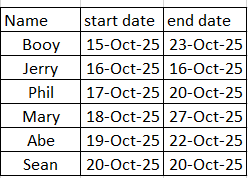
I hope i can explain this right, i have data that shows 3 things: person, start date and end date: now i need excel to take this information and represent it as the following in the month tracker: It would look for the charts and figure out the timeline and add them to a row with the timeframe: example is Booy 15-0ct-25 to 23-oct-25 the char would go to the next one and add his information, I hope someone can help me. I just need it to populate the month tracker, ThankshackbitJan 15, 2026Copper Contributor185Views0likes4Comments


Resources
Tags
- excel43,525 Topics
- Formulas and Functions25,228 Topics
- Macros and VBA6,532 Topics
- office 3656,256 Topics
- Excel on Mac2,710 Topics
- BI & Data Analysis2,461 Topics
- Excel for web1,992 Topics
- Formulas & Functions1,716 Topics
- Need Help1,703 Topics
- Charting1,682 Topics