

Forum Widgets
Latest Discussions

If formula based on cell value
Not sure if an "IF" formula is the right one needed here, but this is what I am trying to do. In cell B9, I want text to display based on what is in cell I6. I have I6 set up as a list of one of the following AS, EA and PI (acronyms for Assemblies, Each and Per Install) I am trying to get the worksheet to do the following If I6 is blank, I want B9 to read "Select Unit" if I6 is AS, I want B9 to read "Assemblies" if I6 is EA, I want B9 to read "EACH" if I6 is PI, I want B9 to read "Installs" This is what I started with, but I cannot figure out how to include the rest of the conditions - =IF(I6="AS","Assemblies","Select Unit") Any help would be appreciated. Thanks,neilm1Jul 22, 2026Occasional Reader10Views0likes1CommentCurrency Formatting adding additional periods to number
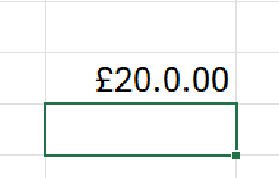
Hi, This has started happening on Excel and its baffling me so I thought I'd reach out to the community to see anyone can help. This is Excel v2606 (M365) with latest updates. Issue: I have a new work book and in a cell I simply add the number 20 I right click the cell with the 20 in it and select "Format Cells.." and change it to currency and this happens If I go back into "Format Cells" the selection has moved from Currency to Custom and it shows this: And clicking on Currency the format is shown as this: No matter what I do I can't get it to format correctly, if I change the format back to "General" it goes back to being 20. I've tried doing an online repair and that hasn't had any affect. Any help gratefully received. RobRob-CTLJul 22, 2026Iron Contributor17Views0likes2Commentshow to ignore conditional formatting for a cell that is not empty but invisible (cell format ;;;)
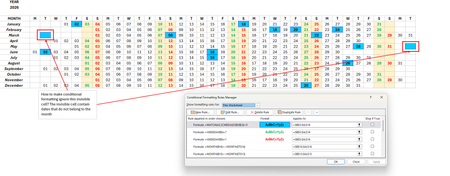
hi, i need help with a conditional formatting of cells that are not empty but invisible (cell format to ;;; (invisible)). I have a calendar where the dates are invisible (outside of the month) but the cell formatting applies to it (cuz it is that date, i.e., public holiday). i have attached the screenshots and i hope someone can help me out. thank you so much. regards, angelenghietan1986Jul 22, 2026Copper Contributor83Views0likes4Comments
chart change
I have an excel spreadsheet with several tabs. 4 of those tabs have charts. On my first chart, the information is no longer displaying correctly. I have deleted and readded, compared formating, used google. I cannot figure out why it is different. Only one of my chart lines is showing, the rest are so small I can barely see them and the heading color key won't display. - If I post this twice, apologies, I backed out accidentallyAShell23Jul 22, 2026Copper Contributor37Views0likes2Comments
currency format Excel 360
I highlight a column and click on the format for "currency" and choose options for use 2 decimal places, show dollar sign, then for negative number, no minus sign, no red. Aside from the currency format tab, I choose to format the column in red and bolded using the "home" button. The problem is this format is inconsistently applied. Sometimes it shows a leading minus sign, sometimes it shows a hidden minus sign, and sometimes there is no minus sign at all. This causes me problems when I try to total a column by highlighting it and looking on the lower right for the value. Why is it doing this and how can i stop it?KimC1Jul 22, 2026Copper Contributor34Views0likes3CommentsSpacing on stacked bar charts
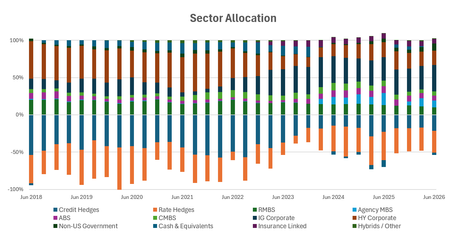
Hi all, I searched for a solution, but changing to 'text' axis doesn't work and that's the only solution I have seen offered. Issue: When using a date axis, there is too much white space / bars are too skinny to be legible despite gap width set all the way at 0. When switching to a text axis, the bar spacing is perfect, but the spacing between dates are at times nonsensical or for some reason it thinks the range is way different than what is highlighted. Here is how the data is highlighted, I only hid columns to make the picture a reasonably proportion the screenshots from above are when no columns are hidden. Is there a way to re-scale the gap-width when using a data axis to effectively to go something like -50%? Or to somehow manipulate the range and the months between labels when using a text axis? Thank you for the help. MattExcellerator1Jul 22, 2026Copper Contributor62Views1like5Comments
Excel Copilot fails when local workbook filename contains #
Excel Copilot does not work with locally stored workbooks whose filename contains the '#' character. The same workbook works correctly after renaming the file to remove '#'. The same workbook also works when stored on OneDrive with '#' in the filename. The issue appears specific to local files and filename parsing. Specifically, when clicking on Copilot in Excel, Copilot says "This file type is not supported for editing with Copilot. Please save this file as a modern file format, such as ".xlsx", to be able to edit it with Copilot." Interestingly, Copilot works fine if the Excel file name contains, for example, % or &, the problem only occurs if the name contains #. We suspect this is a bug. In our workflows, we work a lot with files that have # in their names and we would be very happy if this was indeed a bug and if it was fixed. Tnx.Elvis-19Jul 22, 2026Occasional Reader3Views0likes0Comments
Stock symbol SKHY is missing in Excel's Stock data type
I have been frustrated trying to report a stock ticker symbol that is missing from Excel's Stock data type. SKHY is the ticker symbol for SK HYNIX INC ADR on NASDAQ. Excel responds with the following error when attempting to convert this symbol to a Stock data type: Data Type: Stocks No results found for "SKHY". How do I report this issue so that it can be fixed?Carl32351Jul 21, 2026Copper Contributor60Views0likes3Comments
Which postal codes are available on cartogram chart
I want to show some data on the cartogram chart - thousands of records which belong to certain postal codes. Basically this works fine using the cartogram chart. I have a Country row, postal code row and a value row. The problem is that some postal codes are not known (Germany and Austria) but they are found in e.g. USA (even though I do use the country row). This makes the chart impossible to use because instead of Germany I see nearly the whole world. Land PLZ Wert Deutschland 80331 20 Deutschland 80333 20 Deutschland 80335 20 Deutschland 80336 20 Deutschland 80337 20 Deutschland 80339 20 Deutschland 80469 20 Deutschland 80538 20 Deutschland 80539 20 Deutschland 80634 20 Deutschland 80636 20 Deutschland 80637 20 Deutschland 80638 20 Deutschland 80639 20 Deutschland 80686 20 Deutschland 80687 20 Deutschland 80689 20 Deutschland 80796 20 Deutschland 80797 20 Deutschland 80798 20 Deutschland 80799 20 Deutschland 80801 20 Deutschland 80802 20 Deutschland 80803 20 Deutschland 80804 20 Deutschland 80805 20 Deutschland 80807 20 Deutschland 80809 20 Deutschland 80933 20 Deutschland 80935 20 Deutschland 80937 20 Deutschland 80939 20 Deutschland 80992 20 Deutschland 80993 20 Deutschland 80995 20 Deutschland 80997 20 Deutschland 80999 20 Deutschland 81241 2 Deutschland 81243 2 Deutschland 81245 2 The above data works nice - but change the postal code from e.g. 81243 to 81242... Any hint how to either remove not working postal codes or show just Germany/Austria on the cartogram chart?MTrummerJul 21, 2026Copper Contributor509Views1like1Comment


Tags
- excel43,890 Topics
- Formulas and Functions25,397 Topics
- Macros and VBA6,571 Topics
- office 3656,340 Topics
- Excel on Mac2,746 Topics
- BI & Data Analysis2,491 Topics
- Excel for web2,016 Topics
- Formulas & Functions1,716 Topics
- Need Help1,703 Topics
- Charting1,702 Topics