

Forum Widgets
Latest Discussions

Need help with conditional fomatting formula based in text on cells
Hi everyone, I have a list of owners' names in column C. C2 contains 1+1 CAR CORPORATION C3 contains 8-J ENTERPRISES, LLC C4 contains LOYD RENTALS LLC C5 contains SMITH PAUL & PAULA C6 contains DOE JHON & JANE C7 contains MENENDEZ JAMES C8 contains BROWN INVESTMENTS, INC. And so on I'd like to highlight the whole row for the cells that have CORPORATION, LLC, INC, ENTERPRISES in their names. Hope this makes sense and someone can help me. Thank you.jai_v327Dec 06, 2025Copper Contributor16Views0likes2Comments OliverScheurichDec 06, 2025Gold Contributor44Views0likes1Comment
Trying to insert Pivot Table
I recorded a new macro, using the tab View Macros-Record Macro, which resulted in the following VBA code: Sub CreatePivotTable() Sheets("Year Data").Select Range("A3:F24").Select ActiveWorkbook.PivotCaches.Create(SourceType:=xlDatabase, SourceData:= _ "Year Data!R3C1:R24C6", Version:=xlPivotTableVersion14).CreatePivotTable _ TableDestination:="Yearly Summary!R3C1", TableName:="PivotTable3", _ DefaultVersion:=xlPivotTableVersion14 Sheets("Yearly Summary").Select Cells(3, 1).Select End Sub The recording did exactly as I wanted, taking the data from the "Year Data" WS and adding the new pivot table to the "Yearly Summary" WS. As a test of the macro, I deleted the initial pivot table that was created on the "Yearly Summary" WS. The problem I have now, when I attempt to run this macro again it constantly fails on the 4th line of the macro with Run-time error '5': Invalid procedure call or argument. ActiveWorkbook.PivotCaches.Create(SourceType:=xlDatabase, SourceData:= _ "Year Data!R3C1:R24C6", Version:=xlPivotTableVersion14).CreatePivotTable _ TableDestination:="Yearly Summary!R3C1", TableName:="PivotTable3", _ DefaultVersion:=xlPivotTableVersion14 I cannot figure out why it works when I am recording the macro but fails when I try to run it alone. Help is greatly appreciated.WIllowEDDec 05, 2025Occasional Reader21Views0likes0Comments
formula Excel help
In tab 1, I have three columns on row 2 F, G and H (representing first name, second name and family name) In tab 2, I want to import column F, G and H combined in one single cell. I have tried =IF(Import!F2="";"";Import!F2)+IF(Import!G2="";"";Import!G2)+IF(Import!H2="";"";Import!H2) but result wrong #VALUE! What is the correct formula ?Huub_MaasDec 05, 2025Copper Contributor40Views0likes3Comments
Linking a cell from a OneDrive excel sheet to another OneDrive excel sheet in different workbooks
Hi, I'm trying to make a cell in sheet A of workbook 1 display the cell from sheet X in workbook 2. Both workbooks are in the same parent folder with different sub folders. I want all this to be done with OneDrive apps, not desktop app. Any help would be greatly appreciated! ThanksZachary1999Dec 05, 2025Copper Contributor9.5KViews0likes2Comments
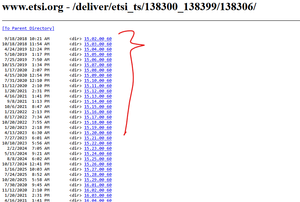
How to write a script or any PQ or in Excel to download the zip files from a Webpage
Dear Experts, Greetings! https://www.etsi.org/deliver/etsi_ts/138300_138399/138306/ Could you please help me on how to download the pdf.zip files from above for all the versions? Using a single command in Excel or PQ-option. Thanks in Advance, Br, Anupam77Views0likes1Comment
Specific Rounding Rules
Howdy! My job has a bit of a weird rule for their rounding technique. I was curious if there is a way I can format my cells or write a function that allows for it. The rule is as follows: If the number your rounding is proceeded by a 5, instead of rounding up, you look at the number being rounded. If it is even, you rounding down else you round up. Basically you want the number your rounding to remain at an even number if it's being rounded by 5. Is there a way to get this rule into excel? Thanks in advance for the help!DonR1299Dec 05, 2025Occasional Reader57Views0likes5CommentsExcel specific text search in one cell
Hello Excel Profs, i am searching for a way how to search in an excel sheet for a specific text AND mark/highlight this part. With the normal search function the cell is selected but not the specific text. Tried several functions (vlookup, xlookup, hlookup, match, xmatch, conditional fomat etc) but unfortunately without the succes. Can somebody help me with this? many thanks in advanceSolvedgijsvancuijkDec 05, 2025Copper Contributor2.3KViews1like5Comments
#Name? error in a formula adjusted for circular reference
How can I solve #Name? error in formula: =H2+(I2*Parameters_2026!$G$1)+(I2*Parameters_2026!$G$3)+(I2*Parameters_2026!$G$5)+((I2-I2*Parameters_2026!$G$1-I2*Parameters_2026!$G$3)*İNDEX(Parameters_2026!$C$3:$C$7;MATCH(MAX(I2;1);Parameters_2026!$A$3:$A$7;1))). Where: H2 → Net Salary I2 → Gross Salary (to be calculated iteratively) Parameters_2026!$G$1 → Employee Social Insurance Rate (0,14 of Gross Salary) Parameters_2026!$G$3 → Employee Unemployment Insurance Rate (0,01 of Gross Salary) Parameters_2026!$G$5 → Stamp Tax Rate (0,00759 of Gross Salary) INDEX + MATCH → Finds income tax rate (range C3:C7) applicable for Gross Salary amount (A3:A7 range) Iterative calculation enabled for Maximum Iterations: 1000 and Maximum Change: 0.000001. Thank you in advanceKpamuksuzDec 05, 2025Copper Contributor8Views0likes0CommentsFormula help
I have the following formula that partially works. It processes this formula and returns the 1st match based on the formula criteria. =IFERROR( LET( KeyTypes,FILTER('Key Log'!$F$4:$F$309,(TRIM('Key Log'!$A$4:$A$309)=TRIM($D$6))*(TRIM('Key Log'!$C$4:$C$309)=TRIM($K$15))), KeyNums,FILTER('Key Log'!$K$4:$K$309,(TRIM('Key Log'!$A$4:$A$309)=TRIM($D$6))*(TRIM('Key Log'!$C$4:$C$309)=TRIM($K$15))), IF(INDEX(KeyTypes,ROW(A1))="Hard Key","V"&INDEX(KeyNums,ROW(A1)),INDEX(KeyNums,ROW(A1))) ),"") This formula resides in cells A8:A18 which is designed to return a key number, whether the key be a swipe key or a hard key. Cells B8:B18 are for descriptions of the key identified in cells A8:A18. This formula is supposed to find the 1st match on the key log and then find any other matches and place them in cells A8:A18. There is another formula for defining the description based on criteria. I need this formula to search out all transactions on the key log that match the ID number on the Key Issue Form in cell D6 with the cells in column A on the ID number and to also match the room number from K15 on the Key Issue Form with the room number in column C on the key log. There is something missing from this formula that is not allowing the other transactions to be found and listed on the Key Issue Form. Can anyone help me complete this formula? This is the formula for B8:B18 =IF(A8="","", LET( FilteredRows,FILTER(SEQUENCE(ROWS('Key Log'!$A$4:$A$309)),('Key Log'!$A$4:$A$309=$D$6)*('Key Log'!$C$4:$C$309=$K$15)), RowNum,INDEX(FilteredRows,ROW(A1)), Room,INDEX('Key Log'!$C$4:$C$309,RowNum), Status,INDEX('Key Log'!$E$4:$E$309,RowNum), Type,INDEX('Key Log'!$F$4:$F$309,RowNum), DateVal,INDEX('Key Log'!$D$4:$D$309,RowNum), IsAB,OR(RIGHT(Room,1)="A",RIGHT(Room,1)="B"), DoorDesc,IF(IsAB,"Combined Main & Room Door","Main Door"), KeyDesc,IF(Type="Swipe Key","Swipe Key","Hard Key"), DoorDesc & " " Can someone help me figure this out? CarlCarl_61Dec 05, 2025Iron Contributor116Views0likes4Comments


Resources
Tags
- excel43,422 Topics
- Formulas and Functions25,172 Topics
- Macros and VBA6,518 Topics
- office 3656,225 Topics
- Excel on Mac2,699 Topics
- BI & Data Analysis2,446 Topics
- Excel for web1,981 Topics
- Formulas & Functions1,716 Topics
- Need Help1,703 Topics
- Charting1,679 Topics