

Forum Widgets
Latest Discussions
Welcome to the Excel Community
The Excel Community is a place we've built for all of you. You can learn more about how to do something with Excel, discuss your work, and connect with experts that build and use the product. With over half a billion Excel customers, we want to engage with you in fundamentally different ways and the community is a starting point for that. Our community helps answer your product questions with responses from other knowledgeable community members. We love hearing feedback and feature requests from you which helps us build the best version of Excel ever. If you have found an outage or a bug please post at our Answers forum. We look forward to getting to know you! Sangeeta Mudnal & Olaf Hubel on behalf of the Excel TeamSangeeta MudnalJan 15, 2026Former Employee63KViews30likes85Comments
Summary sheet, copy entire row if a cell criteria is met
https://arengio-my.sharepoint.com/:x:/g/personal/melanie_stokes_areng_io/IQC2OhPfZnKEQL6qfPj11gqfAQSh8Em3Zp95fkYbLBTZc3g?e=oNU1pEHi Can you please help me, I have a schedule for jobcards, each tab is a book that is given to someone, if that specific jobcard is invoices, then in column T where it says "Incomplete", I want that entire row to be copied to the "Outstanding Jobcards"tab. As a new book is handed out, a new tab is create and the tab is named according to the book sequence. This is updated daily as jobcards are being invoiced.20Views0likes1Comment
Variable "Connecting to Datasource" Load times
Hello, I am running into a strange issue that I am not sure how to solve. I am using Power Query to link to external Excel data files/Sheets and then I process the data within Power Query and also have some Macros that run after the data is refreshed. I am seeing a drastic difference in the amount of time it takes separate users to open/refresh this file (the users have the same internet connection, use the same link to the file on a Shared Drive on our servers, same Excel settings, and have the same hardware). Some users can load and run all Macros in < 15 seconds, while the others take > 10 minutes. I have exhausted all possible causes/reasons that I can think of and am looking for some guidance. Any and all suggestions are appreciated! Thanks, Skywalker_Skywalker_Jan 15, 2026Occasional Reader23Views0likes1CommentTop n vs. Others in Excel
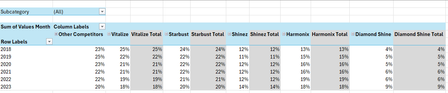
Hi all, I'm seeking some help because I'm kind of new to the more intermediate stuff in Excel. I have an Excel table with the following columns: Subcategory in column A, Brand in column B, Region in column C, Year in column D and Values Month in column E. I want to create a PivotTable and a Pivot line chart from this PivotTable that ranks the Top 5 Brands vs. Other Competitors by each region. For added context: There are 5 subcategories, 3 regions and 25 brands. Currently, I've tried grouping the remaining 20 brands as "Other Competitors" vs. the Top 5 brands within a selected region and possibly all regions (when no selection is made). I'm seeking a solution similar to this... Please mind the colours. I will sort those out later. But, the problem that I'm faced with is that upon selection of a region, the PivotTable won't update to the Top 5 brands of a selected region because they've already been grouped. How can I make this more dynamic so that I'm able to show The Top 5 brands vs. Others? Please help. EDIT: My operating system is Windows 10 (64-bit) and I use Excel 365 (Desktop version). For reference, I've attached a link to a sample file. https://1drv.ms/x/c/b2d878e32a062614/IQC1wcnwLICcQasOfnGcwKn0ASjpXp9xQ6rjnOP10Jal5cc?e=HaXEWd Thank you all once again.SolvedAnonymous29007Jan 15, 2026Copper Contributor250Views2likes9CommentsHelp with data and visuals
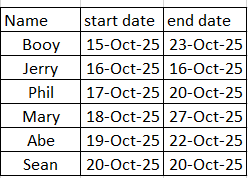
I hope i can explain this right, i have data that shows 3 things: person, start date and end date: now i need excel to take this information and represent it as the following in the month tracker: It would look for the charts and figure out the timeline and add them to a row with the timeframe: example is Booy 15-0ct-25 to 23-oct-25 the char would go to the next one and add his information, I hope someone can help me. I just need it to populate the month tracker, ThankshackbitJan 15, 2026Copper Contributor181Views0likes4Comments
Too thick/fat gridlines when printing from excel
When I print a spreadsheet where I have selected/marked for gridlines, the gridlines become much thicker than they should be. They have the same thickness as the cells I have given borders. On the screen everything looks correct. The problem is only on the printout. I get the same problem no matter which printer I choose (has nothing to do with the printer driver). I have the latest operating system and drivers.OivindJan 15, 2026Copper Contributor182Views0likes2Comments
Dynamic array formula call with spill range input parameter crashes Excel; legacy array call works
Hi, I have a workbook with a dynamic range formula call referencing a spill range that worked last week but is suddenly causing excel to crash this week when using a full worksheet re-calc on a specific machine. This workbook works on multiple other machines but something on that machine is causing this formula to break. 1) Excel version is 2211 (Build 15831.20208 Click-to-run). I have tried an excel repair already on that specific machine. 2) Shift+F9 on the offending worksheet hangs excel with the status bar showing: "calculating (spill resize pass 1)" stuck at 66%. Pressing escape allows me to regain control, but a subsequent Shift+F9 crashes the excel process entirely. 3) The legacy Ctrl+Shift+Enter method of using the formula with a defined output range allows Shift+F9 to work on that worksheet without any issue. 4) Calculating the rest of the page separately without the offending formula, then inputting the offending dynamic range formula also works. 5) Other machines on the identical version of Excel recalculate the sheet instantaneously. 5) I've tried to disable things such as endpoint security services to no avail. Is there anyone who has encountered this behavior before and/or can tell me how to diagnose better the issue?BeastianJan 15, 2026Copper Contributor3KViews0likes5CommentsDisplay Last Value in Column when certain criteria match
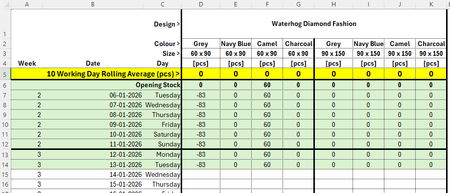
Hello all, I am trying to find a way of displaying the last value in a column when certain criteria match... Criteria that need to match would be Design, Colour and Size, so the quantity column would populate with the latest stock quantity: Thanks all! MichaelmbanksJan 15, 2026Copper Contributor87Views0likes3Comments
Help with Excel Sorting
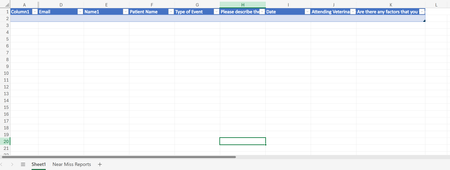
Hello! I am looking for help with sorting data on a sheet with form responses to different excel sheets. I want to filter by column G to different sheets ("Near Miss", "Adverse Event", "Sentinel Event". The data automatically goes to sheet1 via form responses, but I am trying to streamline the data into specific types of events. I'm using office 365. TIA!ahawaii87Jan 14, 2026Copper Contributor37Views0likes1CommentLoss carry forward for limited years
Hello Excel Community, Excel Version: O365 (Enterprise) I’m running into a mental block trying to model loss carryforward with limited years using a spill formula. Below is a simplified example of what I’m trying to build a formula for. Rules: • A loss from any year can be carried forward for N years, after which it expires and can no longer be used. • In any year with a positive tax liability, if there is any remaining loss from the past N years, you deduct using a FIFO approach (oldest losses used first). • Any unclaimed balance from year N+1 expires, even if it hasn’t been fully used. I’ve found plenty of examples showing loss carryforward without expiration, but I’m struggling to build something that handles both FIFO and expiration in a dynamic array formula. I feel like this must be a solved problem and I’m just missing something obvious. Any help would be greatly appreciated! ------------------------------------------------------------------------------------------papa_austinJan 14, 2026Copper Contributor25Views0likes0Comments

Resources
Tags
- excel43,523 Topics
- Formulas and Functions25,228 Topics
- Macros and VBA6,532 Topics
- office 3656,256 Topics
- Excel on Mac2,710 Topics
- BI & Data Analysis2,461 Topics
- Excel for web1,992 Topics
- Formulas & Functions1,716 Topics
- Need Help1,703 Topics
- Charting1,682 Topics