Forum Widgets
Latest Discussions

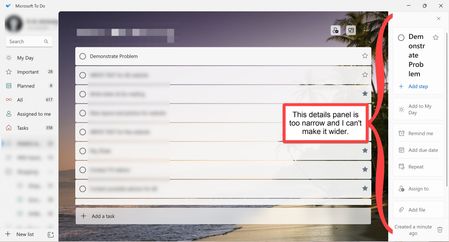
The details panel in Microsoft To Do is too narrow and I can't make it wider
A few months ago, something happened to my instance of Microsoft To Do. The "Details Panel" (I think that is the name) that appears on the right side of the screen when a task is selected is too narrow to even accommodate words more than a few letters long. (See photo) The only way I know to adjust this is to place the pointer along the border between the Details Panel and the Task List until it becomes a double arrowhead. However, while this feature ought to permit me to adjust the width of the Details Panel, it is now non-functional. Does anyone have any idea how can I fix this?remcnultyApr 01, 2026Copper Contributor630Views0likes1Comment
Steps initially show only first line of text
Currently and for the past year+ on Microsoft To Do Web, after selecting any List, the initial view of the Steps within a Task, only shows the first line of text in each Step. If I select a different Task within the same List and then reselect the original Task, the Steps within display all of the lines of wrapped text. This occurs using both MS Edge and Google Chrome. I rebuild my computer from a new Windows 11 ISO after stripping my SSD to zero partitions last week and this is still a problem. It would be really great if we could get this fixed.Scott_WigginsMar 22, 2026Copper Contributor199Views0likes5CommentsMicrosoft ToDo Retention policy
When I add tasks to my ToDo lists through Outlook or the ToDo app, the tasks stay for about 2 weeks and then after that, they are moved into an online archive folder, but do not show up in the ToDo app. Is there a way to either: Change the retention policy to only move completed todo items to the archive. or Show all tasks from the online archive in the ToDo app. Currently, I have to manually move the uncompleted ToDo items from the online archive back to the original location. This is extremely inconvenient.JDavid1615Mar 21, 2026Copper Contributor3.3KViews1like2Comments
Colours within task notes
Hello, I noticed that when copying text from elsewhere, it does copy the colors, but I cannot find any way of replicating this myself. Are there tags or markers to use to be able to use colours (red or green or blue) when writing? It does seem like the notes can support them since they do stay without any issue when copied from elsewhere. Thanks for your helpLBouguetMar 10, 2026Copper Contributor25Views1like0Comments
To Do: scrolling bug
You can’t scroll all the way down in longer notes anymore in the Android app. The keyboard covers part of the note. I already tried to update it an reinstall it. Many users have this problem. This makes the app almost unusable. I'm on OneUi 7. I attached a screenshot with a transparent keyboard.kopaturexMar 03, 2026Copper Contributor56Views0likes0Comments
Feature Asymmetry
Does anyone else find the feature asymmetry between the web & android versions to be a little odd? Also everything feels stagnant like all the To Do engineers moved to the Copilot Team (haha, but no really :) Categories is the biggest oddity. It's been on web to-do for years now. Then there's the sorting differences between web & android. Android actually has more sorting capabilities? That seems wierd. And last but not least... The web version kinda retained the old (and quite magical) "To Do" view of: Today Tomorrow This Week Next Week (this was so useful, why'd you remove it?!? Later What I struggle with is these are core features to task management as they exist on every other platform, and they all originally existed in Outlook! Strange that the phone l app and the web app (presumably using the same back-end APIs) have such different usability.jeffhoward01Mar 02, 2026Copper Contributor36Views0likes0Comments
Email notifications when a new TO DO task is assigned to me?
Hi, I just started using Microsoft To Do as a shared task manager with my team and we created a shared list of tasks so we can all be on the same page. However, I'm trying to figure out if it's possible for team members to receive an EMAIL notification when a there is a new task assigned to them. I did turn on notifications for "shared list activity" but I'm not receiving any notifications or emails. Any insight would be much appreciated!SionSemahFeb 18, 2026Copper Contributor11KViews2likes2CommentsMicrosoft To Do: Problems with the Bell Sound
I love this app. It's easy to use and the sound it makes when I complete a task is amazing. My sounds have recently stopped working however and I am very disappointed. No matter how many times I turn them on and off in the preferences there is no change in the app. Does anyone have any recommendations? The number one reason I use this app is because of the sounds it makes. I use it with an iMac (my os is Catalina) in case this can help.oliviabrownFeb 04, 2026Copper Contributor34KViews2likes21CommentsMicrosoft TO DO language Change
Hello All, we are worked under cloud workplace , one of our user using MS to do application in his laptop all of sudden her MS to DO language change to turkey and this is happened for only one user , please help. Steps taken; 1.change the windows language and checked 2.checked and changed the browser language but no luck thanks in advanceKannanR279Feb 02, 2026Copper Contributor40KViews1like10Comments

Tags
- To Do27 Topics
- ToDo23 Topics
- To-Do12 Topics
- Microsoft To Do12 Topics
- Tasks8 Topics
- My Day7 Topics
- productivity6 Topics
- request6 Topics
- To Do web5 Topics
- Sync5 Topics