microsoft to do
14 Topics
All my unassigned tasks vanished overnight
Hi, about 300 of my unassigned tasks -those not on lists- vanished overnight. All of them. My tasks on lists seem to be all there. The previous day, I was doing cleaning on that list, since the android app stopped synching, and it was sluggish before that. I had over 50000 completed tasks on that list. I moved those 300 uncomplete tasks to a temporary list, deleted all completed tasks, then moved those 300 back, and deleted the temprorary list. I most definitely did not delete those 300 tasks in question, and I checked hours before going to bed and going to bed that on my phone, in the desktop app and in my desktop browser they were all present and in synch, and addings tasks was very snappy and synched across devices. Official chat was completely useless and I couldn't even reach or be connected to anybody in the correct department after banging my head against a wall for an hour. I have little hope of fixing this, but is there anything I can do, or should I just finally bail out of using this buggy mess of a software? Thanks196Views0likes1CommentTasks sync failure - Outlook web vs mobile Outlook vs desktop Outlook
--- # 📄 **Technical Report: Persistent Outlook Web App Sync Failure Affecting Microsoft To Do / Outlook Tasks Ecosystem** **Issue Duration:** At least 3 months probably more **Platforms Affected:** - Microsoft To Do (Android) - Outlook Tasks (Windows Desktop Outlook) - Outlook Tasks (Outlook Web App) - Exchange Online (backend sync service) --- ## 1. **Executive Summary** I have experience **persistent, intermittent, and platform‑specific synchronization failures** within the Microsoft To Do / Outlook Tasks ecosystem. The critical finding is: ### **The Outlook Web App is often isolated and does not sync with any other platform.** Meanwhile: - **Windows Desktop Outlook ↔ Android To Do sync perfectly in both directions.** - **Outlook Web App ↔ (Desktop / Android)** do not sync. This isolates the issue to the **web app’s sync pipeline**, not the task data, not the account, and not the other apps. The failures present as: - **“Synchronization in progress”** stuck indefinitely - **“Synchronization failed”** when manually attempting sync - Web app showing **stale, outdated, or incomplete task lists** - Web app failing to send or receive updates from Exchange Online The same tasks that fail to sync for hours later sync successfully without any modification, proving the data is not corrupted and the failure is backend‑related. --- ## 1.1 **Cross‑Platform Sync Behavior (Critical Diagnostic Insight)** ### ✔ **Windows Desktop Outlook ↔ Android To Do** - Full two‑way sync - Immediate updates - Reliable and consistent ### ✖ **Outlook Web App ↔ Desktop Outlook** - No sync in either direction ### ✖ **Outlook Web App ↔ Android To Do** - No sync in either direction ### ✖ **Outlook Web App ↔ Exchange Online** - Appears to be failing or stalling This proves the web app is **not participating in the sync ecosystem**. --- ## 2. **Symptoms Observed** ### 2.1 **Outlook Web App** - Sync button stuck on **“Synchronization in progress”** for hours - Manual sync results in **“Synchronization failed”** - Web app shows outdated task lists - Web app does not receive updates from desktop or mobile - Web app does not send updates to desktop or mobile ### 2.2 **Android To Do** - Tasks created on Android do not appear in the web app - Tasks created in the web app do not appear on Android - Edits fail to propagate to the web app - Manual sync does not resolve the issue - Logout/login sometimes helps, inconsistently ### 2.3 **Windows Desktop Outlook** - Syncs perfectly with Android - Does not sync with the web app - Shows correct, up‑to‑date task data ### 2.4 **Platform Sync Matrix** | Action | Desktop Outlook | Android To Do | Outlook Web App | |--------|-----------------|---------------|------------------| | Create/edit task on **Desktop** | ✔ Syncs to Android | ✔ | ✖ No sync to Web | | Create/edit task on **Android** | ✔ Syncs to Desktop | ✔ | ✖ No sync to Web | | Create/edit task on **Web** | ✖ No sync to Desktop | ✖ | ✔ Stays only on Web | **Conclusion:** The Outlook Web App is **fully isolated** from Exchange Online’s task sync pipeline. --- ## 3. **Troubleshooting Steps Already Attempted** ### 3.1 **Web App** - Hard refresh (Ctrl + Shift + R) - Full browser cache clear - Logout → close browser → reopen → login - Switching lists to force metadata reload - Creating tasks to trigger sync events - Deleting tasks to force backend updates ### 3.2 **Android** - Manual sync - Clear cache - Logout/login - Device restart - Network switching - Creating/completing tasks to trigger sync ### 3.3 **Desktop Outlook** - Verified account health - Verified Exchange Online connectivity - Verified task folder integrity ### 3.4 **Account / Backend** - Verified Microsoft Account stability - Verified no multi‑account conflicts - Verified Exchange Online service health None of these steps produce consistent or lasting resolution. --- ## 4. **Frequency and Pattern** - Occurs multiple times per week - Occurs regardless of recent task edits - Occurs across multiple browsers - Occurs across multiple Android versions - Sync resumes randomly after hours - Sync resumes without any data changes - Sync resumes after logout/login, but inconsistently This pattern strongly suggests **backend sync token stalling**. --- ## 5. **Technical Analysis** ### 5.1 **Two‑Way Sync Failure Confined to Web App** Because: - Desktop ↔ Android works - Web ↔ (Desktop / Android) fails The failure is isolated to the **web app’s connection to Exchange Online**. ### 5.2 **Sync Token Stalling (Most Likely Cause)** Symptoms match known sync token stall behavior: - Endless “Synchronization in progress” - Manual sync fails - Sync resumes randomly - Sync resumes after forced metadata refresh - Sync resumes after unrelated actions (e.g., completing a task) ### 5.3 **Not a Corrupted Task Issue** Because the same tasks later sync successfully: - No malformed tasks - No unsupported metadata - No blocked sync queue - No corrupted lists ### 5.4 **Backend Sync Pipeline Instability** The pipeline: **Web App → Microsoft Sync Service → Exchange Online → Desktop / Android** appears to be failing at the **first hop** (web app → sync service). ### 5.5 **Web App Lacks Retry Logic** The web app provides: - No manual retry - No way to cancel a stuck sync - No way to reset sync session - No way to regenerate sync token Thus, when the backend stalls, the web app remains stuck indefinitely. ### 5.6 **Android Background Sync Not the Cause** Android is syncing perfectly with desktop Outlook, proving Android is not the source of the issue. ### 5.7 **Web App Sync Isolation (New Insight)** The web app is the **only** platform failing to communicate with Exchange Online. This is now clearly a **web‑app‑specific sync session failure**, not a multi‑platform issue. --- ## 6. **Impact** - Tasks frequently out of sync - Web app becomes unusable for task management - Daily workflow disrupted - Manual intervention required multiple times per week - Task state inconsistent across platforms - Reduced confidence in Microsoft To Do as a reliable ecosystem --- ## 7. **Requested Assistance** ### 7.1 **Engineering‑Level Investigation** Specifically into: - Outlook Web App sync token behavior - Web app → Exchange Online sync session stability - Backend retry logic - Web app sync error handling - Web app task API connectivity ### 7.2 **Diagnostic Tools** If available: - Sync session logs - Sync token status - Task metadata inspection tools - Backend queue visibility - Error codes beyond “Synchronization failed” ### 7.3 **Known Issues** Requesting documentation on: - Known To Do / Outlook Web sync token stalls - Known Exchange Online sync delays - Known intermittent sync failures - Known web app pipeline instability ### 7.4 **Confirmation Whether This Is a Known Issue** Given the duration and reproducibility, this appears to be a **backend‑level web app sync failure**. ### 7.5 **Request for Web App Sync Session Reset** Specifically: - Manual reset of the web app’s sync session - Forced regeneration of sync token - Flush of stuck sync queues - Verification of web app’s Exchange Online connectivity --- ## 8. **Evidence Available** I can provide: - Screenshots of “Synchronization failed” - Screenshots of “Synchronization in progress” - Timeline of sync failures - Android device logs - Browser console logs --- ## 9. **Conclusion** This is a **persistent, platform‑specific sync failure** affecting only the Outlook Web App. Desktop Outlook and Android To Do sync perfectly, proving the backend and data are healthy. The web app is isolated and failing to communicate with Exchange Online. I am requesting **engineering‑level support** to reset or repair the web app’s sync session and investigate the underlying cause. ---Solved267Views0likes1Comment
Microsoft TO DO language Change
Hello All, we are worked under cloud workplace , one of our user using MS to do application in his laptop all of sudden her MS to DO language change to turkey and this is happened for only one user , please help. Steps taken; 1.change the windows language and checked 2.checked and changed the browser language but no luck thanks in advance41KViews1like11Comments
Teilen von Listen Microsoft To Do nicht mehr möglich
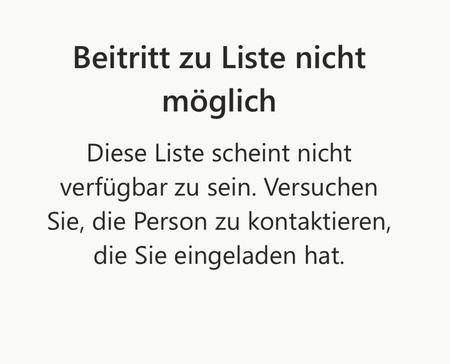
Hi everyone, I've been using Microsoft To Do for years and have always been able to share lists with my family. Now, when I send my wife or son an invitation link, they get an error message saying the list isn't available and they can't join. Here's what I've tried so far: I created a new invitation link and confirmed they're signed in with their Microsoft accounts. I tried using the app on their iPad or iPhone, and also on my MacBook. I checked if the list still exists. Despite all this, sharing still doesn't work. Has something changed with To Do sharing? Is there a new requirement or setting I need to enable? The error message attached. Translated: Any help would be greatly appreciated! Thank you in advance. Best regards Martin501Views4likes5Comments
To Do Task Details Not Showing
When I am in To Do, I can only add and complete tasks. I no longer have the option to click in and see details, add notes, or edit titles. I can see the area they are supposed to pop up in, but I can't expand the side window or see any information.221Views0likes0Comments
Outlook Task Not Syncing With MS To do
Anyone experience issue with not able to sync their task from outlook to to do? The today task and old task from Outlook not showing in To do web. I'm using the outlook app and To do web. I tried to click on sync button from todo but it still did not sync.1.2KViews0likes1Comment
!!!!!!! how to Create a To Do from Microsoft Edge???? Is this really not an option??
I am a wee bit frustrated, there HAS TO BE a way to save a web page in MS Edge into To Do, I have searched high and low and the only thing I can find are third party edge extensions. Anyone have insight or a work around? its driving me CRAZY!!1KViews1like2Comments
There is no flagged email option in connected apps section of MS ToDo
Hello everyone. I am trying to connect outlook tasks to the ToDo app. After reading some support pages, I found out that I should enable the flagged email option in the connected apps section of the MS ToDo settings. The problem is that there is only one option, planner, in that section. I've tested windows and web apps. But the settings are the same.6KViews0likes14Comments
All my tasks have gone
So today I added a few new tasks to my To Do list on the webapp, upon creating these the webapp advised me I needed to refresh the webapp to sync my data to my calendar. After selecting this and when the webapp refresh all of my tasks including the tasks I just created where gone. The weird thing is it must be stored somewhere because when I go to My Day and click on the suggestions pane, the tasks I created today are on there however I am unable to add them to by day when I click on them. Has anyone experienced this before and know how I can restore all of my tasks, both outstanding and completed? UPDATE: I can see the tasks in the To Do outlook but still unable to see these in the To Do webapp2.1KViews1like0Comments