Recent Discussions

Edge Password Manager keeps passwords cleartext at runtime — misaligned with Chromium (CWE-316)
Microsoft Edge is a strong Chromium‑based browser, and its Password Manager is promoted as a secure, integrated solution. However, its current runtime behavior prevents adoption: saved passwords remain available in cleartext during the entire Edge session, even when they are not actively used. This differs from the Chromium / Chrome model, where credentials are decrypted only on demand and cleared afterward. Importantly, the device does not need to be “fully compromised”: a standard user‑mode process, using common Windows APIs and tooling that often bypass traditional antivirus detection, can extract all stored credentials from the running Edge process. Chromium / Chrome already addresses this by combining DPAPI (user scope), App‑Bound Encryption, and process‑to‑process protections, ensuring passwords are decrypted only on demand and not kept continuously available at runtime. Request: please align Edge Password Manager runtime behavior with the Chromium model: decrypt passwords only when needed avoid keeping unused credentials available in cleartext This would close a significant gap with Chromium and remove an important blocker to real‑world adoption, without impacting user experience.630Views5likes1Comment
Web Speech API stopped working on Edge starting with v.134
Starting with version 134 of the Edge Browser (Windows 10, Edge Stable Version 134.0.3124.51, released March 6, 2025), the functionality of speech recognition (WebSpeechAPI) has been broken. This issue potentially impacts millions of users. Requests to Microsoft servers return a "Network error." For more details, please refer to this ticket: https://github.com/speech-translator-ext/speech-translator-readme/issues/50 An easy way to test speech recognition: https://www.google.com/intl/en/chrome/demos/speech.html About Web Speech API: https://developer.mozilla.org/en-US/docs/Web/API/Web_Speech_API#browser_compatibility PS: It’s also unfortunate that, as a web browser extension developer, the "App Assure" functionality is not available. (App Assure: Facing issues with your business apps or websites on the latest version of Microsoft Edge? Microsoft will help you resolve them at no additional cost.) And in general it's very unclear where to report such issues.Solved16KViews3likes15Comments
Picture-in-Picture seek controls bypass MediaSession ad restrictions on YouTube
In Microsoft Edge, the Picture-in-Picture overlay exposes functional +10s/-10s seek controls during YouTube ad playback. The seek action advances the ad playhead even when YouTube has declared the seekforward action as unavailable via the Media Session API. Repro: InPrivate window, logged out of YouTube Play any video on youtube.com When pre-roll ad starts, click the in-player PiP icon Press +10s seek-forward on the PiP overlay Observed: a non-skippable NPCI ad followed by a Maggi ad were both bypassed in ~10 seconds of wall-clock time. The main <video> element briefly buffers during seek, consistent with HTMLMediaElement.currentTime being mutated directly rather than dispatched through the page's registered MediaSession action handlers. Cross-browser: verified the same flow in Google Chrome on the same Windows install. Seek-forward during ad playback does NOT advance the playhead, confirming YouTube's MediaSession setup is correct and isolating the issue to Edge's PiP implementation. Impact: affects any site using the Media Session API to restrict seek — live streams, DRM-protected content, ad-bound playback. Not YouTube-specific. Environment: Edge version: latest stable channel OS: Windows 11 - Chrome compared: latest stable channel21Views0likes0Comments
Edge on Wayland flickering when navigate
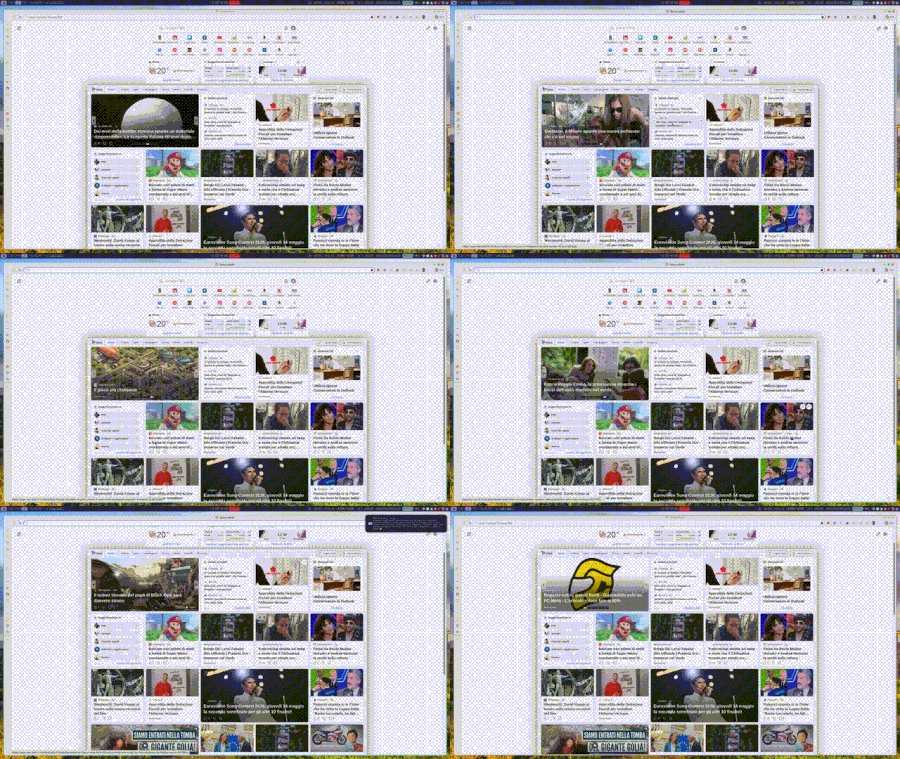
When I browse, in this example within the MSN page, and I hover over any link, I get that very ugly effect, as if the sidebar opens and closes. At times it can give you a headache because it never stops. Has anyone encountered the same problem?12Views0likes0Comments
Allow removal of "Connected to Windows" accounts from Edge profiles
I love being able to create multiple profiles for the various accounts and services I have to use, I am now up to 7. It's great to be able to separate them and just utilize sso to do what I need without constantly having to login to each admin console. The problem is that every once in a while, my "Connected to Windows" account get associated with a profile and it becomes a royal nuisance. The only way I have seen to fix it is to delete the profile and start over and that hasn't always worked. On any profile, you can "Sign-Out" or "Sign-Out and Forget" a non-Connected to Windows account. I would like to see the option to "Remove from this Profile" option for the Connected to Windows account. It would also be great if when setting up a new profile there was a more streamlined process to add a work account that won't let the company manage the pc and is only for this application. Perhaps after adding one work account to Edge, the default should be reversed?Solved60KViews11likes34Comments
EdgeUpdater Popup on Intune Managed Macs
A new popup occurs routinely throughout the day since last week, approximately May 6th. "EdgeUpdater" would like to access data from other apps. MacOS Tahoe26.4.1 & Edge 148.0.3967.54 It doesn't matter if I **allow** or **don't allow**, it keeps popping back up. Anyone else having this problem or know how to make it go away? I have checked with others, it doesn’t happen on non-managed Macs. Only seems to be those with Intune.1.1KViews4likes6Comments
Add Secure DNS (DNS-over-HTTPS) Support to Edge Mobile
Hello Edge Team, I’ve noticed that while Edge desktop already supports Secure DNS (DNS-over-HTTPS), the mobile version currently lacks this option. Competing browsers like Chrome and Brave allow users to configure Secure DNS directly on mobile, which provides: Improved privacy by preventing ISP-level DNS snooping Consistency across platforms so Edge users enjoy the same protections on desktop and mobile User choice to select trusted DNS providers (Cloudflare, Google, Quad9, etc) Adding Secure DNS support in Edge mobile would strengthen Edge’s privacy posture and align it with modern browser standards. Could the team consider prioritizing this feature in upcoming Insider builds? I believe many users would welcome the option to configure Secure DNS directly within Edge mobile settings. Thank you for your continued work on making Edge a competitive and privacy‑friendly browser.14Views0likes0Comments"Microsoft Edge rounded corners" flag
Hello The "Microsoft Edge rounded corners" flag in edge://flags/ disappeared in last Canary version The display is reduced on web pages and even more so on laptops with small screens The display is already a bit smaller with the wider title bar Please, bring back this option Especially since there's no other way to disable it, except by switching to Chrome Thanks205Views3likes6Comments
Propuesta para mejora de Microsoft Edge
Propuesta de mejora para Microsoft Edge: Configuración de carpeta predeterminada por sitio web Asunto: Solicitud de función: Carpeta predeterminada por sitio para cargas y descargas de archivos en Microsoft Edge Estimado equipo de Microsoft Edge: Quisiera proponer una mejora que sería de gran utilidad para profesionales que trabajamos con múltiples plataformas web que requieren la carga y descarga constante de documentos. Actualmente, Edge permite controlar permisos de acceso a archivos por sitio, pero no ofrece la posibilidad de asignar una carpeta predeterminada específica para cada página o dominio. Esta función sería especialmente valiosa en entornos legales, administrativos y gubernamentales, donde distintos portales requieren manejar documentos en rutas separadas para mantener orden, trazabilidad y eficiencia. Beneficios de la función solicitada Reducir tiempos de navegación al seleccionar carpetas en cada carga de archivo. Evitar errores al subir documentos desde carpetas equivocadas. Facilitar flujos de trabajo donde cada plataforma requiere carpetas distintas (por ejemplo: "Acceso" y "Firma"). Mejorar la productividad en sectores que dependen de múltiples portales judiciales, administrativos o corporativos. Propuesta técnica Agregar en la configuración de permisos por sitio una opción como: "Asignar carpeta predeterminada para cargas/descargas en este sitio" Esto permitiría que Edge recuerde automáticamente la carpeta seleccionada cada vez que el sitio solicite subir o guardar un archivo. Estoy seguro de que esta mejora beneficiaría a miles de usuarios que trabajamos diariamente con plataformas que requieren manejo intensivo de documentos. Agradezco su atención y quedo a disposición para aportar más detalles si son necesarios. Atentamente, Víctor Hugo Escobedo Barajas No soy programador, soy abogado y este modificación directo desde configuración por sitio ayudaría bastante a reducir el tiempo de revisión de mis actividades diarias.29Views0likes0CommentsNext Update for Edge not compatible with my mac
Hi, so I'm so sorry if this isn't the right place or if I'm doing this wrong, but I'm kind of freaking out. So I use Edge on an older mac that cannot be updated as mac no longer supports updates for it. I was previously using Edge Dev and after an update got a message saying that the next update won't be compatible with my mac and I tried not to update but at some point Edge Dev restarted and thus updated and then it wouldn't open on my mac, so I switched back to regular Edge. After the last update on regular Edge, I got the same pop up saying that the next update won't be compatible with my mac and now I'm terrified that when that update comes out at some point Edge will restart and update and then I will lose my ability to use Edge. I love Edge as a browser and have so much stored in it. I have exported my passwords just in case, but am still super scared that I'll lose all the work I've put into Edge and that I'll just lose Edge as it's such a superior browser that I've come to rely on. Does anyone have any suggestions on what I should do? I can't afford to get a new computer right now and as I mentioned my Mac doesn't support updates. Any help would be unbelievably appreciated. Thanks in advance.54Views0likes0CommentsExtensions
I haven't really been paying attention to what does or does not work in Edge Dev and Canary recently. But today I had issues again with Canary. I completely cleaned out all the stored data and reinstalled it. I noticed that all the extensions disappeared. I went looking for them to replace the few I actually used and got a message telling me that they are no longer available for this version of Edge. I get the same message on Dev. But production Edge allows them to be turned on and added to. Has anyone else run into this or am I missing something in the setting that change and I have totally overlooked.47Views0likes0Comments
Microsoft Edge "Save as" function not working for pdfs
Good day. Since the last Edge update, I have not been able to save pdf files(editable pdf). Before when you click save as, and enter a new name, the page referred to the new name. but now, the page refreshes, the content is the new content but the file name remains the same Please, does anyone know how to solve the issue?21KViews4likes16CommentsPassword autofill broken in Edge Dev 149.0.4009.0
It looks as if the Password Autofill is broken in Edge Dev build 149.0.4009.0. Toggling autofill on and off again doesn't resolve the problem. All saved passwords are still searchable and can be manually copied/pasted, but autofill appears to not be working. Tested on both 64-bit and arm64 versions of this Edge Dev build. Anyone else seeing the same?Solved25Views0likes1CommentWebView2 - Roll back to previous version
Hello. We have enterprise applications that a re sensitive to WebView2 updates and have blocked this from automatically updating with MS Edge. On occasion, we will manually update WebView2 from Evergreen Standalone Installer from developer.microsoft.com. We have discovered that we need to roll back WebView2 from 144.x.x.x to 143.0.3650.97. The Microsoft Update Catalog for WebView2 appears to be EDGE and not the WebView2 cab files to install WebView2 only! How am I suppose to replace 144.x with 143.x? Where can I locate the WebView2 archives?19Views0likes0CommentsExport tool for Edge Collections before deprecation
Microsoft is deprecating the 'Collections' feature in Edge, but there is currently no export option available for personal Microsoft accounts. This creates a serious problem for users who rely heavily on Collections for research, organization, and long‑term workflows. In my case, I have 166 main Collections, each containing dozens of items. Migrating this manually is simply impossible/undoable. ‼️ Please Microsoft: provide an official export tool (HTML, JSON, or migration to Favorites/Bing Saves) before removing the feature. Without this, users risk losing years of structured work and saved content. This is essential for anyone who has used Collections as a core part of their workflow.177Views1like3CommentsMS Edge use of file:// protocol in script and link tags
I'm trying to view an html file that exists on my hard drive. I have <SCRIPT> and<LINK> tags with relative addresses to files (stylesheets and scripts) in the folder (and subfolders) that contains the html file. OOTB Edge errors in the console attempting a GET for these files. Is there a way, perhaps via Internet Options, to override this behavior and access the additional files from my hard drive? I'm not interested in a webpage self-hosting solution. Thanks in advance for any insight you can provide.Solved44Views0likes1Comment



Events
Recent Blogs
- 8 MIN READMicrosoft Edge for Business, the new, dedicated work experience for the Microsoft Edge browser, is now available in Microsoft Edge stable version 116. All customers who sign into Edge using Microsoft...Aug 04, 2023302KViews2likes73Comments
- Microsoft Edge for Business, the new, dedicated work experience for Microsoft Edge, is in preview today! Microsoft Edge for Business is planned to be the standard browser experience for organi...Jul 11, 202310KViews3likes2Comments