Forum Discussion

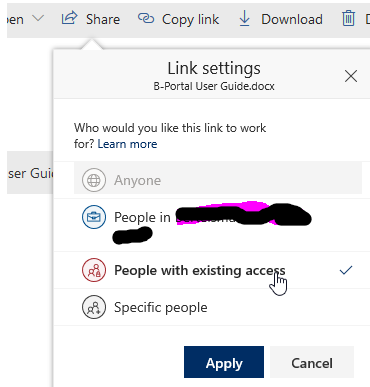
Share to "People with existing access" breaks role inheritance
- Jan 15, 2019
Hi all,
The bad news is that this is unexpected. When sharing with a "People with existing access link", it should only send the user a canonical URL and it definitely shouldn't permission the user to the item.
The good news is that a fix is already rolling out and so this should go away shortly :)
Thanks!
Stephen Rice
OneDrive Program Manager II


StephenRice just tested in my company tenant (Targeted Release for all users) and confirmed that sharing a doc from OneDrive changed the permissions from inherited to unique.

@Stephen Rice KevinCrossman I can confirm I'm seeing the issue too. That's actually what drove me to the forum in the first place.
I am looking at modern communication sites if this makes any difference.
- Joe McGiven CorbanDec 17, 2019Brass ContributorSorry... I never tested, and a simple Google test found this...
https://www.contentandcode.com/blog/ignite-day-5/
So, it seems all good.
I really should have done my home work before posting... - Joe McGiven CorbanDec 17, 2019Brass ContributorHi Stephen,
Our lead SPOL developer gave us a run down recently on what was covered at Ignite, but this wasn't touched on. Perhaps you could enlighten us? That is... the Willy Wonker Golden ticket here would be....
A user selects "Copy Link" on a slected doc in the doc library and the following applies:
1. The share type defaults to "People with existing access"
2. Those people include named users already as members of the site, and those to whom the item has already been shared - basically, everyone listed as having access to the item.
3. The inheritance is not broken (...please note, only counts if the item has not been previously shared, which of course in itself will break the inheritance)
Any updates you have on this would be appreciated.
Cheers, Joe - StephenRiceOct 24, 2019
Microsoft
I'd suggest checking out the External Sharing in M365 talk at Ignite in 2 weeks time 😉
Stephen Rice
Senior Program Manager II
- Joe McGiven CorbanOct 24, 2019Brass ContributorHi Stephen - any progress on this please? I see the last update was mid-may, so 5 months ago. Would be good o have an option to send a link to folks whom already have access via the the Share menu without breaking inherited security. Any update on this would be appreciated.
Cheers, Joe - StephenRiceMay 14, 2019
Christophe Humbert, it's my pleasure!
And you are absolutely right :) We've played with/tweaked the language here before to help improve clarity and I don't think anyone things we've nailed it just yet. I'll pass along to the team as food for thought as we make more changes here. Thanks!
Stephen Rice
OneDrive Program Manager II
- Christophe HumbertMay 14, 2019Iron Contributor
StephenRice Thanks, and once again I really appreciate the quick reply.
Specific People is intended to modify the permissions of the doc & add the, well, specified people :)
I guess that's where the issue is. In plain English, "existing access" and "specific people" are not exclusive. I might want to share files with Mary and Joe, who are specific people and also already part of the team.
- StephenRiceMay 14, 2019
Hi KevinCrossman,
That is expected then. Specific People is intended to modify the permissions of the doc & add the, well, specified people :)
Nothing to share on that just yet but it is something we've talked about. Thanks,
Stephen Rice
OneDrive Program Manager II
- Christophe HumbertMay 14, 2019Iron Contributor
StephenRice Thanks for confirming the behavior.
Would you also have an update on my second point: how to make "existing access" the default? From an end user perspective, "specific people" looks fine and it's not obvious why they would need to pick a different option.
- May 13, 2019
StephenRice our default in our tenant and the one I was using was "People in <tenant> with the link can view". That one still breaks the permissions inheritance.
But, yes, when I choose "people with existing access" it does not break the permissions inheritance.
- StephenRiceMay 10, 2019
Hi KevinCrossman,
Sorry, I may have misunderstood then :) I just tried clicking Share & sending the Existing Access link to a user who had access to a parent and that did not also break inheritance.
If you select Specific People though, that will always break inheritance.
Are you seeing something different than I am describing above? Thanks!
Stephen Rice
OneDrive Program Manager II
- May 09, 2019
StephenRice Sorry, I thought we were talking about the Share feature (not Copy Link) and for "People with existing access" not "specific people" (that's the title of the thread here).
- StephenRiceMay 09, 2019
Hi KevinCrossman,
Thanks for checking back in. Can you verify what steps you are using to repro this? On my side, I did:
1) Set the default sharing link to "Specific People"
2) Created a file in a document library
3) Clicked "Copy Link" & copied the Existing Access link
4) Checked Manage Access & Advanced Permissions: No new links were created & the item is still inheriting from it's parent.
Is there some step I am missing here? Thanks!
Stephen Rice
OneDrive Program Manager II
- May 09, 2019
StephenRice It's still breaking the inheritance in my tenant (junipernetworks)
- StephenRiceMay 09, 2019
Hi all,
Sorry for the delay in checking back in here. This issue should now be fixed. When you share to a user who already has access (via the existing access link), inheritance should no longer be broken. Please let me know if you are still seeing this. Thanks!
Stephen Rice
OneDrive Program Manager II
- May 02, 2019Totally agree as well. I did express this idea to SharePoint Team while in Seattle last month, they liked the idea, hoping they follow through and change it. I said default should be existing access on the copy link button for easy of change, but ideally we should be able to just set the default setting for Share and Copy buttons.
Anyway, fully support the idea that Copy link should work like it used to when you right click and get a direct link to the document, no permissions changed. - May 02, 2019
Alberto Schiavon Agree 100% with Alberto's comments
 Alberto SchiavonMay 02, 2019Brass Contributor
Hi Stephen and thanks for your reply.
I have understood a bit better what happens.
First of all it happens only when "Copy link" is used, because the "Share" button always gives you the option to change the link type before creating the link, independently from the type it uses by default.
Therefore I can control what's going on, independently from the default link type I get from the SharePoint.
The "Copy link" instead creates a link immediately, before you change the link type, therefore if the default option turns out to be "People in my organization with the link" the inheritance is broken.
The effective default link type I get seems to depend on a combination of the following settings
"SharePoint admin > Sharing > Default file and folder links" and the setting "SharePoint admin > Active Sites> select the site > Sharing"
In my case the first setting was "Anyone with the link" and the second was "New and existing guests".
In this scenario the default link type becomes (unexpectedly) "People in my organization with the link" and when a user clicks on "Copy link" with the intention to send it by email to a person that already has access, he basically breaks the permissions inheritance.
Not sure if this can be considered a bug but for sure I find "copy link" very misleading, especially for my users.
I believe that Share should be used to grant permissions while Copy link should be used only for copying a link without granting any permissions, as this is the way it is understood by the users.
A possible improvement would be to have to possibility to change the link type before it is created, which is not the case now.
Thanks,
- StephenRiceApr 30, 2019
Hi Alberto Schiavon,
Can you send me a Fiddler trace of the sharing event via private message? This will help us debug and figure out what is happening. Thanks!
Stephen Rice
OneDrive Program Manager II
- Alberto SchiavonApr 29, 2019Brass Contributor
Hi Stephen,
I still have the issue in my tenant (People with existing access" breaks role inheritance).
Any news on that?
Alberto
- StephenRiceApr 08, 2019
Hi all,
Thanks for confirming. Let me circle back with the team and see what's going on.
Stephen Rice
OneDrive Program Manager II

