Forum Discussion

Choice field with Intellisense / Autocomplete not working perfectly
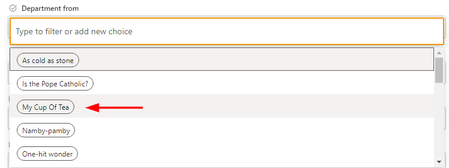

amke321 This is by design in SharePoint and default behavior of search option for choice column options.
Search works based on "starts with" criteria and not "contains" criteria. I don't think there is any setting to change this behavior and you cannot modify this behavior of list forms using SharePoint JSON formatting.
If you want Microsoft to change this behavior, you can submit feedback at: SharePoint Feedback Portal
Please click Mark as Best Response & Like if my post helped you to solve your issue. This will help others to find the correct solution easily. It also closes the item. If the post was useful in other ways, please consider giving it Like.
- amke321Oct 01, 2023Copper Contributorganeshsanap What's the work around bro? The employer just told me 'nothing is impossible' =))
Should I make the shift to PowerApps?- ganeshsanapOct 03, 2023MVP
It is not possible using SharePoint default functionalities as well as SharePoint JSON formatting capabilities.
If this feature is absolutely required by your employer then you will have to customize the list form using either Power Apps (easy & low code) or SharePoint Framework (coding experience required).
I will suggest you to inform your employer that form UI will change if you customize the list form using Power Apps before actually making changes to list form and let them decide they are fine with UI changes.
Please click Mark as Best Response & Like if my post helped you to solve your issue. This will help others to find the correct solution easily. It also closes the item. If the post was useful in other ways, please consider giving it Like.
