Forum Discussion

AB21805
Feb 21, 2024Bronze Contributor
Change primary sharepoint admin
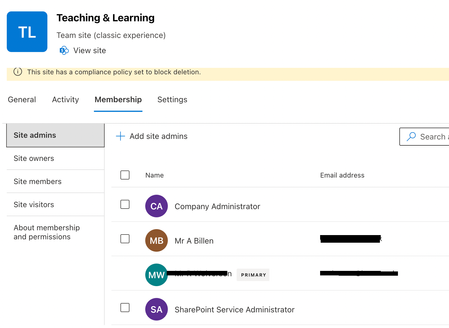
Hi all, I need to change the primary sharepoint admin Im a site admin but I need to be the primary. I am unable to change this or remove the user from site admins. Any ideas?
 Feb 21, 2024Hi,
This didnt work for me as the remove icon didnt appear (think it is because the user was a primary)
I did manage to remove it by going into site settings > Site Collection Administrators which has also made my account the primary

1mercinary
Dec 01, 2025Copper Contributor
I did not want the primary owner set to me so using your work around here's how I achieved that:
- From SPO admin center for the site in question, remove all site admins except myself, the primary admin and the user I want to be the new primary. Be sure to note admins you remove so you can add them back later.
- Go to the SP site, click COG at top-right > Site Contents > Site Settings > Site Collection Administrators.
- Remove everyone (including yourself) except the user you want to be the new Primary Admin and click OK. After it applies you'll see the typical "You need permission to access this site" message, but this is normal.
- Go back to SPO admin center and refresh the site in question.
- You should now see that user as the primary admin and can add any additional admins back including yourself.