Forum Discussion

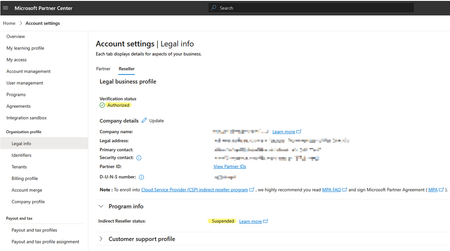
CSP Account Verified & Authorized yet Indirect Reseller Status: SUSPENDED
 Dec 03, 2025
Resolution:
As of yesterday, I have managed to mitigate the issue for us and restore our CSP Active status.
I will document my experience here for posterity and hope that it helps others.
To re-iterate, Our CSP status was Suspended even though our Reseller and Partner status was verified and authorized.
After some deliberation I began to suspect that the problem we were having was inherent in the Microsoft Partner Center account rather than our MPN ID tenancy. Admittedly, a lack of understanding of how the Microsoft Partner Center account aligns with the MPN ID tenant didn't help but it is probably worth noting that our original Microsoft Partner Center account was not an .onmicrosoft.com account and was partially configured as a direct-bill account without any direct bill agreements established.
The solution for us was to create a new Microsoft Partner Center account from scratch as an .onmicrosoft.com account and attach our tenant to that then enroll the tenant into the CSP program with new Microsoft Partner Center account.
While it sounds straight forward, there we some issues along the way but the general process went something like this...
1. Go to https://partner.microsoft.com
2. Log out of all Microsoft accounts
3. Select "Become a Partner" and choose options "Partner", "Build" and "Resell" (You cannot seem to proceed without the "Build" option)
4. Create a Work Account and set up a new .onmicrosoft.com account e.g. email address removed for privacy reasons (You can use any exising work email to verify here)
5. Associate the Microsoft Entra ID of the old account. If the tenant option does not show in Account Settings then use this link... https://partner.microsoft.com/dashboard/v2/account-settings/tenantmanagement
6. Enroll the tenant in the CSP program using the link from the Home dashboard
7. Agree to the CSP agreementOnce the agreement was accepted, the Customers access section became "Granted", Indirect Reseller status became "Active" and the MPN ID tenant started working again with our Indirect Provider.
Note that during this process, I didn't have to do identity verification again like you would with a new tenant.
Note also that at Stage 5, I Associated the Microsoft Entra ID of the NEW account with the old Microsoft Partner Center also. Not sure if this had any influence on the outcome but associating both ways might help.
Hope this helps.
Regards,
One very Frustrated Reseller
Resolution:
As of yesterday, I have managed to mitigate the issue for us and restore our CSP Active status.
I will document my experience here for posterity and hope that it helps others.
To re-iterate, Our CSP status was Suspended even though our Reseller and Partner status was verified and authorized.
After some deliberation I began to suspect that the problem we were having was inherent in the Microsoft Partner Center account rather than our MPN ID tenancy. Admittedly, a lack of understanding of how the Microsoft Partner Center account aligns with the MPN ID tenant didn't help but it is probably worth noting that our original Microsoft Partner Center account was not an .onmicrosoft.com account and was partially configured as a direct-bill account without any direct bill agreements established.
The solution for us was to create a new Microsoft Partner Center account from scratch as an .onmicrosoft.com account and attach our tenant to that then enroll the tenant into the CSP program with new Microsoft Partner Center account.
While it sounds straight forward, there we some issues along the way but the general process went something like this...
1. Go to https://partner.microsoft.com
2. Log out of all Microsoft accounts
3. Select "Become a Partner" and choose options "Partner", "Build" and "Resell" (You cannot seem to proceed without the "Build" option)
4. Create a Work Account and set up a new .onmicrosoft.com account e.g. email address removed for privacy reasons (You can use any exising work email to verify here)
5. Associate the Microsoft Entra ID of the old account. If the tenant option does not show in Account Settings then use this link... https://partner.microsoft.com/dashboard/v2/account-settings/tenantmanagement
6. Enroll the tenant in the CSP program using the link from the Home dashboard
7. Agree to the CSP agreement
Once the agreement was accepted, the Customers access section became "Granted", Indirect Reseller status became "Active" and the MPN ID tenant started working again with our Indirect Provider.
Note that during this process, I didn't have to do identity verification again like you would with a new tenant.
Note also that at Stage 5, I Associated the Microsoft Entra ID of the NEW account with the old Microsoft Partner Center also. Not sure if this had any influence on the outcome but associating both ways might help.
Hope this helps.
Regards,
One very Frustrated Reseller
 Porcupine1009Jan 07, 2026Tin Contributor
I wish this worked for me. Instead I get this lovely message those of us who have been through this are familiar with:
"http://www.microsoftintegrity.com/. We engage in a rigorous set of evaluation and certification processes; as a result your request was blocked. If you require further information please reach out to https://go.microsoft.com/fwlink/p/?linkid=868372 with reference number: and transaction ID:.................."
- Frustrated_ResellerJan 12, 2026Tin Contributor
Oh. That sounds more like the compliance issues. Is your CSP Account verified & authorised in the Legal Info section?
- Porcupine1009Dec 17, 2025Tin Contributor
Hey, so in terms of association, it was your original partner account that you went to associated with the new partner account right?
Right now I think that's the way I did it, so I'm logged into my new tenant account and stepping through the CSP enrollment and it shows my existing company name and partner ID in the "associate partner ID to your CSP indirect reseller account" screen. Is this the right way?
- Frustrated_ResellerJan 12, 2026Tin Contributor
That sounds about right. It's somewhat murky in my memory. Screen shots might help.
- JillArmourMicrosoftJan 12, 2026
Community Manager
Porcupine1009 you can submit a support ticket if you are having troubles! Partner Center Support
