Forum Discussion

Trouble getting a Team to display
 Apr 28, 2022
tealpete This looks like a frustrating issue!
One thing I would like to point out is that your terminology is not quite right when you are talking about "Team 'T'" and "Team 'E'". It would be more correct to call these "Organization 'T'" and "Organization 'E'". I only point this out because it will ensure a more efficient conversation if you do choose to contact Microsoft Support for assistance with this.
One workaround I would suggest would be to try signing in to Teams using the browser (at https://teams.microsoft.com) instead of using the desktop app. You may find it helpful to access one Organization using the app and another using the browser. You can even sign in to multiple organizations in the browser by opening them in different browser profiles (https://support.microsoft.com/en-us/topic/sign-in-and-create-multiple-profiles-in-microsoft-edge-df94e622-2061-49ae-ad1d-6f0e43ce6435).
Hope this helps!

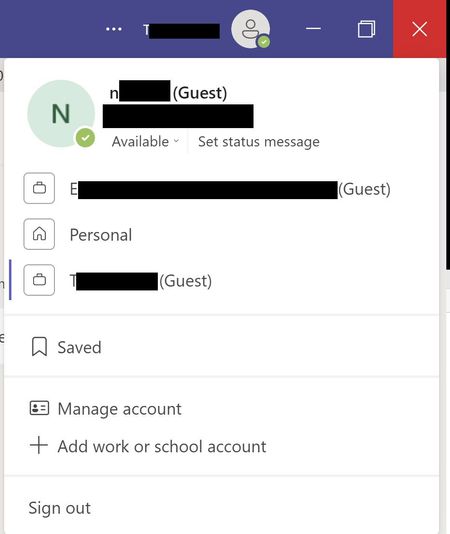
tealpete It is possible I am wrong but as I interpret it from the picture, there are two different tenants that these teams belong to. When you are a guest in a tenant, you do not see the teams that resides in another tenant that you are guest in. Thus, you have to "jump" between the different tenants to be able to work in the different teams.

- MagnusGoksoyrOLDProfileApr 12, 2022Bronze Contributor”An organizations Microsoft 365”/Their toolbox that includes Teams, Sharepoint, mail etc.
- tealpeteApr 12, 2022Tin ContributorMagnusGoksoyrOLDProfile Referring back to the screenshots, both show the same email address for me beneath my name (blacked out for privacy reasons, but I can attest that they match). However, I noticed that my name (blacked out top line) is spelled differently between the two screenshots. Specifically, my name when I'm logged into Team "T" matches my email address, whereas my name when I am logged into Team "E" is my full name. Do you think this might be the issue?
If so, how would you suggest it be resolved? Would that be something I could resolve on my end or would that have to be done by the administrator of Team "T"?- MagnusGoksoyrOLDProfileApr 12, 2022Bronze ContributorNo, i think you are a guest in two organizations and for me it looks like everything is correct. You cannot view both organizations teams at the same time. You need to ”switch” between them in order to see and/or use each organizations team/teams.