Forum Discussion

Taen keren
Sep 15, 2020Steel Contributor
Live event
Hi shouldn't I be able to "resolve" external people in this "give permissions to' - what am I missing if I can't? (normally I can invite external guests)
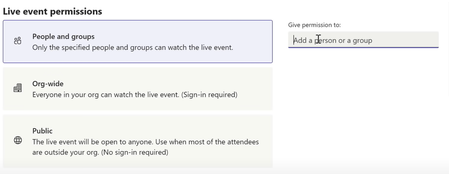
- Sep 15, 2020It really should do a better job of specifying that in the UI/UX, but only guests can join with specific people option not external users. So they must already be a guest in one of your Teams and in the tenant for you to invite them and they be able to join a restricted Teams live event.
So you must select "Public" and give out the join URL in order for externals to join a live event at this point in time.
Hope this helps.

Taen keren
Sep 15, 2020Steel Contributor
ThereseSolimeno - thx - using the People & groups - but facing the
You need permission to join this live event. Please contact the organiser
and in the create live event scheduler
Some attendees won't be able to view the event - try updating your event under Edit Event -> Settings - when doing that - there's "check email" on all the externals

Sep 15, 2020
It really should do a better job of specifying that in the UI/UX, but only guests can join with specific people option not external users. So they must already be a guest in one of your Teams and in the tenant for you to invite them and they be able to join a restricted Teams live event.
So you must select "Public" and give out the join URL in order for externals to join a live event at this point in time.
Hope this helps.
So you must select "Public" and give out the join URL in order for externals to join a live event at this point in time.
Hope this helps.
- Taen kerenSep 15, 2020Steel Contributor
ChrisWebbTech thx, Chris - I almost lost my mind over this 😄