Forum Discussion

I can't switch back to Teams chat with Alt+Tab on Mac
I can't switch back to Teams chat with Alt+Tab on Mac, becose Teams have two windows: the chat and the Microsoft Teams Notification. Microsoft Teams Notification is the default window, and this window is nowhere, and can't close.
Very frustrating.
Test your apps Microsoft!!!!!!!!!!!!!!!!!!!
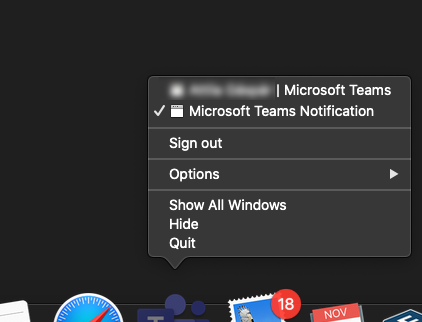
Ok, I found a "solution" to force Teams to use the notifications.
Simple version:
01. You go to your teams https://teams.microsoft.com02. When it asks for notifications, give the permission and that's it.
As an App in your dock:
02. You copy the URL from your logged-in teams-tab (01.)
03. You install Epichrome
(Very useful, you can wrap a Website as a App and it appears in the dock. Basically is MS doing the same with their "App" except it uses Electron, Epichrome uses Chrome or Brave.)
04. Start it, go through the wizard, when it asks for the URL, give your Teams-URL and a fine name for it.
(Icon can be automatically downloaded)
05. Start the new app, log in, give permission for notifications. Since it is basically a browser, it is forced to use the default MacOS Notifications. Alt-Tab works again.
Alternatively, there is a way to make a WebApp with chrome. But I never use chrome.
130 Replies
 JohnnyRicoCopper ContributorI have fixed this issue, just change the style of notification from built-in to mac, then restart the app, done
 NickFunwinBrass Contributor
JohnnyRico - hahah you just wait. We've all been there and thought it worked. Any minute you'll be back going "oh no, it only worked for a while and then went back to being super frustrating after a while"
- JohnnyRicoCopper ContributorAh yes, I see but, but just kill the app and open it again, it still works as expected. I noticed that, if you open teams, while it loading and I move to other desktops, the issue will be back again. But if I wait until the whole app window comes, the issue does not happen anymore
- Marcus RichterCopper Contributor
2 Years and this is still not fixed.... This has got to be by far the worst app on the planet. Slow as hell. Cannot Alt-Tab. Crashes randomly. "Something went wrong".... Yeah, you employed the wrong people that's what went wrong. And who the hell thought Electron would be the right choice???
- wabesasaCopper Contributor
I find that if you use App Expose, there is one invisible window by notification...
That's why we can not get the right window.
Upon this findings,
I change below setting: Notification style: 'Mac' instead of 'built-in', it seems there is no invisible window and solve this problem temporarily... chriswardCopper ContributorThis works for me - Switch Notifications to Mac as in your screen shot. But I also then needed to go into System Preferences -> Notifications and Focus and then enable Notifications for Mac. I then restarted Teams for good measure (don't know if that step was essential) and now it works fine. This makes sense since the problem all along seemed to be to do with the "notifications icon" on every screen. Now Outlook also supports Mac notifications, I am all round having a much nicer experience with Office on Mac!
- chriswardCopper Contributor
chrisward OK .. I spoke too soon! Stopped working and the little Teams icon is back on desktops. Seems if I restart Teams it will work for a period of time and then stop. So at this point I don't know if the Mac Notifications thing makes any difference. Disappointing. It was great being able to work "normally" at least for a couple of hours!
 Karsten_SilkenbaeumerCopper ContributorAfter reading all that I checked, and notification style was already set to Mac but app switcher didn't work. Set to Teams, closed app. Set back to Mac, closed app. Opened app: Now (tm) it works. Let's see how long.
Next idea would be to write a hammerspoon script to kill the invisible window maybe as soon as it appears.- turff890Copper ContributorPernille-Eskebo - fix your software.
- NickFunwinBrass Contributor
PLEASE FIX!! This is driving me FREAKING MAD!
30 times a day I get reminded that Microsoft won't fix a problem that 25,000 people have viewed, has 80 comments of users frustration, in a year.  chromax_123Copper ContributorAnother workaround is to use the website in chrome or brave, make a "new bookmark" (don´t know the exact english wording) and set the "in a new window" active. Then it is shown as a separate window like a Webapp in the dock. CMD + Tab works then. Basically the official app is also an website wrapped in a electron browser.
I just had sometimes micro problems after sleep mode. guitaraddictCopper Contributor
chromax_123
BRILLIANT!!!!
This is the best and simplest workaround to date, and it's practically indistinguishable from using the Desktop app. I'm kicking myself for not thinking of this. Really great idea, chromax_123!Here are some instructions if you've not created a "Chrome App" shortcut before. (Note, this workaround requires a chromium browser with the app/shortcut/pin ability. Instructions below are for Chrome.)
1. Open Chrome and login to the Teams webpage portal (teams.microsoft.com). You may want to enable notifications (if prompted).
2. In your Chrome browser, click the three vertical dots in the top right corner. Select More Tools -> Create Shortcut...3. In the dialog prompt, name your app (e.g., Teams) and be sure to check the checkbox next to "Open as Window."
4. This will Launch teams in what feels like a new, clean tab, and it'll create a shortcut in your "Chrome Apps" folder on your Mac (User/Applications/Chrome Apps). While you have the tab open, its icon should appear in Dock. You can drag this shortcut to the permanent side of your Dock (or desktop, or anywhere else...).Bingo! You can now Command-Tab your way back to Teams. Hallelujah. Thanks chromax_123!!!
- studiorizCopper Contributor
This worked thanks so much!
 matthewbillmanCopper Contributor
This bug is an unending source of frustration for my team - BUMP. Please fix.
- NickFunwinBrass Contributor
Please!! There is 22,500 people who have viewed this post who this massive bug is, well bugging!
- Ganeshkumar86Copper ContributorThis really sucks. Pathetic experience. poor support from Microsoft.
- ivo-ksyosCopper ContributorCan't believe this is still an issue, videoconfering tools have exploded since 2020 and we're still confronted with these annoying bugs.
 bobak617Copper ContributorI created a workaround for this issue using a BetterTouchTool.
Basically I have BetterTouchTool trigger an action when Teams becomes the active app, so when I cmd+tab to switch to teams it triggers the action which is to simulate pressing the 8th item in the menubar under Window, which is always the last window you were active in in Teams.
This makes it so it will change to the desktop/space where teams is running.
I posted the code and screenshots of how it is set up at the BetterTouchTool forum:
https://community.folivora.ai/t/ms-teams-workaround-for-using-cmd-tab-app-switcher/26518- bobak617Copper Contributor
Another great workaround is to install the free app called AltTab (Link Below) which is an app switcher that can either replace the native app switcher or be configured to use a different key combination. for example Ctrl+Tab, to switch between apps.
I have been using AltTab for a few months now and I have had no issues, I can finally switch between apps and back to Teams with ease.
https://alt-tab-macos.netlify.app
https://github.com/lwouis/alt-tab-macos