Forum Discussion

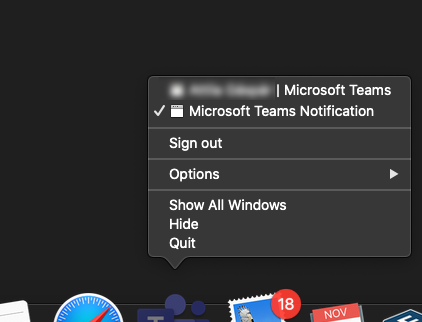
I can't switch back to Teams chat with Alt+Tab on Mac
 Apr 13, 2021
Ok, I found a "solution" to force Teams to use the notifications.
Simple version:
01. You go to your teams https://teams.microsoft.com02. When it asks for notifications, give the permission and that's it.
As an App in your dock:
02. You copy the URL from your logged-in teams-tab (01.)
03. You install Epichrome
(Very useful, you can wrap a Website as a App and it appears in the dock. Basically is MS doing the same with their "App" except it uses Electron, Epichrome uses Chrome or Brave.)
04. Start it, go through the wizard, when it asks for the URL, give your Teams-URL and a fine name for it.
(Icon can be automatically downloaded)
05. Start the new app, log in, give permission for notifications. Since it is basically a browser, it is forced to use the default MacOS Notifications. Alt-Tab works again.
Alternatively, there is a way to make a WebApp with chrome. But I never use chrome.

I find that if you use App Expose, there is one invisible window by notification...
That's why we can not get the right window.
Upon this findings,
I change below setting: Notification style: 'Mac' instead of 'built-in', it seems there is no invisible window and solve this problem temporarily...

Next idea would be to write a hammerspoon script to kill the invisible window maybe as soon as it appears.
- turff890Oct 21, 2022Copper ContributorPernille-Eskebo - fix your software.