Forum Discussion

How to create an "alias" for chat contacts

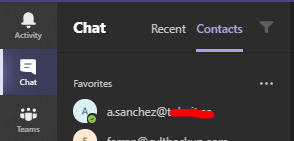
PDostiyarcontacts on chat Teams. You can see on the attached png file.


https://portal.azure.com/#blade/Microsoft_AAD_IAM/UsersManagementMenuBlade/AllUsers
Once there, you should be able to see all Users and Guest Users added to your team: if you have the proper permissions, you’ll also be able to perform administrative tasks such adding new Users, inviting new Guest Users, or editing their Identity, which includes the Name setting – Search and select each contact and change their display name that changes will reflected to Microsoft Teams.
Please let me know if that works for you!
- jordiullateMay 22, 2020Copper Contributor
PDostiyarNot sure this is the right place. Here I can see all people added on our created teams, but I'm not looking for this.
On Teams app, on the left column, I found the Teams option (where we've created some teams) and are these contacts wich I see on the link you've proposed.
But I'm speaking about other option on the left colum. Chat, and this option has its own contacts section. These are the contacts I'm interested to modify creating alias.
On the attached pic on my previous post, you'll find where is the chat option which I'm refering.
- PDostiyarMay 22, 2020Bronze Contributor
jordiullateBut again anything from Azure users will come to your Teams app contact section if they are users within your own tenant or contact in your tenant you edit their names in Azure AD or on Admin Center and they show in your Teams where you could add them to the Contact section on your Chat sidebar in Teams into Contact tab.
Try to find one of your users from that contact in your azure and edit the display name etc. and you will see the changes in the Teams > Chats > Contacts.
- jordiullateMay 22, 2020Copper Contributor
PDostiyarbut, I don't see any of my contacts on my teams/chat section, on azure. On Azure, I only can see all my office colleagues and the "guest" users created in order to add on one of our teams/teams.
All contacts I've added on my teams/chat, doesn't appear on Azure.
In order to show you, on the attached file chat_contact.png, you will see one of my contacts created on my teams/chat section. On the attached file Azure_view.png, you will see that a.sanchez doesn't appear and because of it, I can't edit it.