Forum Discussion

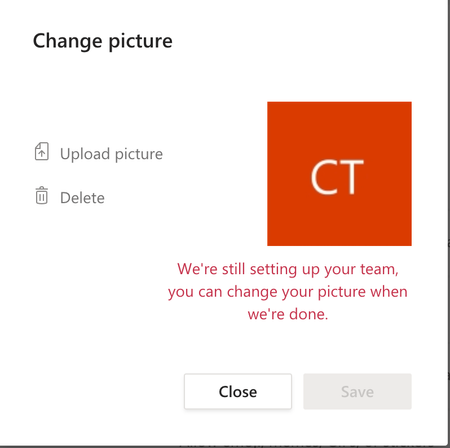
Cant change Team picture !!
- Mar 27, 2020
thomascarrera168 It's a bug in the Teams client-side HTML/JavaScript UI. Luckily the desktop client of Teams (it's Electron-based) shares the UI logic with the web client, so the workaround is simple. In your web browser, go to https://teams.microsoft.com/, login as the owner of your Team, get to the Change Picture dialog, press F12 to go to the browser's F12 Developer Tools, then in the web page's HTML view find and remove the "disable" attribute from both the "Upload Picture" link and the "Save" button (and their parents elements). I've just managed to change and save the icon like that:


Dude, I can "inspect" the upload picture, remove "disabled" and then upload a picture.
Just as you said.
But I cannot "inspect" the 'Save' button. It is greyed out, and nothing happens when I right-click.
My other strategy was to scroll down the html...in the right hand column...but I cannot find the relevant script for this 'Save' button.
Therefore I cannot save the uploaded picture. I can only select 'Close' and the picture is lost. Help!

Shai100 Hello!
Pay attention these steps:
- Go to your browser.
- Login in your owner account on https://teams.microsoft.com/
Note: In the configuration of your team, you have the issue when do you want to change the image. So, I did this: Press Ctrl + Shift + I (Inspect element)
So, we are going to inspect an especific objects; how can I do it? Using the tool selection. (Ctrl + Shift + C) or:Now, you can use your mouse and select the save button and the image upload too.
Only eliminate the part disabled="disabled" in both objects.
For example:
Save Button -> Before
<button class="ts-btn ts-btn-fluent ts-btn-fluent-primary" ng-class="{'ts-btn-fluent-secondary': btn.secondaryStyle,
                                   'ts-btn-fluent-primary': !btn.secondaryStyle,
                                   'dark-mode': darkMode,
                                   'ts-modal-dialog-footer-buttons-with-icon': btn.icon}" ng-attr-id="{{::btn.id}}" ng-attr-title="{{::btn.title}}" ng-click="btn.func()" track-outcome="" track-outcome-new="" track-scenario="" track-scenario-type="" track-name="" track-type="" track-name-new="" track-type-new="" track-work-load="" track-sub-work-load="" track-panel-type="" track-panel-type-new="" track-panel-region="3" track-state="" track-summary="" track-app-id="" track-app-scope="" track-app-scenario-capability="" track-async-data="btn.asyncDataBagFunc()" track-data="" track-data-func="btn.dataBagFunc" track-click-silent="" track-gesture="" ng-disabled="!!btn.disabled" aria-disabled="true" ng-attr-aria-describedby="{{::btn.ariaDescribedBy}}" aria-label="Guardar" ng-attr-acc-focus-default="{{::btn.isFocusDefault}}" ng-attr-set-focus="{{::btn.isSetFocus}}" data-tid="changeTeamPicture-saveBtn" role="button" id="changeTeamPicture-saveBtn" disabled="disabled">
                  <!---->
                  Save
</button>
Save Button -> After
<button class="ts-btn ts-btn-fluent ts-btn-fluent-primary" ng-class="{'ts-btn-fluent-secondary': btn.secondaryStyle,
                                   'ts-btn-fluent-primary': !btn.secondaryStyle,
                                   'dark-mode': darkMode,
                                   'ts-modal-dialog-footer-buttons-with-icon': btn.icon}" ng-attr-id="{{::btn.id}}" ng-attr-title="{{::btn.title}}" ng-click="btn.func()" track-outcome="" track-outcome-new="" track-scenario="" track-scenario-type="" track-name="" track-type="" track-name-new="" track-type-new="" track-work-load="" track-sub-work-load="" track-panel-type="" track-panel-type-new="" track-panel-region="3" track-state="" track-summary="" track-app-id="" track-app-scope="" track-app-scenario-capability="" track-async-data="btn.asyncDataBagFunc()" track-data="" track-data-func="btn.dataBagFunc" track-click-silent="" track-gesture="" ng-disabled="!!btn.disabled" aria-disabled="true" ng-attr-aria-describedby="{{::btn.ariaDescribedBy}}" aria-label="Guardar" ng-attr-acc-focus-default="{{::btn.isFocusDefault}}" ng-attr-set-focus="{{::btn.isSetFocus}}" data-tid="changeTeamPicture-saveBtn" role="button" id="changeTeamPicture-saveBtn">
                  <!---->
                  Save
</button>