Forum Discussion

Can an admin pin an app in Teams for all users?
- Nov 17, 2021Well, the doc says this
"After you edit or assign a policy, it can take a few hours for changes to take effect."
also check this
"Why can't I find an app in the Add pinned apps pane
Not all apps can be pinned to Teams through an app setup policy. Some apps may not support this functionality. To find apps that can be pinned, search for the app in the Add pinned apps pane. Tabs that have a personal scope (static tabs) and bots can be pinned to the Teams desktop client and these apps are available in the Add pinned apps pane."

I think that, if you could add it like that, it should work, can you add another pinned app to the same policy that you will be sure that should work (probably a native app)? if it appears, we can conclude that it has something to do with the powerapps app...

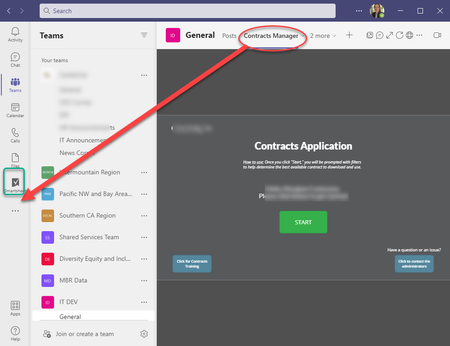
AndresGorzelany I feel silly, but realized I was not applying the policy to users correctly.... Once doing so with our set of test users, we're seeing the app appear in the left nav now. However, the logo is a bit wonky... I tried replacing the existing outline.png in the app's zip file with my a 32x32 image, but the logo image itself is either way too small, or the background is very dark... even though I used the same color as what's being used natively in Teams..... Any tricks for that?
Once we're ready for all-company go live, I will apply it globally. Thank you for your time. Learned a lot regardless of my specific issue.
Enjoy the weekend,
Morghan
- William LampertJan 18, 2023Brass Contributor
- mdcastorenaJan 18, 2023Brass Contributor
William Lampert - add a Test policy in the Teams admin console under Teams apps > Setup Policies and add specific users to that custom policy and test.
- William LampertJan 17, 2023Brass ContributorHow did you apply the policy to a group of people? I'm trying to add the Viva Goals to a group of people including myself - and it's been 24 hours and its not populating in my Teams sidebar
- mdcastorenaMay 20, 2022Brass Contributor
Hi rahulcs2 - From the Teams admin > Teams apps > Setup Policies. I edited the Global policy to add my custom app:
 rahulcs2May 20, 2022Copper Contributor
mdcastorena hey, can you explain a bit how did you manage to pin it to the side bar? i'm struggling to solve it.
- mdcastorenaNov 23, 2021Brass Contributor
AndresGorzelany I hadn't, thank you for that. We now have a properly sized and colored icon uploaded for the app. However, it shows up rather small.... From what I am reading though, that is by design. https://techcommunity.microsoft.com/t5/teams-developer/small-icon-for-power-app-uploaded-to-teams/m-p/1899867/highlight/true#M2175
Thank you for all your help!!
- Nov 21, 2021Hello Morghan,
I am glad to hear that it finally appeared.
About the icon, i am pretty sure you already saw these guidelines right?
https://docs.microsoft.com/en-us/microsoftteams/platform/concepts/build-and-test/apps-package#app-icons