Forum Discussion

Problems identifying managed iOS devices when using APP
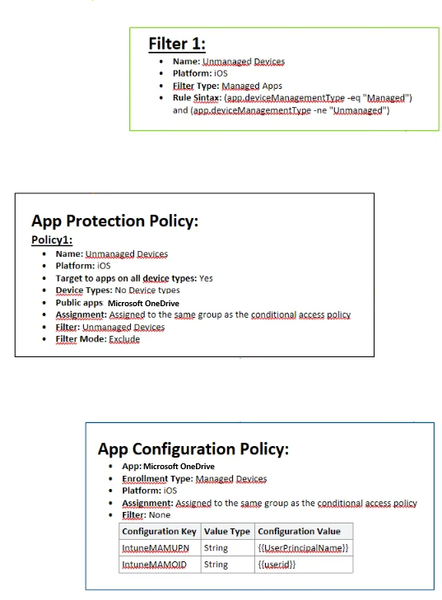

Your goal is APP only on unmanaged iOS while managed devices follow MDM, but a CA exclusion by enrollment-profile name still enforces APP. APP targets the user and determines management state inside the app; a CA device filter does not change that classification. In Intune APP Assignments, use a Managed apps filter for Device management type and target Unmanaged devices. For enrolled iOS, verify managed Microsoft apps receive required MAM identity values; third-party or line-of-business apps may also need the managed device identifier through app configuration. Use separate CA policies: require application protection for BYOD and a compliant device for the corporate-managed path. Stage both in report-only mode and inspect sign-in and App protection status. Test one user with both device types. If managed apps appear unmanaged, correct MAM configuration before changing CA. Do not remove the existing grant broadly until both paths work as intended.