Forum Discussion

Take a series of rows and break each row into multiple rows
- May 09, 2024
NotSoFastEddie Thank you for providing the desired results and additional explanation. Try the newly attached file... it's basically just a combination of the techniques used in the first two versions, with an additional XLOOKUP.
The IF / SEQUENCE method is used to repeat data the required number of times, TOCOL sends each array to a single column, and HSTACK joins each of the columns together horizontally to generate a single output array. To get a better understanding of how these methods work, it's best to start by experimenting with basic examples. For more information, please see: https://techcommunity.microsoft.com/t5/excel/copy-array-n-times-with-excel-formula...
If further explanation is needed, please feel free to send me a private message (just click on my profile name or icon, then click the Message button). Cheers!

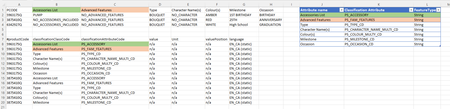
DJ, I apologize for dragging this on. I had some issues on my side with the instructions I received. In the newly attached spreadsheet, I have addressed those and provided explanations. There is a second worksheet, called DesiredResults that hopefully explains more fully what I am looking for.
I have tried to play around with the formula, but I am struggling to understand, exactly what it is doing. I know this is a lot to ask, but would it be possible to get a Teams Meeting to review the actual formula, for my understanding, so I can be more independent. If not, any help is appreciated.

NotSoFastEddie Thank you for providing the desired results and additional explanation. Try the newly attached file... it's basically just a combination of the techniques used in the first two versions, with an additional XLOOKUP.
The IF / SEQUENCE method is used to repeat data the required number of times, TOCOL sends each array to a single column, and HSTACK joins each of the columns together horizontally to generate a single output array. To get a better understanding of how these methods work, it's best to start by experimenting with basic examples. For more information, please see: https://techcommunity.microsoft.com/t5/excel/copy-array-n-times-with-excel-formula...
If further explanation is needed, please feel free to send me a private message (just click on my profile name or icon, then click the Message button). Cheers!
- NotSoFastEddieMay 14, 2024Brass Contributor
djclements THANKS SO MUCH! I was certainly struggling. I appreciate your continued interest and response.
- NotSoFastEddieMay 10, 2024Brass Contributor
Just following up. The formula transferred well into the "real" spreadsheet. I made a decision which is not ideal as I was having an issue with trying to include one cell value based on a condition and if it was false, include another cell value. I used the CHOOSECOLS function. I received some weird results and wondered if you had any thoughts. I am going to look at that link you provided as basically, due to the issue above, I created six tables, for PCODE with lang = en_ca, one with BUNDLE IDENTIFIER with lang = en_ca and duplicated for lang = en and for lang = fr. Not very efficient, but if I can solve the getting the PCODE or the BUNDLE IDENTIFIER in the same column, different rows, then I can reduce the number of table. Thoughts
- djclementsMay 10, 2024Silver Contributor
NotSoFastEddie Your use of CHOOSECOLS was incorrect, nesting the IF statement within the col_num1 argument. Use the IF function on its own to merge columns 2 and 3, then stack the results together with the remaining columns using HSTACK. In the attached file, I've broken it down into steps so you can easily see the process of how one might go about building a single cell dynamic array formula...
- NotSoFastEddieMay 13, 2024Brass Contributor
I have been working on this over the weekend. My full spreadsheet has some 200 columns and I am allowing for 1600 rows. I have gotten everything in order. If you recall, you helped me with the next step which was performing lookups in another table. The language was en_CA was hardcoded. Now that I have the language in place, I want to replace "en_CA" with the actual language in the source table. I have tried a few things, but I have to say, I am confused with what the last TOCOL is doing on the backend of the formula.
=LET(
tbl,Current!$A1:$AV1600,
data, DROP( tbl, 1, 2),
keys, DROP(TAKE(tbl,, 2), 1),
attr, DROP(TAKE(tbl, 1),, 2),
code, XLOOKUP(attr, Table_Specifications[Attribute name], Table_Specifications[[Classification Attribute ]], "not found"),
type, XLOOKUP(attr, Table_Specifications[Attribute name], Table_Specifications[Feature Type], "not found"),
lang, TAKE(DROP(tbl,1),,1), <-- I added this
a, SEQUENCE(ROWS(data)),
b, SEQUENCE(, COLUMNS(data)),
EXPAND(EXPAND(HSTACK(
CHOOSEROWS(keys, TOCOL(IF(b, a))),
TOCOL(IF(a, code)),
TOCOL(data)&","&TOCOL(IF(a, type))),, 6, ""),, 7,"en_CA")
)The feeder table looks like:
=LET(
table, PI_Package!$A$1:$GR$1600,
head,TAKE(table,1),
data,FILTER(DROP(table,6),((PI_Package!$A7:$A1600="PCODE")+(PI_Package!$A7:$A1600="BUNDLE IDENTIFIER")),""),
lang,{"en_ca";"en";"fr"},
specs_heading1,TAKE(DROP(head,,26),,14),
specs_heading2,TAKE(DROP(head,,45),,9),
specs_heading3,TAKE(DROP(head,,177),,8),
specs_headingfr,TAKE(DROP(head,,185),,15),
specs_data1,TAKE(DROP(data,,26),,14),
specs_data2,TAKE(DROP(data,,45),,9),
specs_data3,TAKE(DROP(data,,177),,8),
specs_datafr,TAKE(DROP(data,,185),,15),
a,SEQUENCE(ROWS(lang)),
b,SEQUENCE(,ROWS(data)),
code,IF(CHOOSECOLS(data,1)="PCODE",CHOOSECOLS(data,4),CHOOSECOLS(data,5)),
VSTACK(
HSTACK("#code",specs_heading1,specs_heading2,specs_heading3,specs_headingfr,"Language"),
HSTACK(
CHOOSEROWS(HSTACK(code,specs_data1,specs_data2,specs_data3,specs_datafr),TOCOL(IF(a,b))),
TOCOL(IF(b,lang))
)
)
)
- NotSoFastEddieMay 09, 2024Brass ContributorThanks again for your continued support. It looks beautiful and I can't thank you enough. I did make lots of headway understanding the formula to the point where I got to the unit column. I like this solution even more .